

How to read leave balances
Get PTO and leave balances for one person or the whole company from Vacation Tracker with the REST API, MCP or a scheduled report, and what each number means.
It is the last week of the month and payroll needs everyone's remaining vacation days. Someone exports a spreadsheet, adds last year's rollover by hand, and subtracts the leave they know about. Then the questions start: Ana's spreadsheet says 12 days, but Vacation Tracker says 9. Nobody is sure which number is right, and payroll waits while HR checks each person.
We built Vacation Tracker to be the source of truth for leave and balances. Every change is recorded in a ledger: each request, approval, cancellation and quota change. Balances are calculated from that ledger, and the same records feed the audit logs, so you can always trace a number back to the changes behind it. Because there is only one calculation, the dashboard, the API and the MCP server always show the same numbers.
This guide shows you how to read those numbers directly, for one person or the whole company, and what each one means, so the spreadsheet never has to guess again.
Short answer: call GET /v2/users/{id}/balances with an API key that has balances:read, and read quotas.remaining in the unit the leave type uses (days or hours). For the whole company, list users with GET /v2/users and get each person's balances. To ask in plain language, use the MCP server. For a monthly email without code, use a scheduled Leave Balance Report.
Give this to your agent
Here's how to read leave balances from Vacation Tracker with the Vacation Tracker API v2:
- One person: GET /v2/users/{id}/balances. Everyone: list users with GET /v2/users and get each person's balances. Follow nextToken until it is missing, even when a page is empty.
- The balance left is quotas.remaining, in the field that matches the leave type's unit (days or hours). It is null when hasUnlimitedDays is true.
- remaining already subtracts approved future leave (scheduled). It does not subtract pending.
- The API key needs balances:read and users:read. Keep it in configuration or secrets, never in code.
- Retry 429 RATE_LIMITED with exponential backoff and jitter. Stop on QUOTA_EXCEEDED.

Full guide: https://vacationtracker.io/developers/llms.mdx/guides.leave-balances.md
API v2 docs: https://vacationtracker.io/developers/llms.txt

Unless I already told you what to build in this session, read the documentation and ask me what to do next.How it works
A leave balance is what a person has left of a leave type in a leave year: their quota, plus what rolled over from last year, plus TOIL, minus what they used.
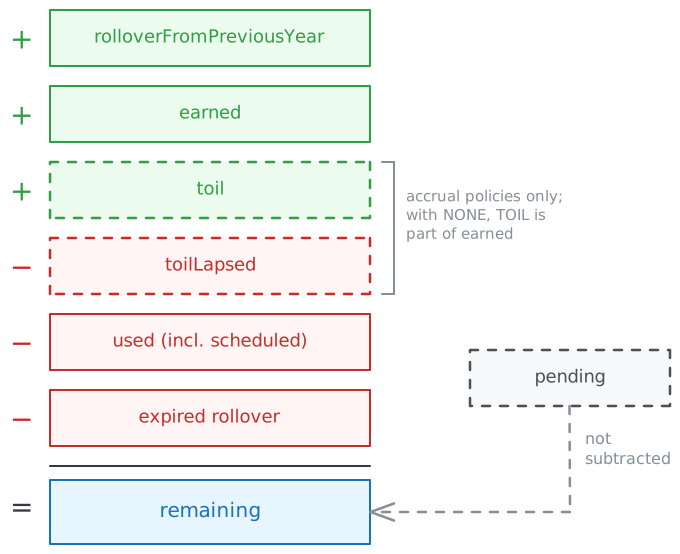
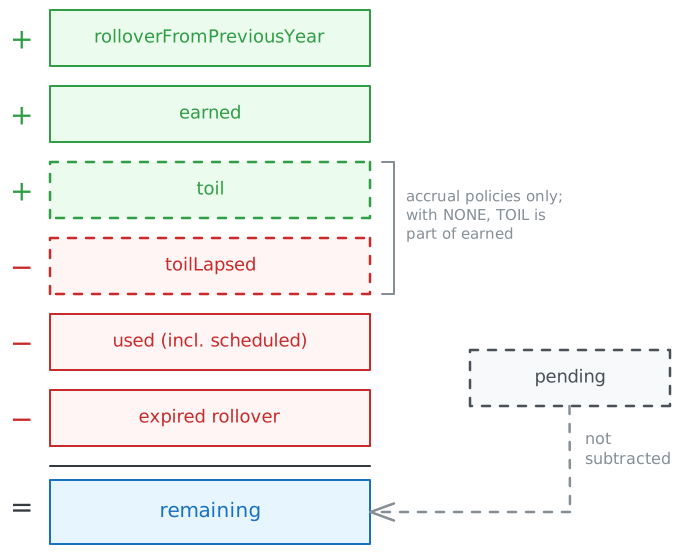
Where TOIL goes depends on the policy's accrualType:
# accrualType NONE: TOIL is already part of earned
remaining = rolloverFromPreviousYear + earned - used - expired

# any other accrualType: earned has no TOIL, so it is added here
remaining = rolloverFromPreviousYear + earned + toil - toilLapsed - used - expired
expired is only the unused rollover that expired. TOIL that lapses is in toilLapsed.
scheduled is approved leave that is still in the future. If Ana took 3 days in March and has 5 approved days in August, used is 8 and scheduled is 5. The API returns it as its own field, quotas.scheduled, so you can show both "used so far" (used minus scheduled) and "booked ahead" (scheduled).
Two things often surprise people:
- Future approved leave is already subtracted.
scheduledis part ofused, so do not subtract it again. To show "left after everything booked" useremainingas is. To show "left as of today", addscheduledback. - Pending requests are not subtracted. If you want "left if every pending request is approved", subtract
pendingyourself.
Whoever reads the balance sees only the people their role can see: an administrator sees everyone, an approver sees the departments they approve, and a user sees only themselves. This applies to API keys and to the MCP server.
Choose a tool
| You want to | Use |
|---|---|
| Sync balances to payroll, an HRIS or a spreadsheet on a schedule | REST API v2 |
| Let everyone check their own balance in the dashboard, Slack or Teams, with nothing to set up | Vee |
| Ask your own AI assistant about anyone's balance your role can see | MCP server |
| Email a balance report to HR once a month, without code | Scheduled report |
| Apply your own logic to balances without coding, for example post someone's remaining days to Slack when their leave is approved | Zapier, through the REST API |
With the REST API
The worked example uses the REST API: one person's balances first, then everyone's.
1. Create an API key
In the dashboard, go to Add-ons → Open API and create a key with Balances: Read and Users: Read (scopes balances:read and users:read). See Authentication.
The key sees only the people its owner can see, so for a company-wide sync, create the key as an administrator.
2. Get one person's balances
curl "https://api.vacationtracker.io/v2/users/$USER_ID/balances" \
  -H "Authorization: Bearer vt_live_..."
The response has one entry for the current leave year, with one item per active leave type:
{
  "data": [
    {
      "userId": "user-63b17e97-d38b-4586-8498-bb4f5d2e2c14",
      "yearStart": "2026-01-01",
      "yearEnd": "2026-12-31",
      "isCurrent": true,
      "leaveTypes": [
        {
          "leaveTypeId": "leaveType-fcc1e5c5-ba93-479d-bd58-8f860ba10615",
          "leaveTypeName": "Vacation",
          "leavePolicyId": "leavePolicy-2d7c1b9e-5a4f-4c3b-8e1d-7f6a5b4c3d2e",
          "accrualType": "NONE",
          "unit": "days",
          "hasUnlimitedDays": false,
          "quotas": {
            "baseQuota": { "days": 20, "hours": 160, "isNegative": false },
            "rolloverFromPreviousYear": { "days": 3, "hours": 24, "isNegative": false },
            "seniorityEntitlement": { "days": 0, "hours": 0, "isNegative": false },
            "entitlementByRole": { "days": 0, "hours": 0, "isNegative": false },
            "toil": { "days": 1, "hours": 8, "isNegative": false },
            "toilLapsed": { "days": 0, "hours": 0, "isNegative": false },
            "earned": { "days": 21, "hours": 168, "isNegative": false },
            "quotaAtYearEnd": { "days": 20, "hours": 160, "isNegative": false },
            "expired": { "days": 0, "hours": 0, "isNegative": false },
            "used": { "days": 8, "hours": 64, "isNegative": false },
            "scheduled": { "days": 5, "hours": 40, "isNegative": false },
            "pending": { "days": 2, "hours": 16, "isNegative": false },
            "remaining": { "days": 16, "hours": 128, "isNegative": false }
          }
        }
      ]
    }
  ]
}
Add period=all to get every leave year of the person instead. isCurrent marks the year that contains today.
3. Read the right number
For "how much does this person have left", read quotas.remaining, in the field that matches unit: remaining.days when unit is days, remaining.hours when it is hours. The other field is a conversion with the person's average working hours per day, so it can show fractions that the dashboard does not.
remaining is null when hasUnlimitedDays is true. Check that before comparing numbers.
Every amount comes from these parts:
| Field | Meaning |
|---|---|
baseQuota | The yearly quota from the leave policy, or the person's custom quota. |
seniorityEntitlement, entitlementByRole | Extra quota for this year from automations. |
earned | What the person has earned so far this year, without rollover. For accrual policies, only what has accrued until today. Prorated when the person started during the year and proration is on. |
quotaAtYearEnd | The yearly entitlement: baseQuota plus the two entitlements, not prorated. It is not a forecast: earned can end the year below it, for example after proration, paused accruals or an accrual cap. |
rolloverFromPreviousYear | Brought forward from last year. Can be negative when the policy carries a negative balance forward. |
expired | The part of the rollover that expired unused. |
toil, toilLapsed | Time off in lieu added to this leave type, and the part of it that lapsed. |
used | Approved leave this year, including approved leave that is still in the future. |
scheduled | Approved leave dated after today. It is the future part of used, already subtracted from remaining. |
pending | Requests waiting for approval. |
remaining | What is left to request. The same number the dashboard shows. |
Check the example against the formula: 3 + 21 - 8 - 0 = 16. The 5 scheduled days are already inside the 8 used, and the 2 pending days are not subtracted.
4. Get everyone's balances
There is no endpoint that returns all balances at once. List the users, then get each user's balances:
const API = 'https://api.vacationtracker.io/v2'
const headers = { Authorization: `Bearer ${process.env.VT_API_KEY}` }

async function listUserIds(): Promise<string[]> {
  const ids: string[] = []
  let nextToken: string | undefined
  do {
    const query = new URLSearchParams({ limit: '1000', ...(nextToken ? { nextToken } : {}) })
    const response = await requestWithRetry(`${API}/users?${query}`, { headers })
    const page = await response.json()
    ids.push(...page.data.map((user: { id: string }) => user.id))
    nextToken = page.nextToken
  } while (nextToken)
  return ids
}

for (const userId of await listUserIds()) {
  const response = await requestWithRetry(`${API}/users/${userId}/balances`, { headers })
  const { data } = await response.json()
  for (const leaveType of data[0]?.leaveTypes ?? []) {
    const remaining = leaveType.quotas.remaining
    const amount = remaining === null ? 'unlimited' : leaveType.unit === 'hours' ? remaining.hours : remaining.days
    console.log(userId, leaveType.leaveTypeName, amount, leaveType.unit)
  }
}
requestWithRetry is the helper from Rate limits.
import os
import random
import time

import requests

API = "https://api.vacationtracker.io/v2"
HEADERS = {"Authorization": f"Bearer {os.environ['VT_API_KEY']}"}


def get(url, params=None, max_attempts=5):
    for attempt in range(max_attempts):
        response = requests.get(url, headers=HEADERS, params=params, timeout=30)
        if response.status_code != 429 or attempt == max_attempts - 1:
            response.raise_for_status()
            return response.json()
        if response.json().get("error", {}).get("code") == "QUOTA_EXCEEDED":
            response.raise_for_status()
        time.sleep(random.uniform(0, min(30, 0.5 * 2**attempt)))


def list_user_ids():
    ids, next_token = [], None
    while True:
        params = {"limit": 1000, **({"nextToken": next_token} if next_token else {})}
        page = get(f"{API}/users", params)
        ids += [user["id"] for user in page["data"]]
        next_token = page.get("nextToken")
        if not next_token:
            return ids


for user_id in list_user_ids():
    balances = get(f"{API}/users/{user_id}/balances")["data"]
    for leave_type in balances[0]["leaveTypes"] if balances else []:
        remaining = leave_type["quotas"]["remaining"]
        amount = "unlimited" if remaining is None else remaining[leave_type["unit"]]
        print(user_id, leave_type["leaveTypeName"], amount, leave_type["unit"])
get retries 429 with exponential backoff and jitter, and stops on QUOTA_EXCEEDED, like the helper in Rate limits.
Keep paginating until nextToken is missing, even when a page is short or empty: see Pagination.
GET /v2/users returns active users by default. Add status=INACTIVE for deactivated users, or filter with locations, departments and labels.
Plan your request budget. A key can send 10 requests per second and 30,000 per month. One full sync costs one request per user plus one per page of users, so a daily sync of 300 people uses about 9,300 requests a month. For bigger companies, sync less often, sync only the locations you need, or contact support for a higher quota.
Keep balances fresh with webhooks and a scheduled sync. Subscribe to webhooks for leave and quota changes and refresh the person they name. Keep a scheduled full sync too: accruals, rollover expiry, seniority entitlements and a new leave year change balances without any event. See Run a full sync on a schedule.
Errors
| Error | Cause | What to do |
|---|---|---|
404 RESOURCE_NOT_FOUND | The user does not exist, or is outside the key's data reach. | Use an administrator's key, or check the user ID. |
403 INSUFFICIENT_SCOPE | The key has no balances:read (or users:read for the user list). | Edit the key and set Balances (or Users) to Read. |
429 RATE_LIMITED | Too many requests in a short time. | Retry with backoff. |
429 QUOTA_EXCEEDED | The monthly quota is used up. | Wait for the next month, or contact support. |
With Vee
Vee is the AI assistant built into Vacation Tracker. Anyone can ask it in the dashboard, Slack, Microsoft Teams or the mobile app, with nothing to set up:
- "How many days do I have left?"
- "Do my unused days roll over?"
Vee reads the same balances as the API, and answers about your own. To look up other people's balances, use MCP or the API.
With an AI assistant (MCP)
Connect your AI client to the MCP server and ask in plain language:
- "How many vacation days do I have left?"
- "What's Ana's sick leave balance this year?"
- "Does Mark have enough vacation days left for two weeks in August?"
The assistant uses the get_user_details tool, which returns the same balances as the API. You see the balances your role allows: your own as a user, your departments as an approver, everyone as an administrator. MCP looks up one person at a time, so it fits questions and quick checks. For the whole team, or a regular export to another system, use the REST API.
With Zapier
Zapier triggers fire on leave events (requested, approved, cancelled and so on) and do not include balances. To get a balance into a Zap, call the REST API from it, for example with a "Webhooks by Zapier" step that sends the request from step 2.
Without code: scheduled report
To get balances by email once a month, go to Reports → Scheduled Reports in the dashboard and create a Leave Balance Report. Choose the locations, departments or labels to include, the people who receive it, and the day of the month it is sent. You can also create the same report with POST /v2/scheduled-reports and reportType: leaveBalanceReport.
Scheduled reports are part of the Complete plan.
Summary
- Vacation Tracker calculates balances the same way in the dashboard, the API and MCP. Read them instead of recalculating.
- Read
quotas.remainingin the field that matchesunit, and checkhasUnlimitedDaysfirst:remainingisnullfor unlimited leave. usedalready includes future approved leave (scheduled);pendingis never subtracted.- For everyone's balances, list users and request each one, follow
nextTokento the end, and budget for 10 requests per second and 30,000 per month. - Use an administrator's key for a company-wide sync, MCP for one-person questions, and a scheduled report for a monthly email without code.
Frequently asked questions
Does the remaining balance include pending requests?
No. remaining subtracts approved leave only. Requests waiting for approval are in pending; subtract them yourself if you want "left if everything is approved".
Does the remaining balance include approved leave in the future?
Yes. used includes approved leave that hasn't happened yet, and scheduled shows that future part. Add scheduled back to remaining for "left as of today".
What does a negative PTO balance mean?
isNegative is true when an amount is below zero, for example when someone used more leave than they had earned so far. A negative balance can also be carried into the next leave year, when the leave policy allows it: then rolloverFromPreviousYear is negative.
Where is last year's rollover, or brought-forward balance?
In quotas.rolloverFromPreviousYear. The part that expired unused is in quotas.expired, and both are already counted in remaining.
Should I read days or hours?
Read the field that matches the leave type's unit. The other one is a conversion with the person's average working hours per day.
Related
GET /v2/users/{id}/balances: the full reference.GET /v2/users/{id}/quotas: the quota setup of each leave type (custom or from the policy), without usage.- Scopes by endpoint.
Integration guides
Step-by-step guides for connecting Vacation Tracker to payroll, HRIS and AI assistants with the REST API, MCP and Zapier, and which tool to use for each job.
How to request and manage leave
Request, edit, cancel, approve and deny time off in Vacation Tracker from your own app with the REST API, from an AI assistant with MCP, or react to it with Zapier.