

How to keep users in sync with an HRIS
Keep employees' location, department, labels, work week, quotas and status in Vacation Tracker matched to your HRIS with the REST API, MCP or directory import.
Your company has offices in San Francisco, Berlin and Bengaluru. San Francisco and Berlin share one HR system, with a different payroll provider in each country. The Bengaluru office has no HR system at all: the team are full-time contractors with their own email addresses, and the office manager keeps them in a spreadsheet. Your Microsoft 365 directory is already imported into Vacation Tracker automatically, so new hires in San Francisco and Berlin show up on their own. But the import doesn't move people between locations, and the Bengaluru contractors aren't in it at all.
This month Maria joins the San Francisco office, Mark relocates from Berlin to San Francisco, and Arjun in Bengaluru hands in his notice. The import brings in Maria. Mark's move is only in the HR system, and Arjun's notice is only in the spreadsheet, so someone copies them into Vacation Tracker by hand, when they remember.
Vacation Tracker is the source of truth for leave and balances, and it applies leave policies, holidays, approvers and quotas based on each person's location, department and work week. When those details lag behind, Mark keeps German holidays and his Berlin approver, and Arjun keeps a seat after he leaves. This guide shows how to bring changes from every source of employee data into Vacation Tracker automatically, so policies, approvers and balances follow people across offices, and how to send changes made in Vacation Tracker back.
Short answer: people join Vacation Tracker through the Slack, Microsoft 365 or Google Workspace directory import or an email invite. After that, a scheduled sync reads each source (your HRIS, a spreadsheet), matches every employee by employeeId, prefixed with the source it comes from, and writes only what changed: PATCH /v2/users/{id} for details and end date, and PUT /v2/users/{id}/location and /department for moves.
Give this to your agent
Here's how to keep users in Vacation Tracker in sync with an HRIS using the Vacation Tracker API v2:
- The API cannot create, invite or delete users. People join through the Slack, Microsoft 365 or Google Workspace directory import or an email invite; the sync updates them after that.
- Use an administrator's key with users:read and users:write (plus locations:read, departments:read and labels:read/write if you sync those).
- Match HRIS employees by email the first time, store the HRIS ID in employeeId with PATCH /v2/users/{id}, and match on employeeId from then on.
- With more than one source of employee data (for example an HRIS and a spreadsheet), prefix employeeId with the source, take each person's office from their own record, and only act on the people a source lists: someone missing from one source is probably in another.
- List users with GET /v2/users (follow nextToken until it is missing), compare with the HRIS, and write only what differs, with a new Idempotency-Key per write.
- Details and end date: PATCH /v2/users/{id}. Moves: PUT /v2/users/{id}/location and PUT /v2/users/{id}/department. Work week: PUT /v2/users/{id}/work-week (replaces, does not merge). Labels: POST and DELETE /v2/users/{id}/labels.
- For leavers, set endDate. Deactivate with POST /v2/users/{id}/deactivate only when someone leaves immediately. Never deactivate or demote the API key's owner: that revokes the key.
- Your own writes send webhook events too (user.updated and others). Ignore the ones whose apiClient.keyId is your key.
- Keep the API key in configuration or secrets, never in code.

Full guide: https://vacationtracker.io/developers/llms.mdx/guides.sync-users.md
API v2 docs: https://vacationtracker.io/developers/llms.txt

Unless I already told you what to build in this session, read the documentation and ask me what to do next.How it works
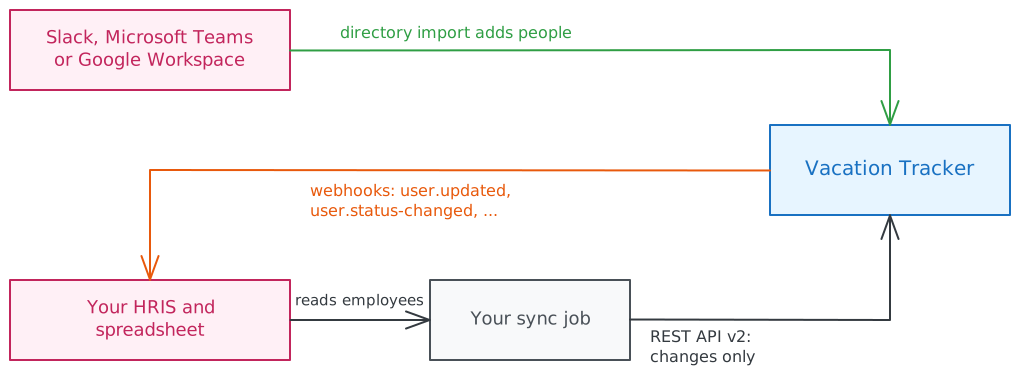
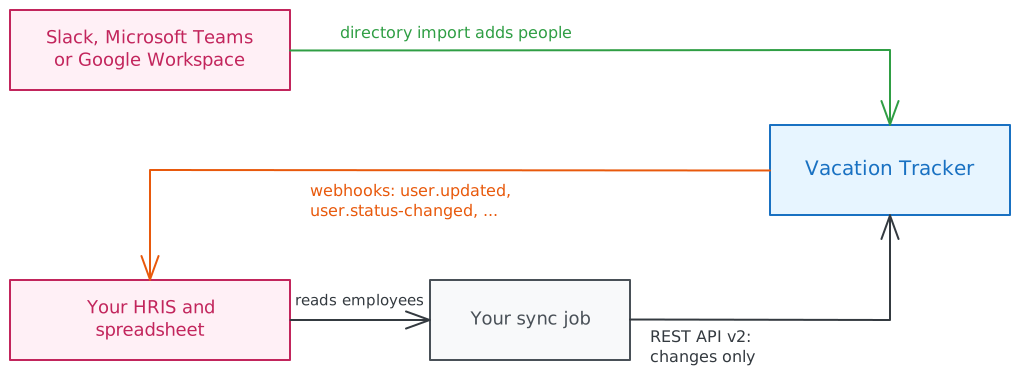
Your HRIS owns who works where. A sync job reads the HRIS and Vacation Tracker, compares them, and writes only the differences through the REST API. Changes made in Vacation Tracker flow back to the HRIS through webhooks.
Choose a tool
| You want to | Use |
|---|---|
| Add new people as they join Slack, Microsoft Teams or Google Workspace | Directory import, built into the dashboard |
| Copy changes from an HRIS (department, location, end date, employee ID, work week, quota) on a schedule | REST API v2 |
| React when someone changes a user in Vacation Tracker | Webhooks |
| Make a one-off change by asking, for example "move Mark to the San Francisco office" | MCP server |
| Apply your own logic without coding | Zapier, with a "Webhooks by Zapier" step that calls the REST API |
Zapier triggers fire only on leave events (requested, approved, cancelled and so on), so Zapier cannot react to user changes.
Adding new users
Neither the API nor MCP can create or invite users. People join Vacation Tracker from the dashboard:
- Import from your directory. Pick people from Slack, Microsoft Teams (Microsoft 365) or Google Workspace on the Users page. Turn on Import users automatically to add and activate new regular users from that platform as they join it.
- Invite by email. For people outside those platforms.
Once a person is in Vacation Tracker, the API can change everything else about them. A practical setup is: let the directory import add people, and let your sync set their department, location, employee ID and the rest. The import doesn't move people between locations, so location changes always come from your sync.
People outside your directory, such as the Bengaluru contractors with their own email addresses, join by email invite. After that, the sync matches them by the email in your spreadsheet like anyone else.
What the API can change
| Change | Endpoint | Who can do it |
|---|---|---|
| Name, first and last name, birthday, language | PATCH /v2/users/{id} | The user, an admin, or a location admin who manages the user |
| Email, start date, end date, employee ID, name lock | PATCH /v2/users/{id} | An admin, or a location admin who manages the user |
| Admin role | PATCH /v2/users/{id} with isAdmin | Admins only |
| Location | PUT /v2/users/{id}/location | Admins only |
| Department | PUT /v2/users/{id}/department | An admin, or a location admin who manages the user |
| Labels | POST /v2/users/{id}/labels, DELETE /v2/users/{id}/labels/{labelId} | Admins only |
| Work week | PUT /v2/users/{id}/work-week, DELETE to go back to the location's | An admin, or a location admin who manages the user |
| Quota for a leave type | PUT /v2/users/{id}/quotas/{leaveTypeId} | An admin, or a location admin who manages the user |
| Activate, deactivate | POST /v2/users/{id}/activate, POST /v2/users/{id}/deactivate | An admin, or a location admin who manages the user |
The API cannot delete users. Deactivate them instead.
What each change does
- Moving location recalculates the user's future leaves with the new location's work week, holidays and leave policies. Only admins can do it.
- End date. When the Enable user end date company setting is on, Vacation Tracker deactivates the user on their end date by itself, and they can no longer sign in. So for leavers, setting
endDateis usually enough; deactivate directly only when someone leaves immediately. - Activating takes a seat on your subscription. When none is free, it fails with
409 USER_SEAT_LIMIT_REACHED. - Deactivating stops the user from signing in or requesting leave, frees their seat, and revokes their API keys and webhooks within about 60 seconds.
- Removing Admin (
isAdmin: false) or a Location Admin role also revokes the user's API keys and webhooks. - Quotas.
amountis in the company's unit (days, or hours with hourly accounting). By default only the current period changes: addapplyToFutureYears: trueto keep the quota in later years too. - Work week is a full replacement, not a merge. Custom hours per day apply only on plans that include custom work hours; otherwise only the working days are saved.
Never let the sync deactivate or demote the person who owns the API key. Their key is revoked, and the sync stops working.
With the REST API
This example builds a scheduled sync that reads both sources, the HR system and the Bengaluru spreadsheet. The Microsoft 365 import brings in Maria, and the sync links her by email. Mark's move to San Francisco and Arjun's end date reach Vacation Tracker on the next run.
1. Create an API key
For a company-wide sync, create the key as an administrator in Add-ons → Open API, with:
- Users: Read & write (
users:read,users:write) - Labels: Read & write (
labels:read,labels:write), if you sync labels - Locations: Read and Departments: Read (
locations:read,departments:read), to look up IDs by name
A key never has more access than its owner. A location admin's key can sync only the users of the locations they manage, and cannot move people between locations or change labels. See Role ceiling and data reach.
2. Match HRIS employees to Vacation Tracker users
Vacation Tracker has its own user IDs. Link each HRIS employee to one of them once, then keep the link:
- List every user with
GET /v2/users. Addstatus=INACTIVEin a second pass if you also want to reactivate people. - Match on email, compared case-insensitively. Each email is unique within a company.
- Write your HRIS employee ID into the user's
employeeIdwithPATCH /v2/users/{id}.
From then on, match on employeeId. It survives email changes, and GET /v2/users returns it for every user. Employees in your HRIS with no matching user are people who haven't joined Vacation Tracker yet: add them, and the next sync links them.
When employee data comes from more than one source, like the HR system and the Bengaluru spreadsheet, two more rules apply:
- Prefix the ID with the source it comes from, for example
hr-1024andin-512. Each source counts its own IDs, so without a prefix two different people can share one. If the spreadsheet has no IDs, give each row one, or match its people by email only. - Missing doesn't mean gone. The HR system doesn't list the Bengaluru team, and the spreadsheet lists no one else. Only act on the people a source lists, and only treat someone as leaving when their source says so.
Take the office from each person's record, not from the source: Mark stays in the same HR system when he moves from Berlin to San Francisco, and only his work location changes.
To turn location, department and label names from your HRIS into IDs, read GET /v2/locations, GET /v2/departments and GET /v2/labels once at the start of each run.
3. Apply the changes
Send only the fields that changed. PATCH merges, so fields you leave out stay as they are; send null to clear endDate, employeeId or birthday.
curl -X PATCH "https://api.vacationtracker.io/v2/users/$USER_ID" \
  -H "Authorization: Bearer vt_live_..." \
  -H "Content-Type: application/json" \
  -H "Idempotency-Key: $(uuidgen)" \
  -d '{ "employeeId": "in-512", "endDate": "2026-12-31" }'
Location, department, work week and the Location Admin role are not profile fields. Each has its own endpoint, listed in What the API can change:
curl -X PUT "https://api.vacationtracker.io/v2/users/$USER_ID/department" \
  -H "Authorization: Bearer vt_live_..." \
  -H "Content-Type: application/json" \
  -H "Idempotency-Key: $(uuidgen)" \
  -d '{ "departmentId": "team-0a21c25e-6925-4a5b-90ee-ecf82096c4f6" }'
Every write waits for the change and answers 200 with the result. A change that takes longer answers 202 Accepted with an operation to follow: see Synchronous writes and operations.
4. A sync run, end to end
Each run reads both sides, compares them, and writes only the differences:
import { randomUUID } from 'node:crypto'

const API = 'https://api.vacationtracker.io/v2'
const headers = { Authorization: `Bearer ${process.env.VT_API_KEY}`, 'Content-Type': 'application/json' }

async function listUsers(status: 'ACTIVE' | 'INACTIVE') {
  const users = []
  let nextToken: string | undefined
  do {
    const query = new URLSearchParams({ status, limit: '1000', ...(nextToken ? { nextToken } : {}) })
    const page = await (await requestWithRetry(`${API}/users?${query}`, { headers })).json()
    users.push(...page.data)
    nextToken = page.nextToken
  } while (nextToken)
  return users
}

// A 202 means the change is still running: wait for it, so the next change for this user starts after it.
async function waitForOperation(operation: { id: string; status: string }) {
  let status = operation.status
  for (let delay = 2000; status === 'PENDING'; delay = Math.min(delay * 2, 30_000)) {
    await new Promise((resolve) => setTimeout(resolve, delay))
    status = (await (await requestWithRetry(`${API}/operations/${operation.id}`, { headers })).json()).data.status
  }
  return status // SUCCEEDED, FAILED or UNKNOWN
}

async function write(method: string, path: string, body?: unknown) {
  const init = { method, headers: { ...headers, 'Idempotency-Key': randomUUID() }, body: body ? JSON.stringify(body) : undefined }
  const response = await requestWithRetry(`${API}${path}`, init)
  if (response.status === 202) {
    const status = await waitForOperation((await response.json()).operation)
    if (status !== 'SUCCEEDED') console.error(method, path, `operation ${status}`)
  } else if (!response.ok) {
    console.error(method, path, response.status, await response.text())
  }
}

const users = [...(await listUsers('ACTIVE')), ...(await listUsers('INACTIVE'))]
const byEmployeeId = new Map(users.filter((u) => u.employeeId).map((u) => [u.employeeId, u]))
const byEmail = new Map(users.map((u) => [u.email.toLowerCase(), u]))

// Each source (the HR system, the Bengaluru spreadsheet) gets a prefix, so IDs stay unique across sources.
const employees = []
for (const source of sources) {
  for (const employee of await source.loadEmployees()) {
    employees.push({ ...employee, employeeId: `${source.prefix}-${employee.id}` })
  }
}

for (const employee of employees) {
  const user = byEmployeeId.get(employee.employeeId) ?? byEmail.get(employee.email.toLowerCase())
  if (!user) continue // not in Vacation Tracker yet

  const profile: Record<string, unknown> = {}
  if (user.employeeId !== employee.employeeId) profile.employeeId = employee.employeeId
  if (user.name !== employee.name) profile.name = employee.name
  if ((user.endDate?.slice(0, 10) ?? null) !== (employee.endDate ?? null)) profile.endDate = employee.endDate ?? null
  if (Object.keys(profile).length > 0) await write('PATCH', `/users/${user.id}`, profile)

  const locationId = locationIdByOffice.get(employee.office)
  if (locationId && user.locationId !== locationId) await write('PUT', `/users/${user.id}/location`, { locationId })

  const departmentId = departmentIdByName.get(employee.department)
  if (departmentId && user.departmentId !== departmentId) await write('PUT', `/users/${user.id}/department`, { departmentId })
}
requestWithRetry is the helper from Rate limits. sources (each with a prefix and a loadEmployees function), locationIdByOffice and departmentIdByName stand for your own code.
import os
import random
import time
import uuid

import requests

API = "https://api.vacationtracker.io/v2"
HEADERS = {"Authorization": f"Bearer {os.environ['VT_API_KEY']}"}


def request_with_retry(method, url, headers=None, max_attempts=5, **kwargs):
    for attempt in range(max_attempts):
        response = requests.request(method, url, headers={**HEADERS, **(headers or {})}, timeout=30, **kwargs)
        if response.status_code != 429 or attempt == max_attempts - 1:
            return response
        if response.json().get("error", {}).get("code") == "QUOTA_EXCEEDED":
            return response
        time.sleep(random.uniform(0, min(30, 0.5 * 2**attempt)))


def list_users(status):
    users, next_token = [], None
    while True:
        params = {"status": status, "limit": 1000, **({"nextToken": next_token} if next_token else {})}
        page = request_with_retry("GET", f"{API}/users", params=params).json()
        users += page["data"]
        next_token = page.get("nextToken")
        if not next_token:
            return users


# A 202 means the change is still running: wait for it, so the next change for this user starts after it.
def wait_for_operation(operation):
    status, delay = operation["status"], 2
    while status == "PENDING":
        time.sleep(delay)
        delay = min(delay * 2, 30)
        status = request_with_retry("GET", f"{API}/operations/{operation['id']}").json()["data"]["status"]
    return status  # SUCCEEDED, FAILED or UNKNOWN


def write(method, path, body):
    # One key per change, reused on every retry, so a change is never applied twice.
    headers = {"Idempotency-Key": str(uuid.uuid4())}
    response = request_with_retry(method, f"{API}{path}", headers=headers, json=body)
    if response.status_code == 202:
        status = wait_for_operation(response.json()["operation"])
        if status != "SUCCEEDED":
            print(method, path, "operation", status)
    elif not response.ok:
        print(method, path, response.status_code, response.text)


users = list_users("ACTIVE") + list_users("INACTIVE")
by_employee_id = {u["employeeId"]: u for u in users if u.get("employeeId")}
by_email = {u["email"].lower(): u for u in users}

# Each source (the HR system, the Bengaluru spreadsheet) gets a prefix, so IDs stay unique across sources.
employees = [
    {**employee, "employeeId": f"{source.prefix}-{employee['id']}"}
    for source in sources
    for employee in source.load_employees()
]

for employee in employees:
    user = by_employee_id.get(employee["employeeId"]) or by_email.get(employee["email"].lower())
    if not user:
        continue  # not in Vacation Tracker yet

    profile = {}
    if user.get("employeeId") != employee["employeeId"]:
        profile["employeeId"] = employee["employeeId"]
    if user["name"] != employee["name"]:
        profile["name"] = employee["name"]
    if ((user.get("endDate") or "")[:10] or None) != employee.get("endDate"):
        profile["endDate"] = employee.get("endDate")
    if profile:
        write("PATCH", f"/users/{user['id']}", profile)

    location_id = location_id_by_office.get(employee["office"])
    if location_id and user["locationId"] != location_id:
        write("PUT", f"/users/{user['id']}/location", {"locationId": location_id})

    department_id = department_id_by_name.get(employee["department"])
    if department_id and user["departmentId"] != department_id:
        write("PUT", f"/users/{user['id']}/department", {"departmentId": department_id})
request_with_retry retries 429 with exponential backoff and jitter, and stops on QUOTA_EXCEEDED, like the helper in Rate limits. sources (each with a prefix and a load_employees function), location_id_by_office and department_id_by_name stand for your own code.
The loop only touches people a source lists, so nobody is changed just because one source doesn't know them. startDate and endDate come back as stored, sometimes as a full timestamp, so compare only the date part. Labels, work week and status follow the same pattern.
A few rules keep the sync safe:
- One
Idempotency-Keyper change. Retrying with the same key never applies a change twice. See Idempotency. - Wait for accepted writes. A
202 Acceptedmeans the change is still running. Follow its operation until it isSUCCEEDED,FAILEDorUNKNOWNbefore the next change for the same person, as the helpers above do. LogFAILEDandUNKNOWN: the next run compares both sides again and corrects anything that did not apply. See Synchronous writes and operations. - Write only what differs. Every write is recorded in the company logs and sends webhook events, so a sync that rewrites unchanged values creates noise.
- Decide who owns each field. If people also edit names or departments in Vacation Tracker, either let the HRIS always win, or sync only the fields the HRIS owns.
Plan your request budget. A key can send 10 requests per second and 30,000 per month. Reading costs one request per 1,000 users for each status you list, plus one each for the location, department and label lookups. Writes cost one request per change. A daily sync of a few hundred people that changes a handful of them uses a few hundred requests a month.
The other direction: webhooks
To update your HRIS when something changes in Vacation Tracker, subscribe a webhook to:
| Event | Sent when |
|---|---|
user.updated | A user's profile, location, department, role or work week changes. A new user added from the directory also arrives as user.updated, with an ID you haven't seen yet. |
user.status-changed | A user is activated or deactivated. |
user.quota-updated | A user's quotas or rollover change. data is the user, so read GET /v2/users/{id}/quotas for the new values. |
label.assigned, label.removed | A label is added to or removed from a user. |
Your own sync's writes send these events too. Ignore an event when it matches what you just wrote, or your HRIS and Vacation Tracker will keep updating each other.
With an AI assistant (MCP)
For one-off changes, connect an AI client and ask in plain language:
- "Move Mark to the San Francisco office."
- "Set Maria's end date to December 31 and her employee ID to E-1024."
- "Give Arjun 25 vacation days for next year."
- "Deactivate the user maja@example.com."
The assistant uses the manage_user tool, which makes the same changes as the API, as you. It needs the Location Admin role or higher, and follows the same rules: location admins change only their locations' users, and only admins move people between locations or manage labels. Like the API, MCP cannot create or invite users, and it changes one person at a time, so use the REST API for a regular sync.
Summary
- People join from the dashboard (directory import or email invite); the API and MCP change everything else but cannot create, invite or delete users.
- Match HRIS employees once by email, store your ID in
employeeId, then match onemployeeId. - Write only what differs, with one
Idempotency-Keyper change, and decide which system owns each field. - Location, department, work week and labels have their own endpoints; a work week is replaced, not merged.
- Setting
endDateusually handles leavers; never deactivate or demote the API key's owner. - Your own writes send webhook events too, so ignore the ones you caused.
Frequently asked questions
Can I create or invite users with the API?
No. New people join through the Slack, Microsoft 365 or Google Workspace directory import, which can run automatically, or through an email invite from the dashboard. The API and MCP update people once they are in Vacation Tracker.
How do I match HRIS employees to Vacation Tracker users?
Match by email the first time, then store your HRIS ID in employeeId with PATCH /v2/users/{id} and match on it from then on. Emails change; IDs don't.
What happens when an employee leaves?
Set their endDate. When the Enable user end date company setting is on, Vacation Tracker deactivates them on that date. Use POST /v2/users/{id}/deactivate only when someone leaves immediately.
What changes when someone moves to another location?
Vacation Tracker recalculates their future leave with the new location's work week, holidays and leave policies. Move them with PUT /v2/users/{id}/location; only admins can do it.
Related
GET /v2/users: every user field and filter.- Acting on behalf of users: when a change should be made as someone other than the key owner.
- Read leave balances: after a move or a quota change, check the new balances.
How to sync leave balances with an HRIS or payroll system
Keep PTO and leave balances in your HRIS or payroll system in sync with Vacation Tracker as the source of truth, and get alerted when someone edits the wrong system.
OAuth2 Authorization
Vacation Tracker's OAuth2 authorization server. PKCE, Dynamic Client Registration, and metadata discovery for third-party integrations.