

How to send approved leave to an HRIS or payroll system
Send every approved leave and PTO day from Vacation Tracker to your HRIS or payroll system, including edits and cancellations, with the REST API and webhooks or Zapier.
Payroll runs on the 25th. The day before, someone opens Vacation Tracker, lists the approved leave for the month, and types it into the payroll system by hand. A week earlier, an employee cancelled two days of vacation and came to work instead. The cancellation was in Vacation Tracker, but not in the copy, so payroll paid those two days as vacation and someone has to correct it next month.
Vacation Tracker is where leave is requested, approved and counted, so it is the source of truth for who is off and when. Your HRIS or payroll system only needs the result: every approved leave, and every later change to it. This guide shows how to keep that copy correct automatically, including the edits, cancellations and deletions that are easy to miss.
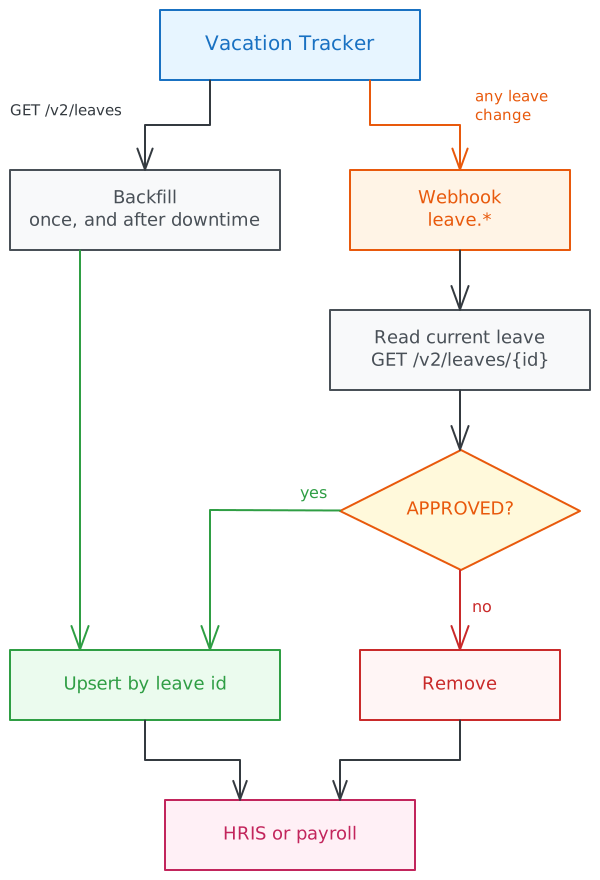
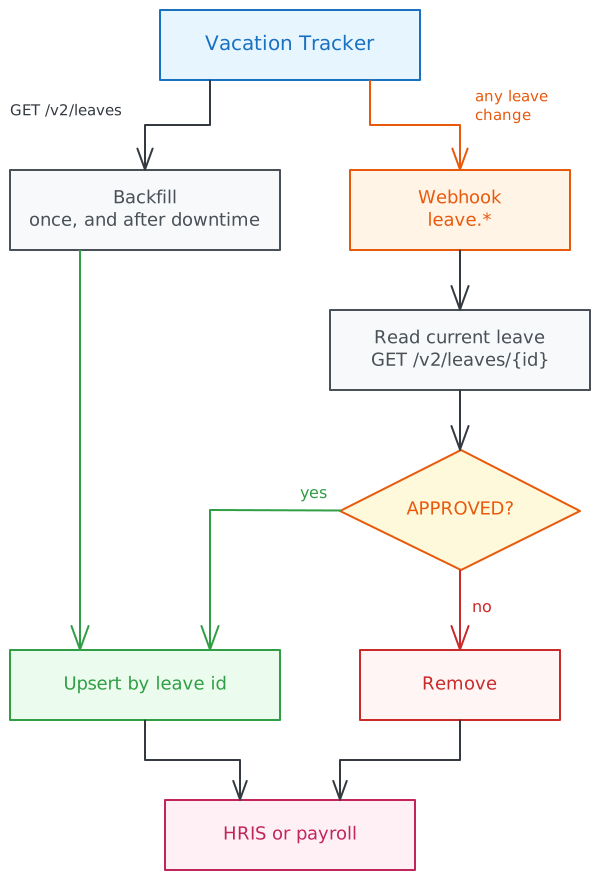
Short answer: subscribe a webhook to the leave.* events, then load existing approved leave once with GET /v2/leaves. On every event, read the leave again with GET /v2/leaves/{id}: if it is APPROVED, create or update it in your payroll system by its id; otherwise remove it. Run the load again after any downtime.
Give this to your agent
Here's how to send approved leave from Vacation Tracker to an HRIS or payroll system with the Vacation Tracker API v2:
- Vacation Tracker is the source of truth. The other system keeps a copy of approved leave only, keyed by the leave id.
- Use an administrator's key with leaves:read and users:read, and a webhook owned by that administrator, subscribed to the leave.* events.
- Create the webhook first, then load existing approved leave with GET /v2/leaves (startDate and endDate are required). Follow nextToken until it is missing, even when a page is empty.
- On every event: verify the signature, answer 200 within 10 seconds, and skip events whose id you already handled. Then read the leave with GET /v2/leaves/{id}: upsert it if it is APPROVED, remove it otherwise. Remove it on leave.deleted.
- Don't trust event order or type: approved leave can be edited back to OPEN, cancelled or deleted, also after payroll closed.
- Handle events for the same leave one at a time (for example a lock per leave id around the read and the write), including the backfill, so a slow worker can't restore a cancelled leave.
- Match people by employeeId (or email), using expand=user, and map leaveTypeId to the payroll's pay codes.
- A paused webhook does not deliver missed events later. Watch its status, and run the load again for the gap.
- Keep the API key and webhook secret in configuration or secrets, never in code.

Full guide: https://vacationtracker.io/developers/llms.mdx/guides.sync-leave-to-hris.md
API v2 docs: https://vacationtracker.io/developers/llms.txt

Unless I already told you what to build in this session, read the documentation and ask me what to do next.To send remaining balances as well, see Sync leave balances.
How it works
A sync has two parts:
- A backfill loads approved leave for a date range. You run it once at the start, and again whenever you need to catch up.
- Webhooks tell you about every change after that.
When an event arrives, the receiver does not trust the event type or the order events arrive in. It reads the leave's current state and makes your system match it: approved leave is upserted by its id, anything else is removed.
Choose a tool
| You want to | Use |
|---|---|
| A reliable sync that also loads past leave and survives downtime | REST API v2 and webhooks |
| Apply your own logic without coding, sending new leave from now on to an HRIS that has a Zapier app | Zapier |
| Check a few leaves by hand, for example "who was off in March?" | MCP server, by asking your AI assistant |
What changes an approved leave
- Edits. When a user edits their own approved leave, it goes back to
OPENfor approval, and you getleave.updatedwith that status. It comes back asleave.approved, or ends asleave.deniedorleave.expired. When an administrator, the user's approver or their location admin makes the edit, the leave staysAPPROVED. The receiver in this guide removes the leave while it waits for approval. If your payroll would rather keep the last approved version until the decision, store it and replace it only on the next approved state. - Cancellations and deletions of past leave. A leave can be cancelled or deleted after it was taken, for example when someone came to work after all. If the payroll period is already closed, your system has to record a correction.
- Leave type changes.
leave.updatedalso covers a change of leave type, so map the pay code again on every upsert.
With the REST API
This example builds the sync with the REST API v2 and webhooks.
1. Create an API key and a webhook
In the dashboard, go to Add-ons → Open API and create a key with these scopes (see Authentication):
| Scope | Why |
|---|---|
leaves:read | Read leaves |
users:read | Match people to employees in your system |
leave-types:read | Map leave types to your pay codes |
webhooks:read, webhooks:write | Only if you create the webhook with the API instead of the dashboard |
Use an administrator as the owner of the key and the webhook. Both see only the people their owner can see: an approver's webhook gets events only for the departments they approve. A webhook is revoked if its owner loses the access it needs, so pick an owner who will stay an administrator.
Then create a webhook on the Webhooks tab of the same page, or with POST /v2/webhooks, subscribed to these events:
| Event | Why it matters |
|---|---|
leave.added | A manager added an approved leave, or a request was approved automatically |
leave.approved | A request was approved. With multi-level approval, it is sent once, after the last level. |
leave.updated | Dates, times or leave type changed. The leave may no longer be approved: see What changes an approved leave. |
leave.denied | A request was denied, including an edited leave that was sent back for approval |
leave.cancelled | An open or approved leave was cancelled, also after it was taken |
leave.deleted | A manager deleted a leave. data has only id and userId. |
leave.expired | A request expired without a decision, including an edited leave that was waiting for re-approval |
Store the signing secret: it is shown once.
2. Map people and leave types
Match each Vacation Tracker user to an employee in your system once, and store the pair:
employeeIdis the best key when you use it. Admins set it on the user's profile page, or withPATCH /v2/users/{id}.emailworks when both systems use the same work email.
GET /v2/users returns both. To read them together with the leave, add expand=user to the leave requests below.
Map each leaveTypeId to a pay code or absence type in your system with GET /v2/leave-types. Use the ID, not the name: names can change.
3. Backfill approved leave
Start the webhook before the backfill. A change made while the backfill runs then reaches you as an event, and the upsert by id makes the overlap harmless.
GET /v2/leaves returns the leaves that overlap a date range, APPROVED by default:
curl --get "https://api.vacationtracker.io/v2/leaves" \
  --data-urlencode "startDate=2026-01-01" \
  --data-urlencode "endDate=2026-12-31" \
  --data-urlencode "limit=1000" \
  --data-urlencode "expand=user" \
  -H "Authorization: Bearer vt_live_..."
Page with nextToken until it is missing, even when a page is short or empty (see Pagination), and upsert every leave by its id.
4. Handle each event
Every event carries the leave in data, in the same shape the API returns. For each event:
- Verify the signature, answer
200within 10 seconds, and do the rest afterwards. - Skip the event if you have already processed its
id. Deliveries are at least once, so the same event can arrive twice. - For
leave.deleted, remove the leave. - For any other event, read the leave again with
GET /v2/leaves/{id}. If itsstatusisAPPROVED, upsert it. Otherwise (or on404), remove it.
Reading the leave again costs one request per event, and it makes the result correct even when two events for the same leave arrive out of order.
Handle one leave at a time. If two workers process two events for the same leave in parallel, a slow worker that read APPROVED can write after a fast one already removed the cancelled leave, and the absence comes back. Process events for the same leave one after another, for example with a lock per leave id around the read and the write, or by sending all events for one leave to the same worker. Run the backfill through the same path.
const API = 'https://api.vacationtracker.io/v2'
const headers = { Authorization: `Bearer ${process.env.VT_API_KEY}` }

// Called after the signature check and the 200 response.
async function handleEvent(event: { id: string; type: string; data: { id: string } }) {
  if (await processedEvents.has(event.id)) return

  if (event.type === 'leave.deleted') {
    await hris.removeLeave(event.data.id)
  } else if (event.type.startsWith('leave.')) {
    const response = await requestWithRetry(`${API}/leaves/${event.data.id}?expand=user`, { headers })
    if (response.status !== 404 && !response.ok) {
      // Don't remove the leave on a temporary error: fail, so your queue retries the event.
      throw new Error(`Reading leave ${event.data.id} failed with ${response.status}`)
    }
    const leave = response.status === 404 ? null : (await response.json()).data
    if (leave?.status === 'APPROVED') {
      await hris.upsertLeave(leave)
    } else {
      await hris.removeLeave(event.data.id)
    }
  }

  await processedEvents.add(event.id)
}
requestWithRetry is the helper from Rate limits.
import os
import random
import time

import requests

API = "https://api.vacationtracker.io/v2"
HEADERS = {"Authorization": f"Bearer {os.environ['VT_API_KEY']}"}


def get_with_retry(url, params=None, max_attempts=5):
    for attempt in range(max_attempts):
        response = requests.get(url, headers=HEADERS, params=params, timeout=30)
        if response.status_code != 429 or attempt == max_attempts - 1:
            return response
        if response.json().get("error", {}).get("code") == "QUOTA_EXCEEDED":
            return response
        time.sleep(random.uniform(0, min(30, 0.5 * 2**attempt)))


# Called after the signature check and the 200 response.
def handle_event(event):
    if processed_events.has(event["id"]):
        return

    leave_id = event["data"]["id"]
    if event["type"] == "leave.deleted":
        hris.remove_leave(leave_id)
    elif event["type"].startswith("leave."):
        response = get_with_retry(f"{API}/leaves/{leave_id}", params={"expand": "user"})
        if response.status_code != 404:
            # Don't remove the leave on a temporary error: fail, so your queue retries the event.
            response.raise_for_status()
        leave = None if response.status_code == 404 else response.json()["data"]
        if leave and leave["status"] == "APPROVED":
            hris.upsert_leave(leave)
        else:
            hris.remove_leave(leave_id)

    processed_events.add(event["id"])
get_with_retry retries 429 with exponential backoff and jitter, and stops on QUOTA_EXCEEDED, like the helper in Rate limits.
In both, processedEvents (processed_events) and hris stand for your own storage and your HRIS or payroll client.
A key can send 10 requests per second and 30,000 requests per month. The backfill costs one request per page of up to 1,000 leaves, and the receiver costs one request per event. See Rate limits.
5. Read durations
| Field | Use |
|---|---|
startDate, endDate | The first and last day, in YYYY-MM-DD. Both are inclusive. |
durationWorkingDays | Working days the leave takes. A fraction for part-day leave, for example 0.5. |
durationCalendarDays | Calendar days, weekends included |
isFullDayLeave | false for half-day and hourly leave |
startHour, startMinute, endHour, endMinute | The times of a part-day leave, in the person's time zone. Only when isFullDayLeave is false. |
For a payroll that counts hours, use the times of a part-day leave, and the person's working hours for full days. GET /v2/locations/{id}/work-week returns the working hours of a location.
6. Catch up after downtime
Each delivery is retried for about 3 days. If your endpoint keeps failing, the webhook is paused, its owner gets an email, and events from the pause onwards are not delivered later. Watch the webhook's status and lastDelivery (from GET /v2/webhooks/{id}), not only your endpoint.
To recover:
- Fix the endpoint, then resume the webhook in the dashboard or with
POST /v2/webhooks/{id}/resume. - Run the backfill again over every period that may have changed, for example the open payroll period and the months ahead. Upsert the approved leaves, and remove the leaves you have that are no longer in the
APPROVEDlist.
For a few missed events, the delivery log on the webhook's page in the dashboard lets you resend deliveries from the last 30 days.
The startDate and endDate filters match the dates of the leave, not when it was changed. That is why the catch-up compares whole periods instead of fetching "changes since".
With Zapier
Vacation Tracker's Zapier app sends leave events to any of the 5,000+ apps on Zapier, including HRIS and payroll tools with a Zapier app. Each Zap listens to one trigger, so a sync needs several Zaps:
| Trigger | Action in your HRIS app |
|---|---|
| Leave Request Approved | Create the absence |
| New Leave Added | Create the absence (a manager added an approved leave) |
| Leave Updated | Update the absence when status is APPROVED, otherwise remove it (use a Paths or Filter step) |
| Leave Cancelled | Remove the absence |
| Leave Deleted | Remove the absence |
Each payload includes userEmail, leaveTypeName, workingDays and the hours of each day in daysList, which most HRIS apps can map directly. Use the leave id to find the absence again when it is updated, cancelled or deleted. See Triggers and Webhook payloads.
Zapier fits small teams and simple flows. Keep its limits in mind:
- It sends new events only. There is no backfill of past leave, and nothing to catch up after a Zap was off.
- A delivery that fails is not retried, so a missed event stays missed.
For a sync that payroll depends on, use the REST API and webhooks.
With an AI assistant (MCP)
To check a few leaves by hand, ask your AI assistant through the MCP server, for example "who was off in March?". It answers questions; it does not keep two systems in step.
Summary
- Vacation Tracker is the source of truth for leave. Your HRIS or payroll system keeps a copy of approved leave only.
- Start the webhook first, then backfill with
GET /v2/leaves, and upsert every leave by itsid. - On each event, read the leave again: upsert it if it is
APPROVED, remove it otherwise. Remove it onleave.deleted. - Edits can send an approved leave back to
OPEN, and past leave can be cancelled or deleted after payroll closed. - A paused webhook does not deliver missed events later: watch its
status, and run the backfill again after downtime. - Zapier suits simple flows, but has no backfill and no retries.
Frequently asked questions
How does PTO get into payroll?
Vacation Tracker sends a webhook when leave changes, and your sync writes approved leave into the payroll system, matched to the employee by employeeId or email. Payroll then pays it as PTO like any other entry.
What happens when an employee cancels approved leave?
Vacation Tracker sends leave.cancelled. Your sync reads the leave, sees it is no longer APPROVED, and removes it from payroll. If payroll for that period is already closed, correct it in the next run.
Can an approved leave change after it is approved?
Yes. It can be edited, cancelled or deleted, and when someone edits their own approved leave it goes back to OPEN for approval. That is why the sync reads the current leave on every event instead of trusting the event type.
Do I need to code this, or can I use Zapier?
Zapier works for simple flows with its leave triggers. It cannot load existing leave and has no retries, so use the API when payroll must be exact.
Related
- Webhooks: headers, signatures, retries and the delivery log.
- Webhook events: every event and its payload.
- Read leave balances.
- Sync leave balances.
How to request and manage leave
Request, edit, cancel, approve and deny time off in Vacation Tracker from your own app with the REST API, from an AI assistant with MCP, or react to it with Zapier.
How to sync leave balances with an HRIS or payroll system
Keep PTO and leave balances in your HRIS or payroll system in sync with Vacation Tracker as the source of truth, and get alerted when someone edits the wrong system.