

How to sync leave balances with an HRIS or payroll system
Keep PTO and leave balances in your HRIS or payroll system in sync with Vacation Tracker as the source of truth, and get alerted when someone edits the wrong system.
Maria has 18 vacation days left on Monday. On Tuesday HR corrects her contract quota in the HRIS, the nightly sync copies it over, and she has 20. On Wednesday her manager adds two days for her work anniversary in Vacation Tracker, the sync runs the other way, and the HRIS correction is gone. Maria took no leave all week, yet she saw three different numbers, and nobody can say which one is right.
The fix is one source of truth. Vacation Tracker already tracks everything a balance is made of: leave policies, accruals, rollover and its expiry, TOIL, seniority and role entitlements, and every approved leave. Let it own the balance, send the result to your HRIS or payroll system in one direction, and get an alert when someone edits the copy.
This guide shows how to set that up with the REST API v2 and webhooks, and how to push yearly entitlements from the HRIS when contracts require it. For reading balances and what each number means, see Read leave balances.
Short answer: make Vacation Tracker the source of truth for balances and sync in one direction. When a webhook says someone's balance may have changed, read GET /v2/users/{id}/balances and write it to the HRIS. Run a full sync nightly as well, because accruals and a new leave year send no webhook, and alert HR when a balance was edited by hand in the wrong system.
Give this to your agent
Here's how to keep leave balances in an HRIS or payroll system in sync with Vacation Tracker using the Vacation Tracker API v2:
- Vacation Tracker is the source of truth for balances. Sync each number in one direction only; never sync the same number both ways.
- Use an administrator's key with balances:read and users:read, and a webhook owned by that administrator.
- When an event names a person (leave.*, toil.*, user.quota-updated, user.updated, user.status-changed), read GET /v2/users/{id}/balances and write the result to the HRIS. Re-read instead of applying the event, and refresh one person at a time (a lock per user around the read, the HRIS write and the saved last-written value, shared by webhook workers and the scheduled sync), so a slow worker can't overwrite a newer balance.
- Run a full sync on a schedule too: accruals, a new leave year, rollover expiry and seniority entitlements change balances without any event. Fit it into 30,000 requests per month per key.
- Send quotas.remaining in the field that matches unit (days or hours). It is null when hasUnlimitedDays is true.
- Before writing, compare the HRIS value with what the sync wrote last time. If it differs, someone edited it by hand: alert HR instead of overwriting it.
- Only if the HRIS owns the yearly quota: push it with PUT /v2/users/{id}/quotas/{leaveTypeId} (needs users:write). It replaces the whole quota setup, and you can never set remaining.
- Keep the API key and webhook secret in configuration or secrets, never in code.

Full guide: https://vacationtracker.io/developers/llms.mdx/guides.sync-balances.md
API v2 docs: https://vacationtracker.io/developers/llms.txt

Unless I already told you what to build in this session, read the documentation and ask me what to do next.How it works
One owner for each number
Pick one system that owns each number, and sync it in one direction only.
We recommend Vacation Tracker as the source of truth for balances: entitlements, accruals, rollover, usage and what is left. Employees request leave and check their balance in Vacation Tracker, approvers decide there, and every rule that changes a balance is set up there. Your HRIS or payroll system receives the result.
Some companies must keep the yearly entitlement in the HRIS, because it comes from employment contracts. That works too: the HRIS sends the yearly quota to Vacation Tracker, and Vacation Tracker still calculates everything else (accruals, rollover, usage, remaining) and sends the balances back.
| Number | Owner | Direction |
|---|---|---|
| Used, scheduled, pending, remaining | Vacation Tracker | Vacation Tracker → HRIS |
| Accruals, rollover, expiry, TOIL | Vacation Tracker | Vacation Tracker → HRIS |
| Yearly quota | Vacation Tracker (recommended), or the HRIS when contracts require it | One direction only |
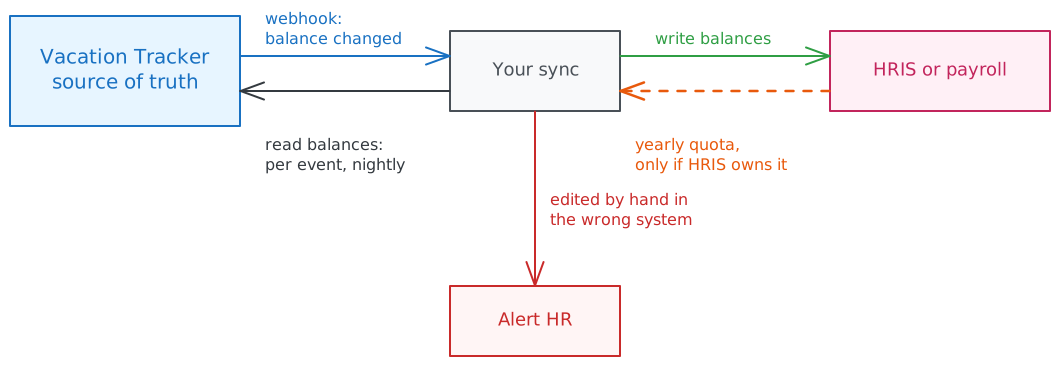
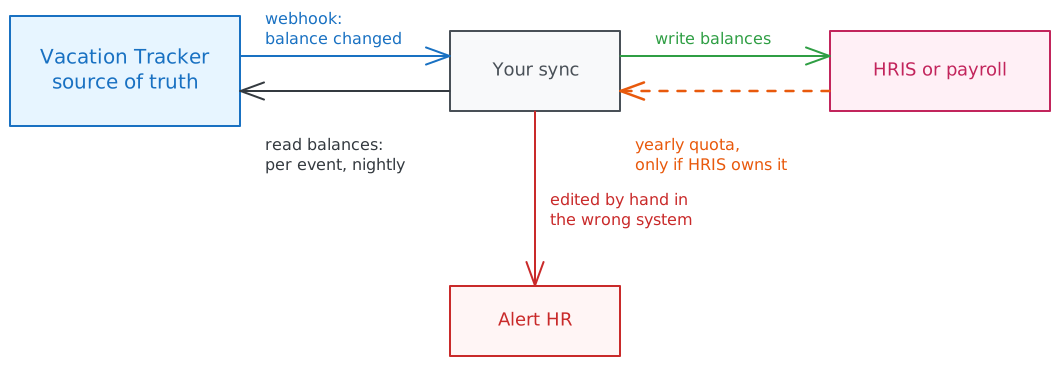
The sync has two parts: webhooks for changes people make, and a scheduled full sync for changes that happen with time, such as accruals and a new leave year.
Why two-way sync goes wrong
Syncing the same number in both directions looks flexible, but it breaks in ways that are hard to notice:
- Different people, different changes. HR often maintains the HRIS while managers and admins maintain Vacation Tracker. The sync cannot know which change was meant to win, so one of them disappears without anyone being told.
- The last sync wins. Whichever system synced last decides the balance, so an employee sees a different number each day with no leave taken in between.
- Changes bounce back. A change synced from A to B looks like a new change in B, so it is synced back to A, and so on. At best it wastes requests; at worst, small rounding differences between days and hours grow with every round trip.
- Nobody can explain the number. When a payroll payout is questioned, there is no single history that shows how the balance was reached.
Treat the other system as read-only for each number it does not own.
Choose a tool
| You want to | Use |
|---|---|
| Keep balances in your HRIS or payroll up to date (recommended) | REST API v2 and webhooks |
| Apply your own sync logic without coding | Zapier, with a step that calls the API |
| Set yearly entitlements in Vacation Tracker from contracts in your HRIS | REST API v2 |
| Adjust one person's quota by hand | MCP server |
With the REST API
This example keeps balances in your HRIS up to date from Vacation Tracker.
1. Create an API key and a webhook
Create an API key as an administrator, so it sees every user, with Balances: Read and Users: Read (scopes balances:read and users:read). Then create a webhook owned by the same administrator. The owner needs leaves:read and toil:read for leave and TOIL events, and the read scope of every other event you subscribe to.
2. Refresh a person when an event names them
These events change someone's balance. When one arrives, read that person's balances with GET /v2/users/{id}/balances and write the result to your HRIS:
| Event | Changes | Person |
|---|---|---|
leave.added, leave.approved, leave.updated, leave.cancelled, leave.deleted | used, scheduled, remaining | data.userId |
leave.requested, leave.denied, leave.expired | pending only | data.userId |
toil.added, toil.approved, toil.updated, toil.cancelled, toil.deleted | toil, remaining | data.userId |
user.quota-updated | Quota or rollover settings | data.id |
user.updated | Location or work week, which can change the leave policy and the hours per day | data.id |
user.status-changed | Activation or deactivation | data.id |
Some events change many people at once. Refresh everyone they affect:
| Event | Refresh |
|---|---|
leave-policy.enabled, leave-policy.disabled | The users in data.locationId (list them with GET /v2/users?locations=...) |
location.updated | The users of that location. The year start or work week may have changed. |
automation.created, automation.updated with data.type seniority-entitlement or entitlement-by-role | Everyone the automation applies to, or everyone if that is simpler |
automation.deleted | Everyone, unless your sync stores each automation's type and the people it applies to. Deleted payloads contain only the ID, not data.type. |
Webhooks are delivered at least once and not always in order. Because you re-read the balance instead of applying the event, a duplicate or late event only costs one extra read, as long as you refresh one person at a time. If two workers refresh the same person in parallel, a slow one can write an older balance over a newer one. Use a lock per user around the whole refresh (the balance read, the comparison and write to the HRIS, and the saved last-written value), and let the scheduled sync take the same lock. See Delivery behavior and Verifying signatures.
If you only send remaining to the HRIS, you can skip pending-only events.
3. Run a full sync on a schedule
Balances also change with time, without any event:
- Accruals. Policies with an
accrualTypeother thanNONEearn a part of the quota every period (for example weekly or monthly). - A new leave year. The quota resets and the rollover from the previous year is added.
- Rollover expiry. Rolled-over leave that was not used expires on the date set in the leave policy.
- Seniority entitlements. Extra days start counting when a person reaches the years of service set in the automation.
No webhook is sent for these, so a sync that only listens to events drifts. Run a full sync of everyone's balances, as shown in Get everyone's balances:
- daily, if your request budget allows it, or
- the day after each accrual date, at the start of each leave year, and on the rollover expiry date.
Request budget. A key can send 30,000 requests per month (see Rate limits). A full sync costs one request per user plus one per page of users, and every webhook refresh costs one more. For example:
| Users | Daily full sync | Monthly full sync after accruals |
|---|---|---|
| 100 | ~3,100 requests a month | ~100 |
| 300 | ~9,300 | ~300 |
| 900 | ~27,900, close to the limit | ~900 |
For bigger companies, sync after accrual dates instead of daily, sync only the locations whose policies accrue, or contact support for a higher quota.
4. Write to the HRIS
Match each Vacation Tracker user to the employee in your HRIS, usually by email. See Keep users in sync with an HRIS.
For each leave type, send quotas.remaining in the field that matches unit, and map leaveTypeId to the matching leave or absence type in your HRIS. When hasUnlimitedDays is true, remaining is null: skip it, or mark the type as unlimited in the HRIS. Payroll systems that pay out unused leave usually also want used, and sometimes earned. See Read the right number.
5. Get notified when a balance changes in the wrong place
Even with one owner, people will sometimes edit the copy. Set up alerts so those edits are caught and fixed, rather than overwritten by the next sync with nobody noticing:
- In the system that is not the source of truth. When Vacation Tracker is the source, make the balance fields read-only in your HRIS or payroll system if it allows that. Before your sync writes a balance, compare the HRIS value with the value the sync wrote last time. If they differ, someone edited it in the HRIS: send an alert to HR (for example by email or to a Slack or Teams channel) with the person, the leave type and both values, instead of overwriting it without a word.
- In Vacation Tracker, when the HRIS owns the yearly quota. Subscribe to
user.quota-updated. Changes made through the API carry anapiClientobject with thekeyIdof the key that made them, and changes made in the dashboard, Slack or Teams have none. An event without your sync'skeyIdmeans someone changed the quota by hand in Vacation Tracker: alert HR, and decide whether to fix it in the HRIS or revert it. - For changes you expect. Large changes are worth a look even when they come from the right system. For example, alert when
remainingchanges by more than a few days outside of approved leave, or turns negative.
Company logs in Vacation Tracker show who changed what, including changes made through each API key, so an alert can always be traced back to a person.
Push yearly quotas from the HRIS
Use this direction only for numbers the HRIS must own, usually the yearly quota from employment contracts.
PUT /v2/users/{id}/quotas/{leaveTypeId} sets one person's quota for one leave type, like editing it on the user's page in the dashboard. It needs users:write, and the key owner must be an administrator, or a location admin who manages the user.
curl -X PUT "https://api.vacationtracker.io/v2/users/$USER_ID/quotas/$LEAVE_TYPE_ID" \
  -H "Authorization: Bearer vt_live_..." \
  -H "Content-Type: application/json" \
  -H "Idempotency-Key: $(uuidgen)" \
-d '{ "amount": 25, "applyToFutureYears": true }'| Field | Meaning |
|---|---|
amount | The yearly quota, in the company's unit: days, or hours when the company uses hourly accounting. Up to 365 days or 2,920 hours. |
unlimited | true for unlimited leave of this type. amount is then ignored. |
period | current (default) or next leave period. |
applyToFutureYears | true to keep the quota in later periods too. By default only the chosen period changes. |
ignoreRolloverFromPreviousYear | true to stop the previous period's rollover being added for this person. |
prorate | Prorate from the start date. Allowed only for the person's first leave period, otherwise 400 PRORATE_NOT_ALLOWED. |
It is a full replacement: fields you leave out go back to their defaults, with one exception. Leaving out prorate keeps the person's current proration; send prorate: false to turn it off in their first leave period. Send every field you care about each time. The response is the person's quotas with 200, or 202 Accepted with an operation to follow. Send a new Idempotency-Key for each change and reuse it only when you retry that same change, so a retry never applies it twice. See Idempotency.
To add time for overtime tracked in the HRIS, create approved TOIL for the person with POST /v2/toil and their userId. This also needs toil:write and leaves:approve, and TOIL must be enabled for that leave type in the person's leave policy.
What you cannot set:
- The remaining balance. Vacation Tracker always calculates
remainingfrom the quota, accruals, rollover, TOIL and approved leave. You can't write it directly. - A custom rollover amount. The API can only turn rollover off for a person (
ignoreRolloverFromPreviousYear). A specific brought-forward amount is set in the dashboard. - Accrual rules, rollover limits and expiry. These belong to the leave policy of the location. Change them with the leave policy endpoints or in the dashboard, not per person.
If your HRIS only knows the final balance, you can't push it as is. Setting the quota to the HRIS balance would count leave twice, because Vacation Tracker subtracts approved leave again. Either move the entitlement into the HRIS as a yearly quota, or let Vacation Tracker own the balance and sync it the other way.
When to push:
- HRIS webhook. Many HRIS systems notify you when an employee's contract or entitlement changes. Receive it, find the Vacation Tracker user, and call
PUT /v2/users/{id}/quotas/{leaveTypeId}. - Polling. If the HRIS has no webhooks, read entitlements on a schedule (daily is usually enough), compare with
GET /v2/users/{id}/quotas, and update only the people whose quota differs. Comparing first keeps you inside the request budget and avoidsuser.quota-updatedevents for nothing.
Every quota you set sends user.quota-updated. If you also sync balances to the HRIS, refresh the balances on that event, but never write the quota back to the HRIS: that is the loop described in Why two-way sync goes wrong.
With Zapier
Zapier triggers fire on leave events: requested, added, approved, denied, updated, cancelled and deleted. See Zapier triggers. They do not include balances, so add a Webhooks by Zapier step that calls GET /v2/users/{id}/balances with the user ID from the trigger, then a step for your HRIS app.
Zapier fits small teams with few leave types. It has no TOIL, quota or policy triggers and no scheduled full sync, so balances drift after accruals and at the start of a new leave year. Use the API when balances must stay exact.
With an AI assistant (MCP)
For a single adjustment, ask your AI assistant through the MCP server, for example "Set Maria's vacation quota to 25 days for this year". The assistant uses manage_user, with the same rules as the dashboard: only administrators, and location admins for their own locations, can change quotas. MCP works on one person at a time and does not fit a regular sync.
Summary
- Vacation Tracker owns the balance; your HRIS or payroll system receives it. Only the yearly quota may come from the HRIS, and only when contracts require it.
- Sync each number in one direction. Two-way sync of the same number loses edits, flips balances and loops.
- Re-read balances on webhook events instead of applying the event, and refresh one person at a time across webhook workers and the scheduled sync, so duplicate, late or parallel refreshes do no harm.
- Run a scheduled full sync too: accruals, a new leave year, rollover expiry and seniority entitlements send no webhook. Size it to the 30,000 requests per month budget.
- You can set the yearly quota, never
remaining. Pushing an HRIS balance as a quota counts leave twice. - Alert on edits in the wrong place instead of overwriting them without a word.
Frequently asked questions
Should the HRIS or Vacation Tracker be the source of truth for PTO balances?
Vacation Tracker. It already has the leave policies, accruals, rollover, TOIL, entitlements and every approved leave, so its balance matches what employees see. The HRIS can own the yearly quota when it comes from contracts; Vacation Tracker still calculates the rest.
Can I sync PTO balances both ways?
Not the same number. When different people edit each system, a two-way sync loses edits without telling anyone, the balance depends on which sync ran last, and changes bounce back and forth. Give each number one owner.
Can I set someone's remaining balance through the API?
No. You can set the yearly quota with PUT /v2/users/{id}/quotas/{leaveTypeId}, and Vacation Tracker calculates remaining from it.
Why do I need a nightly sync if I use webhooks?
Accruals, a new leave year, rollover expiry and seniority entitlements change balances without any event. A scheduled full sync catches them.
Related
- Read leave balances: every number in a balance, and how to read everyone's.
- Keep users in sync with an HRIS: matching employees to Vacation Tracker users.
- Webhooks and webhook events.
PUT /v2/users/{id}/quotas/{leaveTypeId}.
How to send approved leave to an HRIS or payroll system
Send every approved leave and PTO day from Vacation Tracker to your HRIS or payroll system, including edits and cancellations, with the REST API and webhooks or Zapier.
How to keep users in sync with an HRIS
Keep employees' location, department, labels, work week, quotas and status in Vacation Tracker matched to your HRIS with the REST API, MCP or directory import.