





Last updated on October 10, 2025
Can I Set an Expiry Date for Brought Forward Days?
Yes. If you're rolling unused days from one year to the next, you can force them to be used by a specific month and day — otherwise they're forfeited. It's how most teams keep brought-forward balances from snowballing year over year.
How to Set the Expiry Date
The setting lives on each leave policy — per Location, per Leave Type. That means you can expire Vacation rollover on March 31 while leaving a different leave type's rollover with no expiry. The toggles are independent.
- Sign in at app.vacationtracker.io.
- In the left-hand menu, expand Leave Setup and click Locations.
- On the Location you want to configure, click Edit Leave Policies.
- Find the leave policy you want to update and click the edit (pencil) icon on its row.
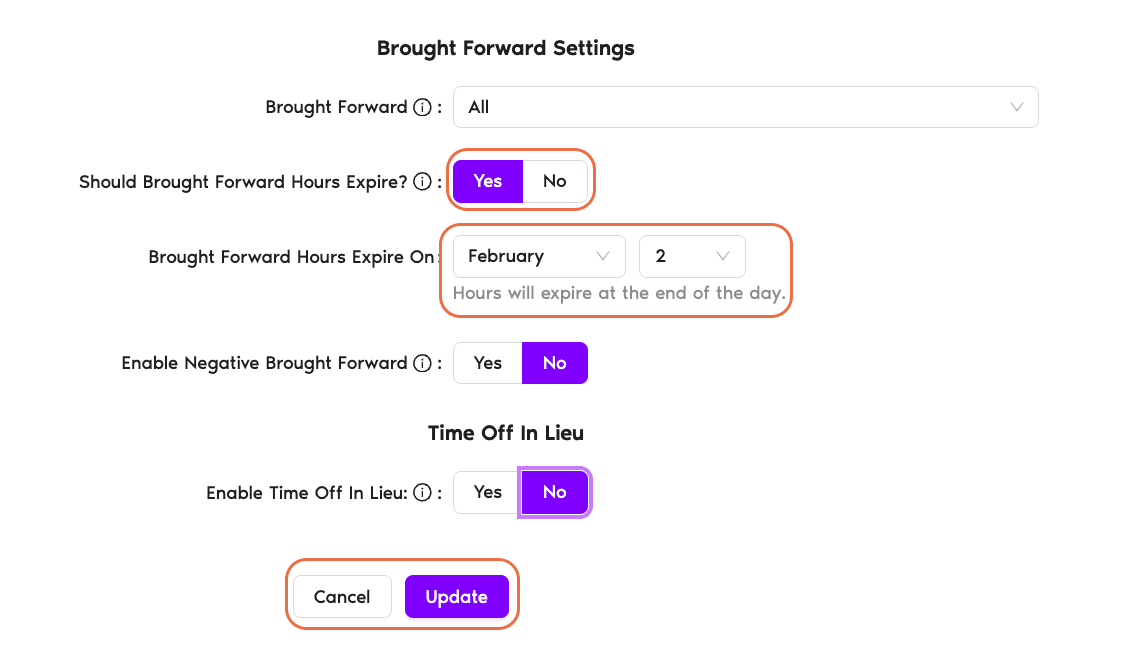
- Scroll to Brought Forward Settings. Make sure Brought Forward is set to Limited or All — if it's Disabled, there's nothing to expire. See How Do I Set a Brought Forward (Rollover) Policy? if you haven't set it up yet.
- Toggle Should Brought Forward Days Expire? to Yes.
- In the Brought Forward Days Expire On field, pick a Month and a Day. The note below the field confirms: "Days will expire at the end of the day."
- Click Update at the bottom of the page to save.
Picking a Good Expiry Date
The patterns below are only suggestions — please feel free to set the expiry date according to your own leave policy.
The example below the picker — "Days will expire at the end of the day" — matters: an expiry of March 31 means the employee can still take a rolled-over day on March 31, but not April 1.
Where the Expiry Shows Up
Once you save, the expiry date is visible on each affected user's profile page under Leave Quotas, alongside their current-year and brought-forward balances. Employees can see it themselves — they know how long they have to use those days.
Common Questions
Check the Brought Forward dropdown above it. If it's set to Disabled, the expiry toggle doesn't appear — there are no rollover days to expire. Switch Brought Forward to Limited or All, and the expiry toggle will show up below.
No — it's per leave policy (one Leave Type at one Location). You can expire Vacation rollover by March 31 and have unlimited expiry on Sick Day rollover, for example. Each policy's expiry is independent of the others.
The note under the date picker says it directly: "Days will expire at the end of the day." So for an expiry of March 31, any rolled-over days still on the balance at the end of March 31 are removed when April 1 begins.
 Book a Call