





Last updated on January 20, 2026
How Do I Check My Remaining Leave Balance?
Three places — pick the one that's most convenient for you. Each one shows the same numbers; the only difference is whether you'd rather look in your dashboard, your chat tool, or both.
Dashboard
Sign in at app.vacationtracker.io, click your name (or avatar) in the bottom-left of the sidebar, and pick My Profile from the menu. Scroll past your User Profile and Working Days sections to the Leave Quotas box.
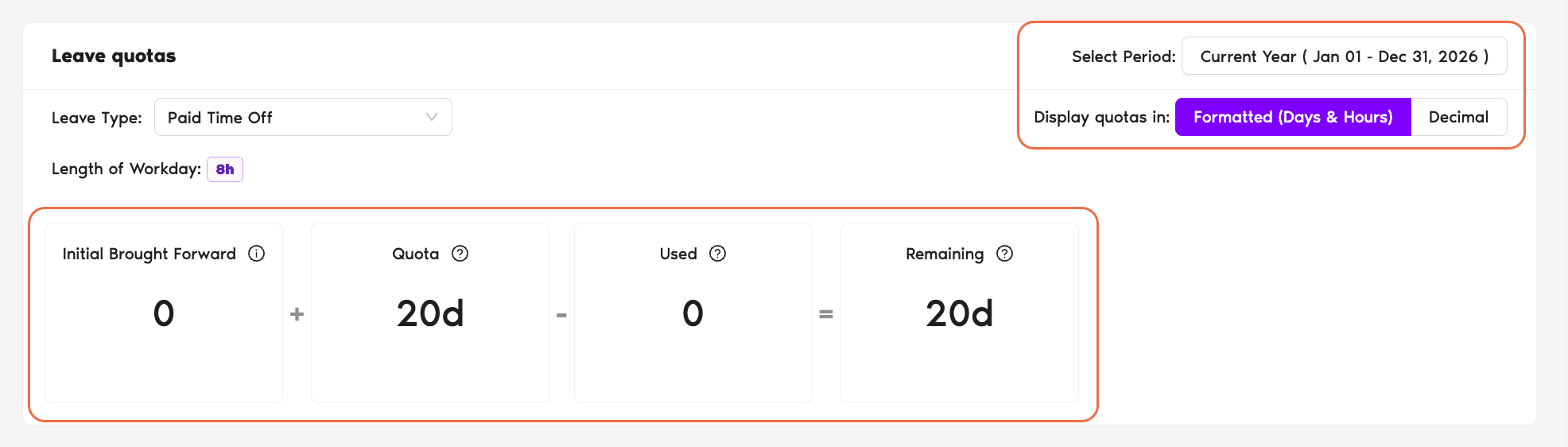
The Leave Quotas box is laid out as a single equation for the leave type you select, so you can see exactly how your balance was built up. From left to right:
Below those controls, you see four boxes that read like a math equation:
Each box has an info "?" icon with a tooltip explaining exactly what's counted in that box — handy when the numbers don't immediately look right and you want to confirm what's included.
Slack
Type /vacation in any Slack conversation (DM yourself if you don't want to send anything to a channel — Slack doesn't post the command itself). The bot opens a menu of options for you. Pick My Status to open your own profile view.
The My Status view shows more than just remaining quota — it's your balance, your upcoming leaves, your pending requests, and quick actions to request leave or TOIL right from chat.
Microsoft Teams
Open the Vacation Tracker app in Microsoft Teams. At the top of the bot conversation you'll see the app's tabs — click the My Profile tab.
The My Profile tab is your personal page inside the bot. It shows your remaining balance per Leave Type, your upcoming approved leaves, and your pending requests. From the same tab you can submit a new leave request without leaving Teams.
Common Questions
Because Remaining includes Brought Forward days carried over from last year — they sit on top of this year's Quota. If you have 10 days brought forward and a 27-day Quota, your starting Remaining is 37. The Quota box on its own only shows this period's allocation, not what rolled in.
Yes. As soon as a request is approved, those days come out of your balance. The point is to show you what's truly available — if you've already locked in a week off in October, that week is reflected in Used now, not in October.
Either your Leave Policy doesn't allow rollover for this Leave Type, or you didn't have any unused balance to carry over from last year. Brought Forward only shows up when both conditions are met: the policy supports it AND you had something to bring forward.
 Book a Call