



Last updated on October 23, 2026
Admin Training 6: Give Someone Admin or Location Admin Rights (Email Only)
Share the work by giving someone the Administrator or Location Admin role. You change a user's Role on their profile.
Decide First
Give the Administrator role to the few people who manage company-wide settings. Use Location Admin for people who run one office or country.
Change Someone's Role
- In the left-hand menu, under Team & Approval Flows, click Users and open the person's profile.
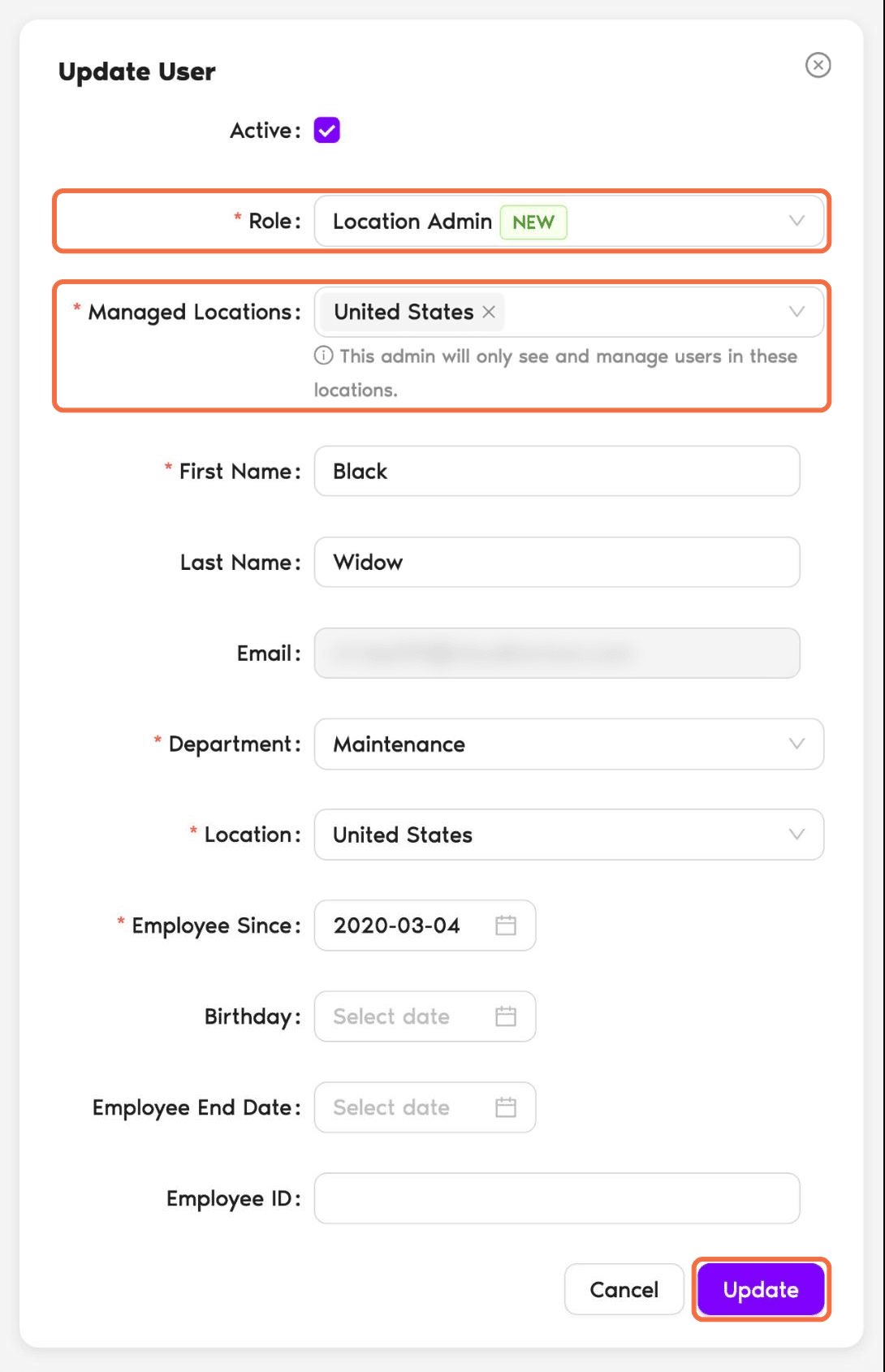
- Under User Profile, click Edit.
- In Role, choose User, Location Admin or Administrator.
- For a Location Admin, choose their Managed Locations.
- Click Update.
Looking for Approver?
Approver isn't in the Role list. You add Approvers on a Department. See Admin Training 4: Choose Who Approves Whose Leave With Departments (Email Only)Check It Worked
On the Users page, the Roles column shows the new Role. Someone who is also an Approver shows both, for example "Administrator, Approver".
Common Questions
Edit their profile and set Role back to User. Their leave history stays.
Yes. Add them as an Approver on a Department. Their Role stays Administrator.
 Book a Call