SOURCE:    Vacation Tracker
TITLE:     User Training 2: Check Your Leave Balance and History (Google Workspace)
URL:       https://vacationtracker.io/knowledge-base/user-training-google-workspace-check-your-leave-balance-and-history/
LANG:      en
PUBLISHED: 2026-10-23
UPDATED:   2026-10-23
READING:   2 min
SUMMARY:   See how much leave you have left, what's scheduled and every request you've made.
User Training 2: Check Your Leave Balance and History (Google Workspace)
User Training 2: Check Your Leave Balance and History (Google Workspace)
Check how much leave you have left and look back at every request you've made.
On Your Dashboard
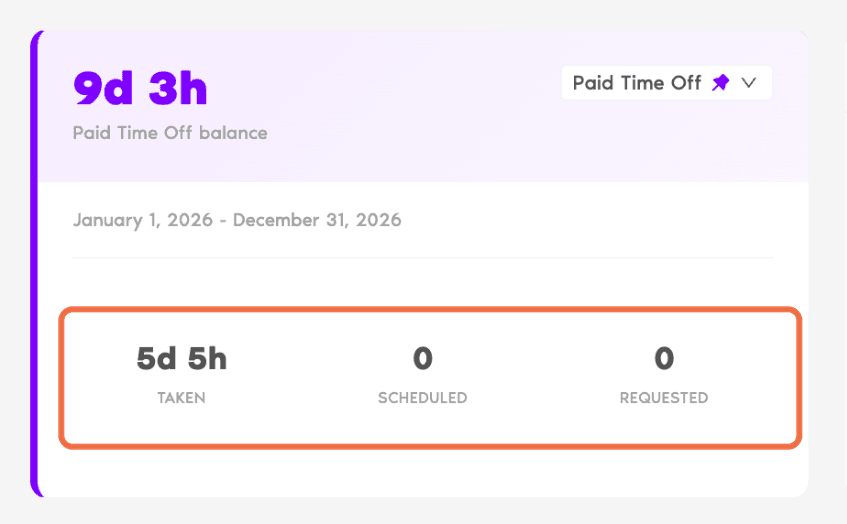
Balance card: your remaining balance for the leave type you pick, with Taken, Scheduled and Requested.
Upcoming Leaves: your next requests and their status, such as Approved or Pending. Click See all for the full list.
Quick Stats: your requests this year, your Approver(s) and your next accrual, if your leave builds up over the year.
On My Profile
Go to My Profile.
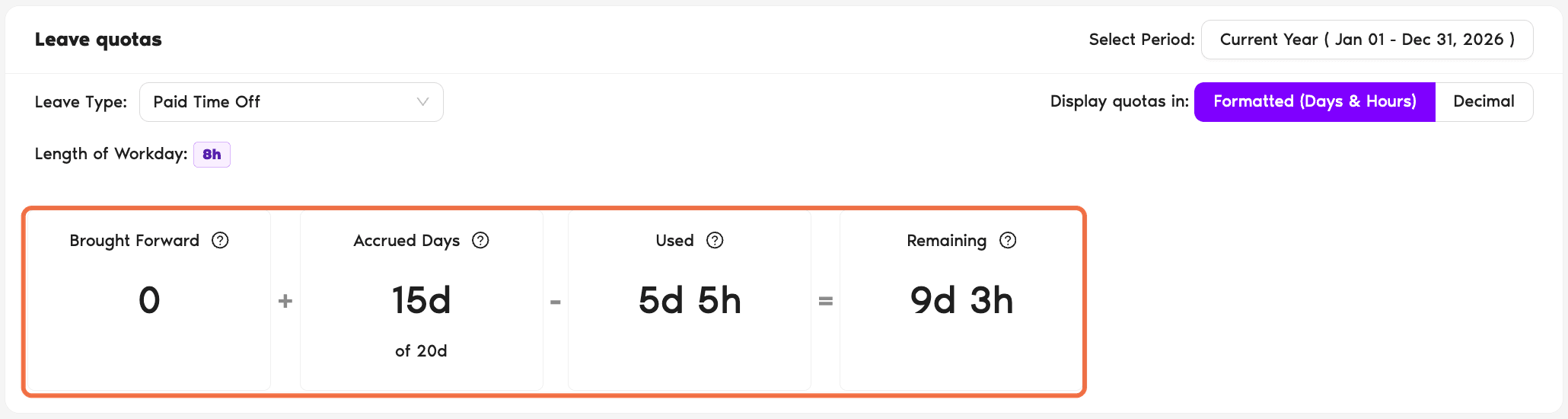
Profile tab > Leave quotas: choose the Period and Leave Type. You'll see Brought Forward + Quota − Used = Remaining. Switch between Formatted (Days & Hours) and Decimal.
Leaves tab: all your pending, scheduled and past requests.
Logs tab: a record of changes to your profile and leave.
Check It Worked
You can see your remaining balance and find any request you've made.
Common Questions
Days you didn't use last year that carried over to this year. Your company decides whether this happens and when those days expire.
Pending requests are counted as Requested so you don't book the same days twice. If the request is denied, the days come back.




 Book a Call