




Last updated on November 2, 2026
User Training 3: Check Your Leave Balance and History (Email Only)
Check how much leave you have left and look back at every request you've made.
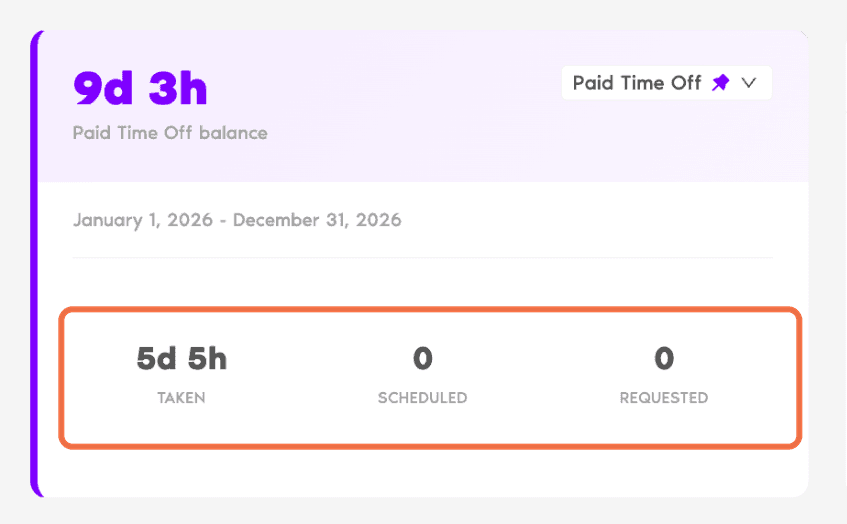
On Home
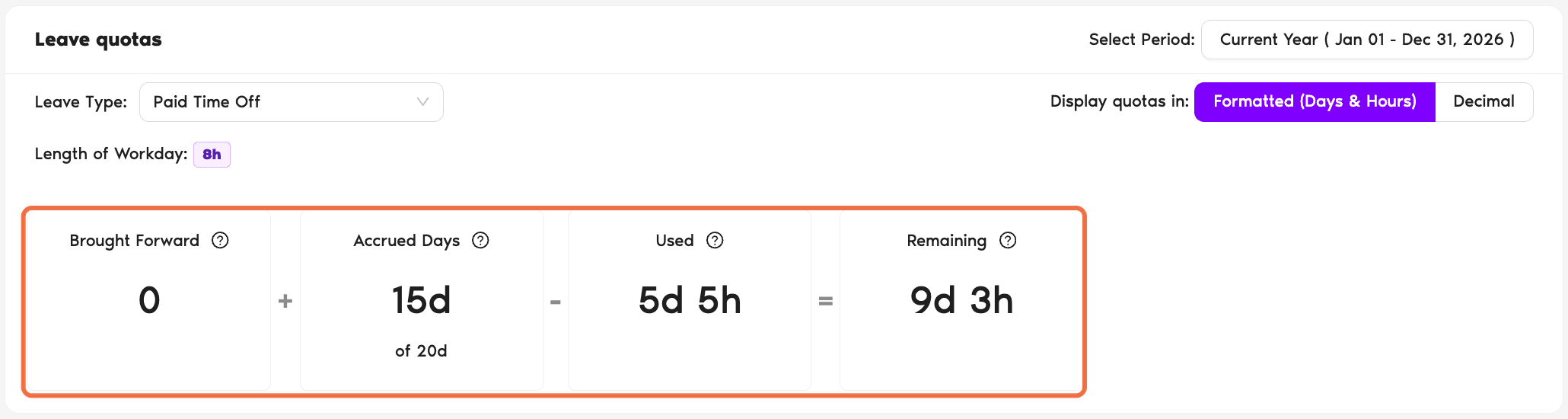
On My Profile
Go to My Profile.
Check It Worked
You can see your remaining balance and find any request you've made.
Common Questions
Days you didn't use last year that carried over to this year. Your company decides whether this happens and when those days expire.
Pending requests are counted as Requested so you don't book the same days twice. If the request is denied, the days come back.
What's Next?
User Training 4: Change or Cancel Your Leave (Email Only) User Training 6: See Who's Off and Upcoming Holidays (Email Only) User Training 2: Request Leave in the Dashboard (Email Only)Need help?
Regular Users: If you have any questions, email us anytime at hello@vacationtracker.io.Admins and Approvers: You can reach us via live chat Monday to Friday, 9 AM – 5 PM EST, or email us anytime at hello@vacationtracker.io.
 Book a Call