






Last updated on October 28, 2026
What Types of Reports Can I Export?
The Reports page in Vacation Tracker has three exportable reports, the Company Audit Logs, and Scheduled Reports, which emails those reports on a schedule. Find them under Reports in the left menu. Who can open them is set in Features & Permissions under Who can run and export Reports.
Where to Find Reports
Sign in at app.vacationtracker.io, then in the left menu expand Reports and click Reports.
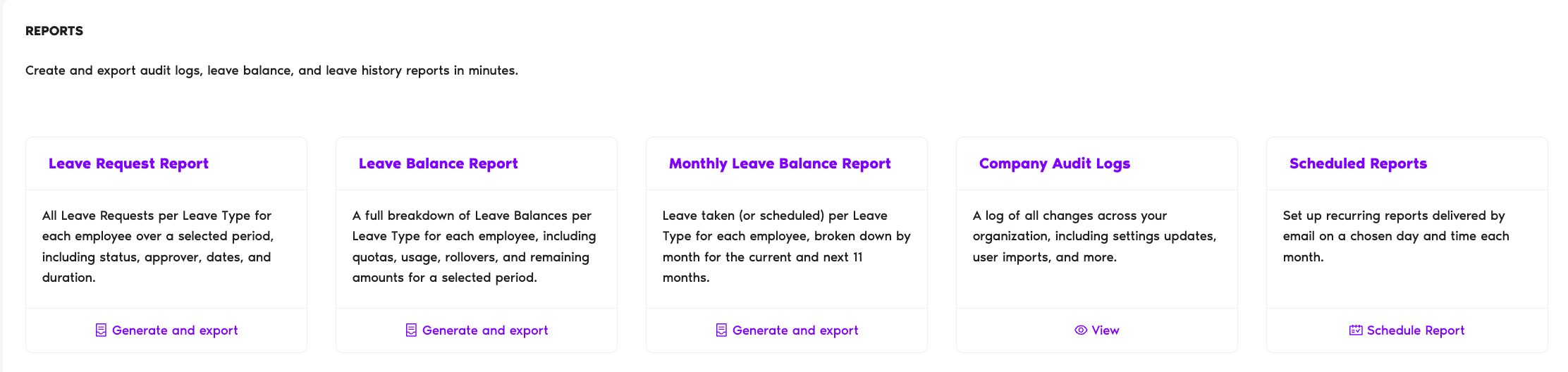
What's on the Reports Page
Leave Request Report
Per the page: "All Leave Requests per Leave Type for each employee over a selected period, including status, approver, dates, and duration."
Best for: auditing leave history, payroll inputs, end-of-quarter or end-of-year reviews.
Leave Balance Report
Per the page: "A full breakdown of Leave Balances per Leave Type for each employee, including quotas, usage, rollovers, and remaining amounts for a selected period."
Best for: a snapshot of where everyone stands today, or a year-over-year comparison.
Monthly Leave Balance Report
Per the page: "Leave taken (or scheduled) per Leave Type for each employee, broken down by month for the current and next 11 months."
Best for: headcount planning, forecasting how balances will look across the year as accrual cycles tick over.
Company Audit Logs
Per the page: "A log of all changes across your organization, including settings updates, user imports, and more."
Best for: change tracking: who changed what setting and when. Cross-reference: How Can I View Company Logs?
Scheduled Reports
Per the page: "Set up recurring reports delivered by email on a chosen day and time each month."
Scheduled Reports isn't a separate report. It sends the Leave Request, Leave Balance, or Monthly Leave Balance Report by email once a month.
Best for: automatic recurring delivery. Payroll wants the Leave Request Report on the 1st of every month? Set it once and forget it.
Plan note: Scheduled Reports is a Complete plan feature. On Free and Core, the Schedule Report option is hidden. Generate and export still works for the other report types.
Exporting from a Report
For each of the three exportable data reports (Leave Request, Leave Balance, Monthly Leave Balance), clicking Generate and export opens the report view with filters at the top. From there:
Admins and Approvers: You can reach us via live chat Monday to Friday, 9 AM – 5 PM EST, or email us anytime at hello@vacationtracker.io.
 Book a Call