
Last updated on October 14, 2026
Your New York team is taking Friday off. Denver expects them to cover the phones. Both managers approved their teams' requests, but neither checked the other office's calendar.
To manage employee leave from multiple locations, you need local rules and a shared view of who's available. Otherwise, a perfectly reasonable approval in one office can leave another short-staffed.
Start by deciding what each location needs to handle differently, then give approvers enough visibility to plan across offices. These eight steps cover the calendars, policies and coverage decisions, with US examples and a separate look at Canadian provinces.
Step 1: Set up one location for every place your people work
Group employees who share the same holidays and leave rules. That might mean one location per office, one per state, or separate groups within the same office.
Use employees' work locations as your starting point. For example, put a New Jersey remote employee in the New Jersey group even if head office is in New York, then check the rules that apply to their work arrangement.
Split a group further when its policies differ. Office and field staff might have different schedules; union agreements or seniority-based benefits can also affect how you organize leave. Most US companies in our data keep their locations within one state, so these groups aren't always a reflection of geography.
Check federal requirements alongside state and local rules. In Canada, first establish whether the employer is federally regulated. Banks, airlines, telecoms and interprovincial transport companies, for example, follow the Canada Labour Code rather than provincial employment standards.
Companies with several locations run about 3x as many leave policies as similarly sized single-location companies, but about the same number per location. Assign someone to maintain each location's setup as the number of policies grows.
Step 2: Review holiday calendars for multiple offices
Check an imported holiday calendar before assigning it to employees. A state calendar can include days your company never intended to offer, while a company-wide calendar can miss a local entitlement.
US state calendars list government holidays
The Fair Labor Standards Act does not require employers to pay employees for time not worked on holidays. The US Department of Labor says these benefits are generally a matter of agreement between employer and employee.
A state government's closure calendar, on its own, is not a list of paid holidays your private company must provide. Check any applicable requirements and agreements, then decide which days belong in your company calendar.
Two offices in different states typically end up about 4 holidays apart a year. Most companies in our data fall between 4 and 6, with some as high as 9. Offices in the same state have nearly identical calendars.
About 90% of those differences come from imported state calendars. The rest come from holidays companies add themselves.
The table pairs holidays that frequently differ between locations with selected state-calendar examples showing why. It is not an all-state holiday directory: a state missing from a row may still observe that holiday. The calendar rules shown are for state employees; private employers should review their own requirements and agreements.
| Holiday | How often it differs between a company's locations | Selected states that observe it | Exceptions in selected state calendars |
|---|---|---|---|
| Columbus Day (some calendars use Indigenous Peoples' Day) | About half of multi-state companies | NY, IL, VA (as Columbus Day and Yorktown Victory Day), GA, CT | Texas state offices stay open. Colorado observes Frances Xavier Cabrini Day instead. Tennessee swaps it for the day after Thanksgiving. Not on the CA or FL lists |
| Election Day (November) | About half | IL, VA; NY (a floating holiday for some state bargaining units in 2026) | Illinois: general election years only |
| Day after Thanksgiving | About half | CA, TX, FL, VA, GA, IL, TN | Not on New York's or Colorado's lists |
| Lincoln's Birthday (Feb 12) | Just under half | IL, CT ("Lincoln Day"); NY (floating for some state bargaining units in 2026) | Not on the CA, TX, FL, CO, TN, VA or GA lists |
| Farmworkers Day, formerly Cesar Chavez Day (Mar 31) | About 2 in 5 | CA (renamed Farmworkers Day in 2026) | Texas: Cesar Chavez Day, optional, in lieu of another holiday. Colorado: renamed Farm Workers Day in 2026, optional |
| Christmas Eve and year-end days | About 3 in 10, mostly added by hand | TX | Georgia closes Dec 24, 2026 as the observed Washington's Birthday. Tennessee added it as a closure for 2026 |
| Good Friday | About 1 in 4, mostly added by hand | TN; GA (a state holiday observed on Good Friday in 2026) | Optional in TX. Utah made it a legal holiday in 2026, a half day for state employees |
Other differences come from holidays specific to one state, such as Colorado's Frances Xavier Cabrini Day and Utah's Pioneer Day. Illinois's Casimir Pulaski Day is commemorative and does not close state offices.
Our recommendation is to agree on a company holiday list first, apply it to every US location, and add state-specific days deliberately. About 14% of US locations in our data import only the national calendar.
For state-specific leave rules, see our pages for California, Texas, New York, Florida, Colorado, Illinois, Tennessee, Virginia and Georgia, or browse all US states.
Canadian locations need provincial holiday calendars
For provincially regulated Canadian employers, statutory holiday rules determine employees' entitlements, subject to eligibility and other conditions. Check the rules for each province before using one calendar across the company.
The comparisons below cover selected province pairs, including the most common combinations in our data: Ontario + Quebec and BC + Ontario. They show differences of 2 to 5 statutory holidays a year. Ontario appears in most multi-province setups, but the table is not a list of every province or every possible pairing.
| Province pair (2026) | Only in the first | Only in the second | Holidays that differ |
|---|---|---|---|
| Ontario + Quebec | Family Day, Boxing Day | Fête nationale (Jun 24) | 3 |
| BC + Ontario | BC Day, National Day for Truth and Reconciliation (Sep 30), Remembrance Day | Boxing Day | 4 |
| BC + Quebec | Family Day, BC Day, Truth and Reconciliation, Remembrance Day | Fête nationale | 5 |
| Ontario + Saskatchewan | Boxing Day | Saskatchewan Day, Remembrance Day | 3 |
| Alberta + Ontario | Remembrance Day | Boxing Day | 2 |
| Alberta + Quebec | Family Day, Remembrance Day | Fête nationale | 3 |
| Alberta + BC | none | BC Day, Truth and Reconciliation | 2 |
These comparisons assume Quebec observes Good Friday. Quebec employers can choose Easter Monday instead, so compare the actual dates if that's your policy. Victoria Day and Quebec's National Patriots' Day fall on the same Monday and don't count as a difference here.
Alberta treats Easter Monday, Heritage Day, Truth and Reconciliation and Boxing Day as optional holidays. Federally regulated employers follow a separate list of 10 general holidays, including September 30 and Boxing Day.
For locations outside these examples, use the same process: check the local holiday list, compare actual dates, then review company-wide additions. Our Canadian leave-law directory covers every province and territory:
- Provinces in the comparisons: Ontario, Quebec, British Columbia, Alberta and Saskatchewan.
- Other provinces: Manitoba, New Brunswick, Newfoundland and Labrador, Nova Scotia and Prince Edward Island.
- Territories: Northwest Territories, Nunavut and Yukon.
Step 3: Add company-wide holidays to every location at once
If you decide to close the company on Christmas Eve, update every affected location in the same operation. Adding the day only where someone requested it leaves you with another calendar difference to explain.
Consider a company with offices in Texas, Illinois, Colorado and New York. Its imported Texas and Illinois calendars include the day after Thanksgiving; Colorado and New York don't. Adding that day only to New York leaves Denver working while the other offices are closed. A company-wide decision should reach all four calendars.
Companies with several locations add about 3x as many holidays by hand as single-location companies. Common additions include Good Friday, the day after Thanksgiving, Christmas Eve, Presidents' Day and Columbus Day.
Some additions are intentionally local: a year-end office closure, July 3 or the July 4 week, the day after New Year's, or a day between a holiday and a weekend. Companies with overseas staff also add Indian or Latin American holidays to the relevant locations. If your locations are in different countries, our guide to managing leave across multiple countries covers allowances, carryover and remote employees.
Hand-added holidays leave the gap between locations unchanged in about 2 in 3 companies. They widen it in about 1 in 4 and narrow it in about 1 in 10. Review the affected locations before saving a new holiday.
In Canada, the most common manual additions are Family Day, Victoria Day, Boxing Day, Heritage Day and Civic Holiday.
Step 4: Decide which leave types each location gets
Start with vacation or PTO and sick leave, then review the other categories each team needs. Keep the distinction between a leave type and its policy clear: two offices can both offer PTO while giving employees different allowances or accrual rules.
| Leave type | What usually differs between locations | How often |
|---|---|---|
| Vacation / PTO | The rules: allowance, accrual and rollover | About 69% of US companies that run PTO in more than one location |
| Sick leave | Whether it's a separate leave type in that location | Often |
| Remote/WFH | Whether the location offers it | Often |
| Floating holidays | Whether the location offers it | Often |
| Parental/family leave | Whether the location has its own type | Often |
Vacation and PTO
Use a consistent name for vacation or PTO so employees know which category to request. Configure the policy behind it for each location. In our data, the allowance is the PTO setting that differs most often.
Check carryover before copying a policy between states. In California, earned vacation cannot be forfeited. A reasonable accrual cap can stop employees earning more once they reach a balance limit; it cannot erase vacation they have already earned (California DIR).
Sick leave
Decide whether each location needs a separate sick leave category and configure its policy against the applicable requirements. A separate category makes the sick leave balance easier to review without confusing it with vacation.
Other leave types
Remote/WFH is especially location-specific. A warehouse team and an office team may need different arrangements, and working remotely does not necessarily mean taking leave.
Floating holidays can help address differences between office calendars. Our multi-state PTO policy guide covers the policy decisions behind them.
For parental and family leave, distinguish the leave employees can take from any pay or benefits available during that leave. US FMLA protections and state programs need separate checks. In Canada, confirm the applicable provincial or federal rules before configuring a category.
Step 5: Set leave policies per location for PTO and sick leave
For each leave type, document the allowance, when employees earn it, what carries over and who approves requests. Check these settings against local requirements before copying them to another location.
In the US, check state and city sick leave requirements
There is no general federal paid sick leave requirement covering all private-sector employees. Some federal contractors have separate obligations under Executive Order 13706.
The FMLA provides eligible employees of covered employers with up to 12 weeks of unpaid leave for qualifying medical and family reasons. Eligibility includes length-of-service, hours-worked and worksite requirements (Department of Labor).
State and city paid sick leave requirements vary. California, for example, generally requires at least 5 days or 40 hours per year, whichever is greater (California DIR).
Every state page in our US leave laws section includes sick leave information. Use it to identify what to check for each location, including any city-specific rules.
For the detailed PTO allowance, accrual and carryover decisions, use our multi-state PTO policy guide. You can also use the leave policy generator to prepare a starting draft.
In Canada, check federal or provincial coverage first
Employees covered by the Canada Labour Code can earn up to 10 days of paid medical leave a year. Provincial rules differ in both paid and unpaid entitlements. Each province page in our Canadian leave laws section includes sick leave information.
For employees elsewhere, see our overview of sick leave policies around the world.
Once the policies are configured, check how approved leave reaches payroll. Use an integration or an agreed export process so someone doesn't have to reconstruct each office's absences at the end of the pay period.
Step 6: Assign local approvers to manage employee leave
Give each location an approver who understands its calendar and staffing needs. If one manager covers several offices, make sure they can see each office's holidays and existing absences before deciding.
Leave requests in US companies with several locations take about 1.45x as long to approve as requests in single-location companies. In Canada, the ratio is 1.12x.
To keep requests moving:
- Route them to a named approver, with a substitute for when that person is away.
- Send requests through the channel managers use, such as Microsoft Teams or Slack.
- Set reminders for requests that remain unanswered.
- Show the approver who is already off and which public holidays affect the request.
Set each location's time zone, too. For a team spread across Canadian time zones, agree which local working hours apply when arranging handoffs and coverage.
Our guide to running a team across multiple offices covers the wider communication and coordination work.
Step 7: Plan coverage for overlapping leave across multiple locations
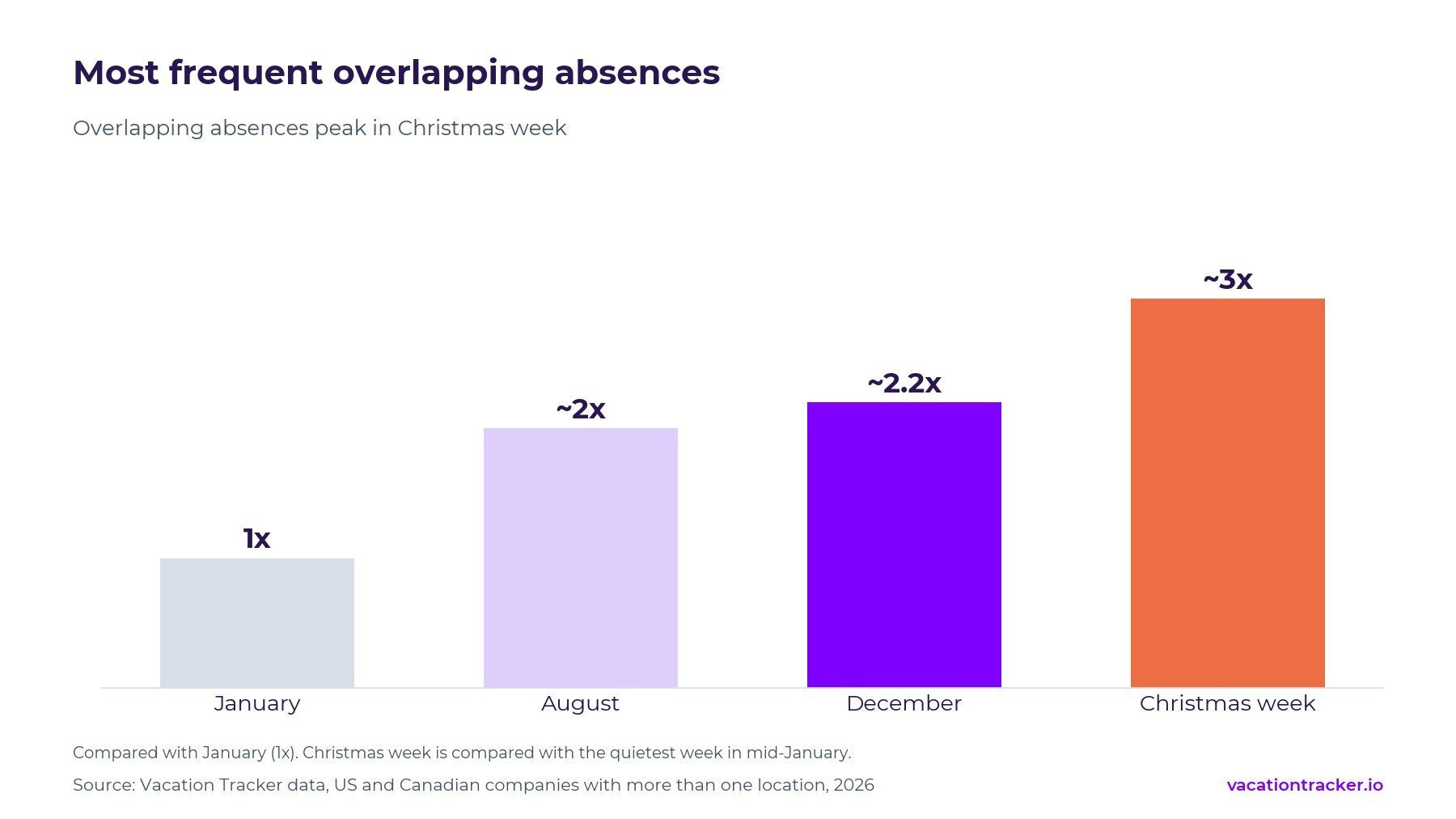
Overlapping absences across locations peak in Christmas week, at about 3x the mid-January low. For overlaps involving three or more locations, Christmas week reaches about 5x.
An overlap is a weekday when employees in two or more locations are off at the same time. Before relying on another office for coverage, check whether its employees have booked the same week.
| Period | What happens to overlapping absences |
|---|---|
| January to February | Overlaps are at their lowest. January is the monthly comparison point. |
| March to July | Overlaps increase through spring and early summer. |
| August | The summer peak: about 2x as many overlaps as in January. |
| September | Overlaps fall from the August peak. |
| October to November | Overlaps increase again, with a spike during Thanksgiving week. |
| December | The highest monthly level: about 2.2x January. Christmas week reaches about 3x the quietest mid-January week. |
After Christmas week, the busiest overlap periods are New Year's week, the week before Christmas, Thanksgiving week, mid-August and July 4 week.
Plan coverage for those weeks before approving vacation requests. Identify the work that must continue, assign backup staff, and agree how many people on each team can take vacation at once. Pair offices with different holiday schedules where that gives you useful coverage.
If you use vacation blackout dates, such as year-end close for finance, communicate them before employees make plans. Review protected leave separately from discretionary vacation requests.
Step 8: Review every location each January
Assign an annual review to the person responsible for each location. Check the holiday calendar, leave policies and approvers, then record any changes employees need to know about. Review legal changes when they take effect, even if that's midyear.
Recent changes show why old calendars need attention. California renamed Cesar Chavez Day to Farmworkers Day in 2026; Colorado renamed it Farm Workers Day. Utah added Good Friday as a legal holiday in 2026. Some state closures in Georgia, Tennessee and Colorado are announced year by year.
For eligible employees in Ontario, unpaid long-term illness leave of up to 27 weeks took effect in June 2025. Alberta extended long-term illness and injury leave to up to 27 weeks a year from January 1, 2026.
Compare the new calendar with the official source before importing it. Check that your company-wide holidays are still included and that employees haven't been left in the wrong location after a move or transfer.
How Vacation Tracker handles leave across locations
Vacation Tracker is leave management software that lets teams request, approve and track time off (PTO) directly in Microsoft Teams, Slack and Google Workspace, with multi-country leave policies, accruals, public holidays and audit-ready reports, with no HRIS required.
You can give each location its own settings, including country and state, time zone, workweek, holiday calendar and leave policies. PTO and sick leave can accrue differently by location, and Location Admins manage only the locations assigned to them.
Public holidays import by state or province. You can review them and add custom holidays to one location or several (how to set regional holidays).
The Complete plan includes unlimited locations, accruals, substitute approvers, blackout periods and maximum-users-away limits. Core covers up to 3 locations. Approved leave can also sync to ADP Workforce Now. See the plan comparison for the full breakdown.
If you already use an HRIS or payroll suite, check its leave module before adding another tool. Our comparison of multi-location leave management tools covers the alternatives.
To test the setup with your own locations, start a free 14-day trial or book a demo.
FAQs about managing leave across multiple locations
How do I manage employee leave across multiple locations?
Group employees by work location and shared leave rules. Configure the holiday calendar, leave types and policies for each group, assign an approver, and use a shared calendar to check coverage before approving requests.
How many holidays differ between offices in different US states?
In our data, offices in different states typically differ by about 4 holidays a year, with most companies between 4 and 6. Most differences come from imported state government calendars. Review those calendars before adopting them as company holidays.
Do two offices in the same state need different holiday calendars?
Usually not. Same-state offices in our data have nearly identical calendars. Their PTO policies can still differ, for example if office and field staff have different benefits or schedules.
How do you treat employees in multiple locations fairly?
Start with a shared company holiday list and explain any local differences. Honor applicable local entitlements, apply the same approval process to comparable requests, and consider floating holidays where employees have different observances. Make the policy available to everyone so differences are understood before people book time off.
Can I have different leave policies for different office locations?
Yes, subject to applicable legal requirements and agreements. Companies in our data typically maintain a set of policies for each location, resulting in about 3x as many policies as similarly sized single-location companies.
Which leave types usually differ by location?
Sick leave, remote/WFH and floating holidays are often configured in only some locations. Vacation or PTO may be available across the company while the allowance, accrual or carryover rules differ by location.
When do absences across locations overlap the most?
Christmas week has about 3x as many overlapping absences as the quietest mid-January week. Other busy periods include New Year's week, the week before Christmas, Thanksgiving week, mid-August and July 4 week.
How do I handle statutory holidays for offices in Ontario, Quebec and BC?
Use a separate calendar for each province. In 2026, Ontario and Quebec differ on 3 statutory holidays, BC and Ontario on 4, and BC and Quebec on 5. These comparisons assume Quebec observes Good Friday; check the dates if you choose Easter Monday instead.
Final thoughts
Managing leave across multiple locations is easier when you can explain every difference between offices. Keep a shared company standard, document local exceptions, and give someone responsibility for each location's calendar and policies.
Start by reviewing the calendars and policies you already use. Then check your coverage for Christmas and the other peak weeks, while you still have time to arrange it.
Further reading:
Sources
Vacation Tracker data. Figures on how companies set up leave (policies, holiday calendars, hand-added holidays, leave types, PTO rules, approval times and overlapping absences) come from anonymized, aggregated Vacation Tracker data for US and Canadian companies with more than one location, 2025 to 2026. Comparisons with single-location companies use companies with 15 to 100 users. Worked examples illustrate the setup decisions and do not describe individual customers.
United States
- US Department of Labor: Holidays; Sick leave; FMLA; paid sick leave for federal contractors
- California: CalHR holidays; Gov. Code §6700; DIR paid sick leave FAQ; DIR vacation FAQ
- Texas: Gov't Code ch. 662
- New York: Department of Civil Service, 2026 legal holidays
- Florida: Fla. Stat. §110.117
- Colorado: DHR 2026 holiday schedule; HB26-1339
- Illinois: CMS state holiday calendar; 5 ILCS 490/15
- Tennessee: State holidays
- Virginia: Code of Virginia §2.2-3300
- Georgia: 2026 State Holidays memo
- Connecticut: Conn. Gen. Stat. §1-4
- Utah: Utah Code §63G-1-301
Canada
- Ontario: ESA guide: public holidays; long-term illness leave
- Quebec: CNESST statutory holidays
- British Columbia: Statutory holidays
- Alberta: General holidays; long-term illness and injury leave
- Saskatchewan: Public holidays
- Federal: Canada Labour Code holidays; medical leave with pay
Last reviewed: October 13, 2026.
Sidenote: This guide explains leave-management practices in the United States and Canada. It is not legal advice. Check the applicable federal, state, provincial and local requirements before changing a policy.

Lav Crnobrnja

The COO and co-founder of Vacation Tracker. He loves sharing his knowledge and passion for startups, business, and AI. When he’s not working, he can often be found experimenting with AI agents and exploring what the latest technology can do.