






Last updated on October 28, 2026
How Do I Cancel My Upcoming Leave Request?
Plans changed? You can cancel a leave you've submitted from any of three places (the Dashboard, Slack, or Microsoft Teams) without going through an Admin. Cancelling returns the days to your balance immediately and notifies your Approver(s).
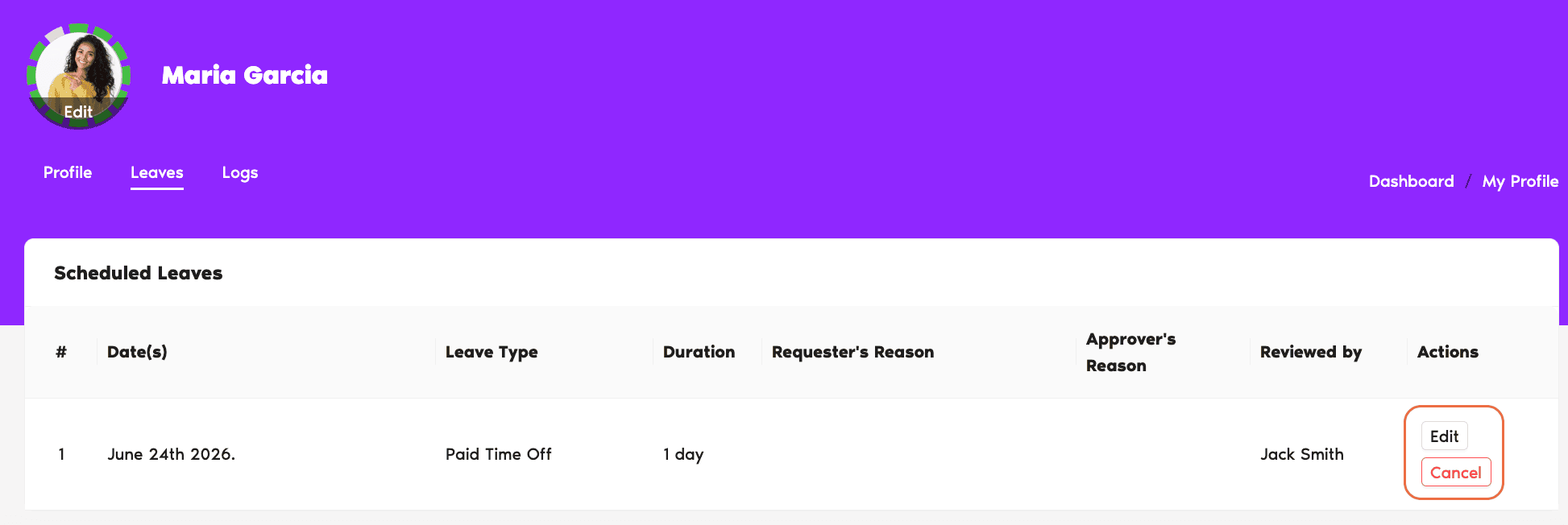
From the Dashboard
- Sign in at app.vacationtracker.io.
- On Home, scroll to Pending Requests (for leaves still awaiting approval) or Scheduled Leaves (for approved upcoming leaves).
- Find the leave you want to cancel.
- Click Cancel Leave on that leave's card.
- Confirm the cancellation in the pop-up.
From Slack
- Type
/vacationanywhere in Slack (channel, DM, or your own DM, it works in any conversation). - From the menu, pick My Status to open your profile view.
- Find the leave you want to cancel in your list of upcoming leaves.
- Click Cancel on that leave.
- Confirm the cancellation.
From Microsoft Teams
- Open the Vacation Tracker bot in Microsoft Teams.
- Click the My Profile tab at the top of the bot.
- Find the leave you want to cancel in your upcoming leaves.
- Click Cancel on that leave.
- Confirm the cancellation.
However you cancel, the days return to your balance immediately, your Approver(s) get a notification, and the leave shows up as Cancelled in your Leaves tab going forward.
Common Questions
Yes. Cancellation returns the days to your balance immediately, refresh your Leave Quotas section and you'll see Remaining tick back up.
Yes. A cancellation notification is sent to whoever approved (or was due to approve) the leave, on whatever channel they use. No action is required from them, it's a heads-up.
It depends on the Leave Policy. If the policy permits past or in-progress cancellation, you'll see the Cancel option for that leave; if it doesn't, the option is hidden. In that case, ask your Admin or Approver to edit or delete the leave from your profile.
Admins and Approvers: You can reach us via live chat Monday to Friday, 9 AM – 5 PM EST, or email us anytime at hello@vacationtracker.io.
 Book a Call