Vacation Tracker and Day Off both manage leave requests, approvals, balances and calendars. Vacation Tracker connects leave to AI tools and manages location-specific policies. The Day Off app adds an optional time tracker.
Vacation Tracker fits companies managing leave across offices in Microsoft Teams, Slack or Google Workspace. Day Off suits small teams and deskless staff. Below, we compare the two on pricing, AI and MCP, Microsoft Teams and Slack, multi-location leave, leave policies, time tracking, integrations, support and security.
Prefer video? Watch the comparison here.

Watch: Vacation Tracker vs. Day Off | Comparing Top HR Tools
Day Off vs Vacation Tracker at a glance (2027)
Monthly prices and features checked on each vendor's site in November 2026. All prices are in US dollars.
| Feature |  Vacation Tracker |
 Day Off |
|---|---|---|
| Best for | Larger teams managing leave across offices, states or countries in Microsoft Teams, Slack or Google Workspace, with AI built in | Small teams and deskless staff, with optional time tracking |
| Works in | Microsoft Teams, Slack, Google Workspace and Outlook | Microsoft Teams and Slack; Google Calendar and Outlook sync |
| Pricing (monthly) | Core: $2; Complete: $4 per user per month, minimum 25 users | Free: $0 for up to 10 users. Pro: $2 per user per month, minimum $20 a month. Pro + Time Tracker: $3 per user per month, minimum $30 a month |
| Minimum | 25 users | Pro: $20 a month; Pro + Time Tracker: $30 a month |
| Free plan or trial | 14-day trial, no credit card | Free for up to 10 users; 14-day trial of Pro, no credit card |
| Time to set up | Under a day, often under 30 minutes | Under a day |
| Key features | MCP and Open API on every plan, Vee, location-specific policies, blackout periods, limits on how many people are off at once, seniority entitlements, unused-leave alerts | Custom leave types, sub teams, optional clock-ins and project tracking |
| AI assistant and MCP | Vee in the dashboard, Microsoft Teams, Slack and mobile. Claude connector, ChatGPT plugin and MCP: request, change, cancel and approve leave, check balances and who's off, manage users, locations and policies | Leo for setup and how-to questions. Claude connector: balances, who's off, availability, calendar and leave requests |
| Open API | Available on every plan, with webhooks | Public API with custom API keys |
| Integrations | Microsoft Teams, Slack, Google Workspace, Outlook, ADP Workforce Now, BambooHR, HiBob, Remote, Deputy, Linear, Google Calendar, Outlook Calendar, iCal, Claude connector, ChatGPT plugin, Zapier (7,000+ apps), Open API and MCP | Microsoft Teams, Slack, Google Calendar, Outlook, Claude connector and public API |
| Multiple locations | Country plus sub-locations (state, province or region), public holidays for 150+ countries, policies, time zone, workweek and Location Admins | Unlimited locations with their own working days and policies; holidays imported from Google Calendar or added manually |
| Approvals | Multi-level and substitute approvals, with approvers per department and sub-department; decisions in chat | Multiple approvers and sub teams; decisions in Microsoft Teams and Slack |
| Accruals, rollover, TOIL | Accruals, rollover, time off in lieu and hourly leave | Accruals, carryover, comp time and hourly balances |
| Time tracking | Dedicated leave management connected to multiple HR and payroll systems | Clock-ins, projects, tasks, clients, reports and attendance review |
| Calendar sync | Google Calendar, Outlook and iCal | Google Calendar and Outlook |
| Apps available | Web, iOS, Android, Microsoft Teams, Slack and Outlook | Web, iOS, Android, Microsoft Teams and Slack |
| Customer support | Live chat, email and monthly Office Hours on every plan; Complete adds setup calls and training, data migration, an SLA and 1-hour priority support | Email, live chat and demo booking |
| Security | SOC 2 Type II certified, GDPR compliant; single sign-on (Microsoft, Google, Slack) and multi-factor authentication | TLS in transit, 256-bit encryption at rest, SSO and two-factor authentication |
| Languages | English, French, Spanish, Portuguese, German, Italian, Polish, Turkish and Swedish | iOS app: English. Website: English, French, Spanish and German |
Who is Day Off for, and who is Vacation Tracker for?
Vacation Tracker is built for companies working in Microsoft Teams, Slack or Google Workspace, especially across states, provinces or countries. Each office gets its own holidays and policies, with leave requests and approvals in chat. MCP and the Open API connect leave to AI tools. It suits larger teams that need highly rated support, an SLA and SOC 2 Type II compliance. More than 3,500 companies and 200,000+ employees in over 100 countries use it.
Day Off suits small teams and employees in retail, hospitality or field services. Its free plan covers up to 10 users. The mobile-first design lets employees manage leave from their phones, and optional time tracking adds clock-ins and project work.
AI, MCP and Open API: connecting leave to your AI tools
Vacation Tracker includes a Claude connector, a ChatGPT plugin, its MCP connector and the Open API on every plan. Together they let Claude, ChatGPT, Copilot, Gemini, Cursor, Codex and other MCP clients work with leave data, and in ChatGPT the plugin also shows the Wallchart and request forms. Employees can request, change or cancel leave, check balances and see who's off. Approvers can approve requests; admins can manage users, locations and policies.
Permissions follow each user's role. The Open API and webhooks connect leave data to your own systems and AI agents. Vee works in the dashboard, Microsoft Teams, Slack and mobile, answering questions about balances and policies and preparing requests.
Day Off's Leo answers setup and how-to questions inside the app. Its Claude connector checks balances, who's off, availability and the calendar, and submits leave requests. Day Off also has a public API with custom keys and an AI employee-handbook generator.
Day Off pricing vs Vacation Tracker pricing: every plan, monthly
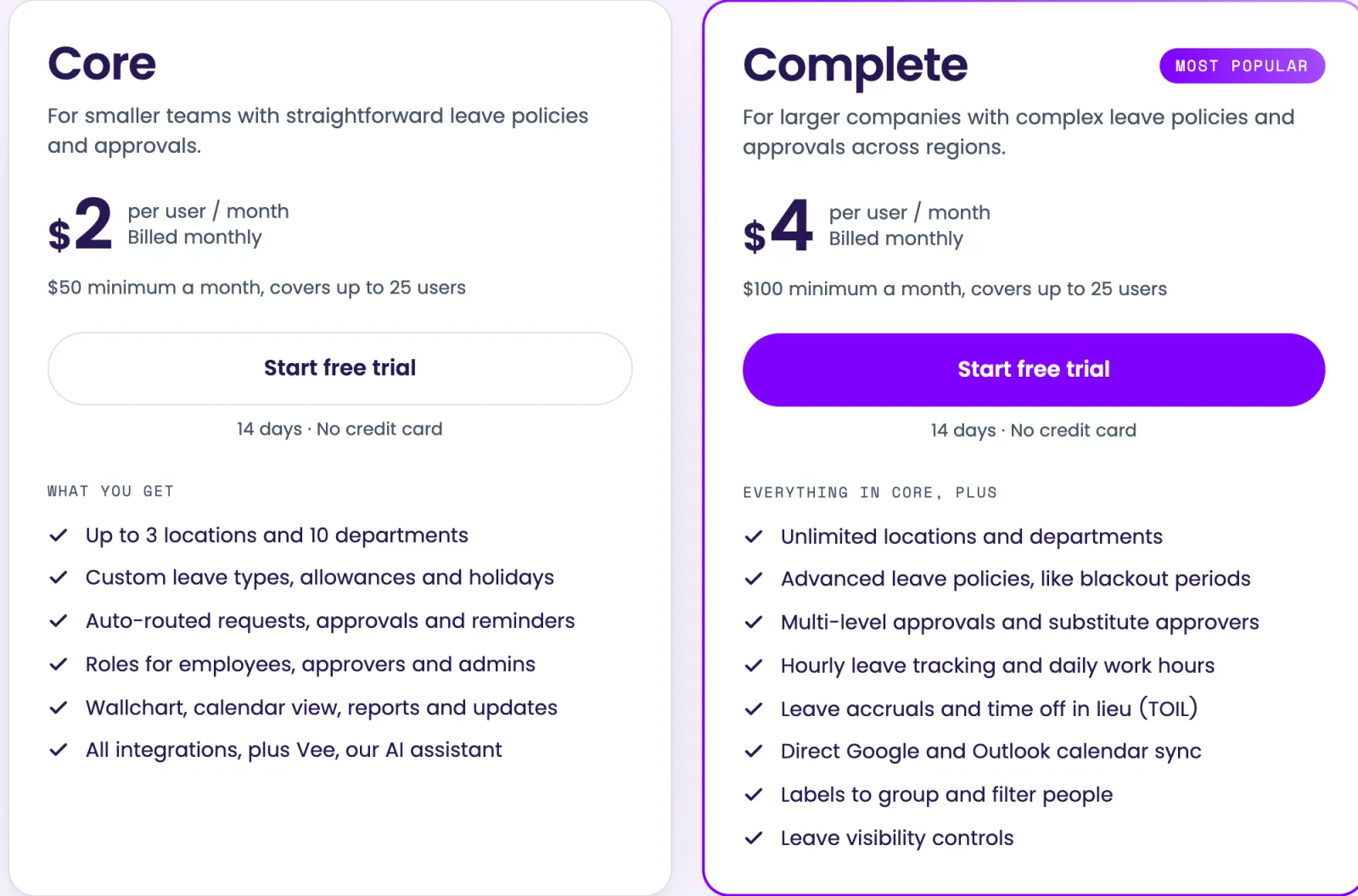
Vacation Tracker pricing has a minimum of 25 users: Core is $2 and Complete is $4 per user per month. The 14-day free trial requires no credit card.
Complete includes advanced policies, accruals, TOIL, multi-level and substitute approvals, and every automation, such as blackout periods, limits on how many people can be off at once and seniority entitlements. It also adds setup calls and training, data migration, an SLA and priority support. MCP and the Open API are included on both plans.
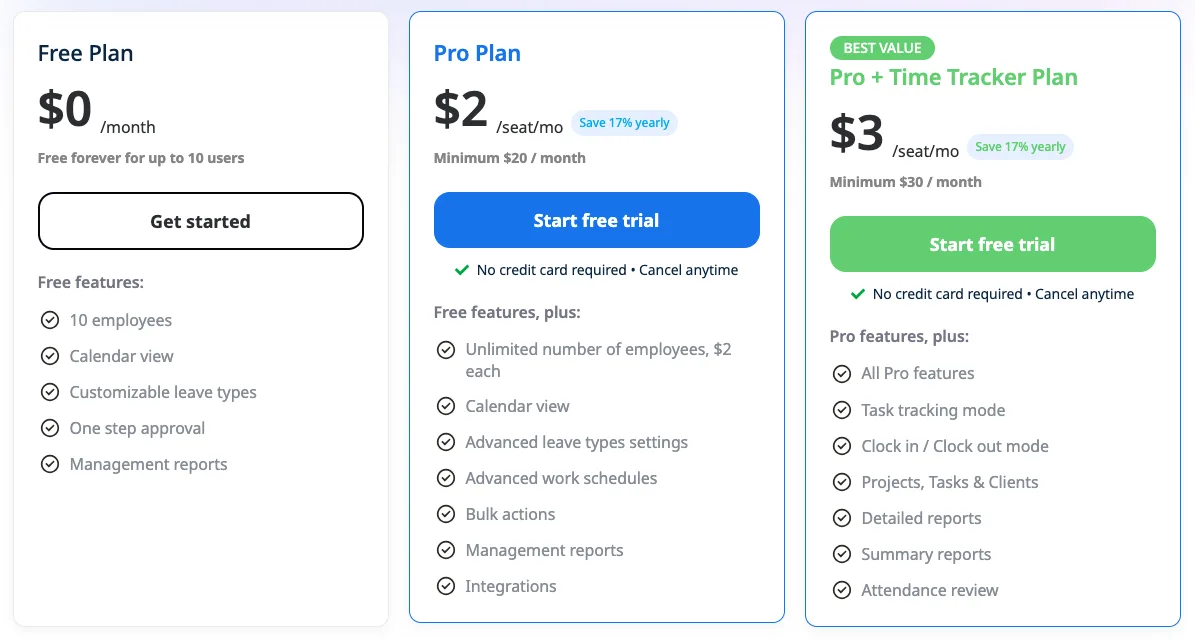
Day Off pricing has three plans:
- Free: $0 for up to 10 users, with calendar views, custom leave types, one-step approval and basic management reports.
- Pro: $2 per user per month, minimum $20 a month. Adds integrations, multiple locations and policies, accruals, carryover, multiple approvers, hourly balances and advanced work schedules.
- Pro + Time Tracker: $3 per user per month, minimum $30 a month. Adds clock-ins, project and task tracking, clients, reports and attendance review.
Day Off offers a 14-day free trial of Pro without a credit card.
Leave across several locations: states, provinces and countries
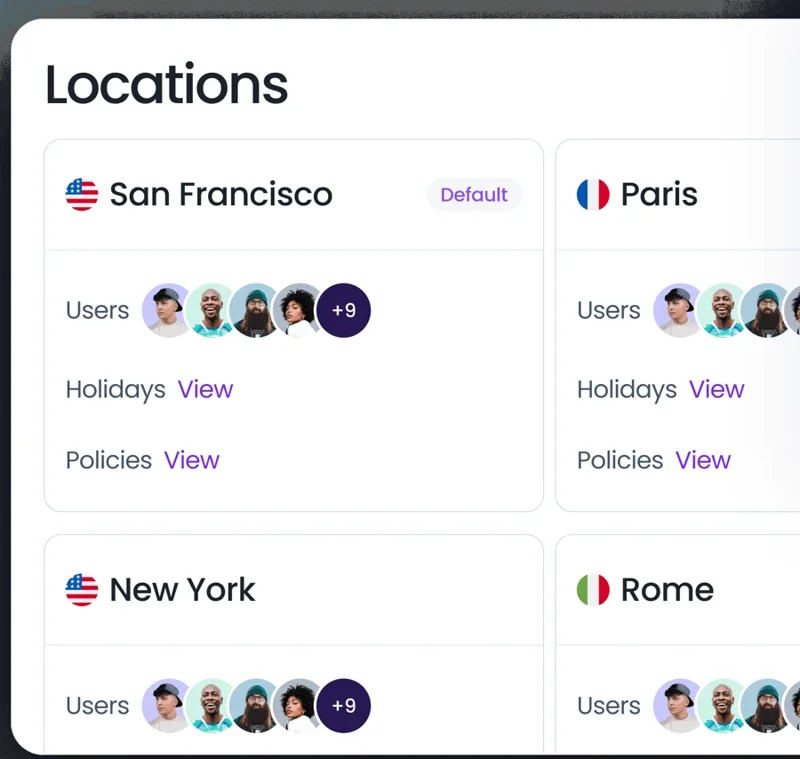
Vacation Tracker assigns each location a country and sub-location, such as a state, province or region. You can import public holidays for 150+ countries and set each location's leave policies, time zone and workweek. Location Admins manage their offices.
Day Off supports unlimited locations, each with its own working days, weekends and leave policies. You import holidays from Google Calendar or add them manually.
Microsoft Teams, Slack and mobile: requesting and approving leave
Vacation Tracker has an AI bot in Slack and Microsoft Teams. Employees can ask it in plain language to request leave, check their balance or look up a leave policy. Microsoft Teams also has tabs, including the Wallchart, and there's an Outlook app too. Daily or weekly who's-out summaries go to a channel, and iOS and Android apps handle leave on mobile.
Day Off supports requests and approvals in Microsoft Teams and Slack on paid subscriptions, with a daily Slack digest. Its iOS and Android apps let employees request leave, check balances and view the team calendar.
Leave policies: accruals, carryover and approvals
Vacation Tracker applies your leave rules automatically, so nobody has to police them by hand:
- Blackout periods: block leave on set dates, such as a year-end close or a product launch, for the whole company or one location or department.
- Maximum users away: cap how many people can be off at once, as a number or a percentage of the team.
- Notice periods: decline requests submitted with less notice than your policy requires, all year or only in peak season.
- Probation periods: hold leave for a set number of days after a new hire's start date.
- Seniority and role entitlements: add days automatically at tenure milestones (for example, 2 extra days after 5 years) or for roles such as managers.
- Leave duration limits: stop requests that run longer than your policy allows.
- Accruals, caps and carryover: accrue leave through the year with a cap, and carry unused days over with an expiry date. Time off in lieu and hourly leave are tracked too.
Requests go to approvers for each department and sub-department, with multi-level and substitute approvals.
Day Off's paid subscriptions cover accruals, carryover, blockout dates, comp time, probation rules and hourly balances. Multiple approvers and sub teams organize approval workflows. Employees can see their balances before submitting a request.
Time tracking: clock-ins, projects and timesheets
Day Off's optional time tracker records clock-ins and clock-outs, tasks, projects and clients. Detailed and summary reports support timesheet and attendance review alongside leave tracking.
Vacation Tracker is dedicated leave management that connects to multiple HR and payroll systems, and to your AI tools through MCP and the Open API.
Integrations
Vacation Tracker's integrations include:
- Microsoft Teams, Slack, Google Workspace and Outlook.
- ADP Workforce Now, BambooHR, HiBob, Remote, Deputy and Linear.
- Google Calendar, Outlook Calendar and iCal.
- Claude connector and ChatGPT plugin.
- Zapier, connecting to 7,000+ apps; Open API with webhooks; MCP.
Day Off connects to:
- Microsoft Teams and Slack for leave requests, approvals and team updates.
- Google Calendar and Outlook for calendar sync.
- Claude through its connector, plus custom systems through its public API.
How do you get started?
Both tools offer 14-day free trials without a credit card. Day Off also has a free plan for up to 10 users.
Vacation Tracker is self-service: most teams are set up in under a day, often under 30 minutes. On Complete, our team runs setup calls and training and handles your data migration.
Support and security
Every Vacation Tracker plan includes live chat, email and monthly Office Hours with a world-class support team, highly rated in reviews on Capterra and G2. Complete adds setup calls and training, data migration, a Service Level Agreement (SLA) and priority support, with a 1-hour response time during business hours.
Vacation Tracker is SOC 2 Type II certified and GDPR compliant. It supports single sign-on with Microsoft, Google or Slack and multi-factor authentication, and is hosted on AWS in North America and Europe.
Day Off provides email and live chat support, plus demo booking. Its security measures include TLS encryption in transit, 256-bit encryption at rest, SSO and two-factor authentication.
What to consider with Vacation Tracker
Vacation Tracker lets you run Claude, ChatGPT or your own AI agents on leave data through MCP and the Open API. Employees handle requests, approvers make decisions, and admins manage policies within their existing permissions.
Locations and sub-locations organize office-specific rules, while requests and approvals stay in chat. You can use Vacation Tracker on its own or alongside HR and payroll systems, with setup calls, training, data migration and an SLA available for larger rollouts.
What to consider with Day Off
Day Off's free plan for up to 10 users makes it worth considering for a small team.
Integrations, multiple locations, accruals and multiple approvers require Pro, with a $20 monthly minimum. Time tracking requires the separate Pro + Time Tracker plan, with a $30 monthly minimum.
Which one should you choose?
Choose Day Off if you're a small team that wants a free plan, or leave tracking with clock-ins.
Choose Vacation Tracker if you have offices across states, provinces or countries and work in Microsoft Teams, Slack or Google Workspace. Its location-specific policies, AI connections and HR and payroll integrations are built for that setup. It also suits larger teams that need world-class support, an SLA and SOC 2 Type II compliance.
Planning a move? Follow our guide to switching leave tracking systems.
Connect leave to your team's tools.
Manage office-specific policies in Microsoft Teams, Slack or Google Workspace, with MCP, the Open API and Vee.