Last updated on October 8, 2026
Vacation Tracker vs Cocoon: Which Leave Management Tool Fits Your Team?
I'm breaking down how Vacation Tracker and Cocoon actually compare in 2026. This is an honest look at both platforms—their strengths, weaknesses, pricing, and who they're really built for. (I work for Vacation Tracker, but I'll stick to the facts so you can make the right call for your team.)
Watch the full breakdown here:
Who Vacation Tracker Is Built For
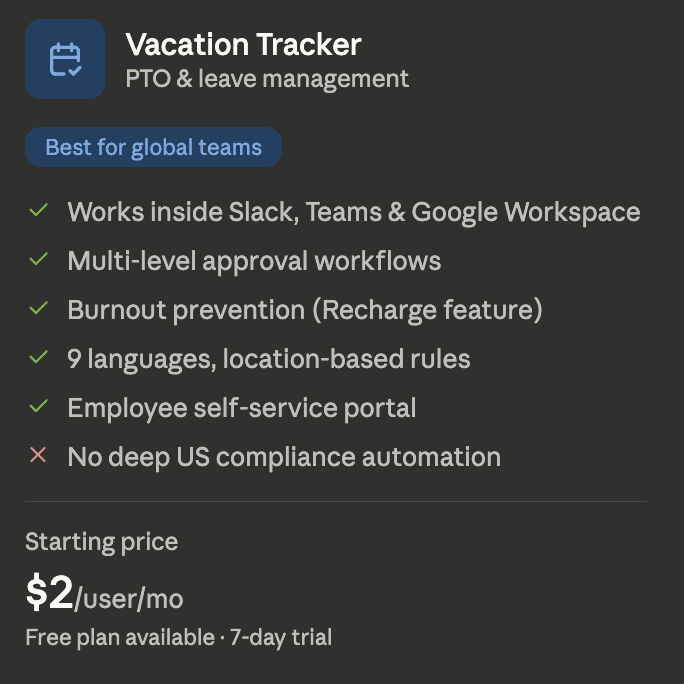
Vacation Tracker is used by over 3,500 companies. It works for teams of all sizes, but it's especially strong for distributed or global teams that need consistent leave management across multiple locations, time zones, or regional policies. (If you're in one location, it still works well.)
One of the biggest advantages: it lives inside the tools you already use. Whether your team works in Slack, Microsoft Office, or Google Workspace, employees can request time off and check their balances without ever leaving the app.
Who Cocoon Is Built For
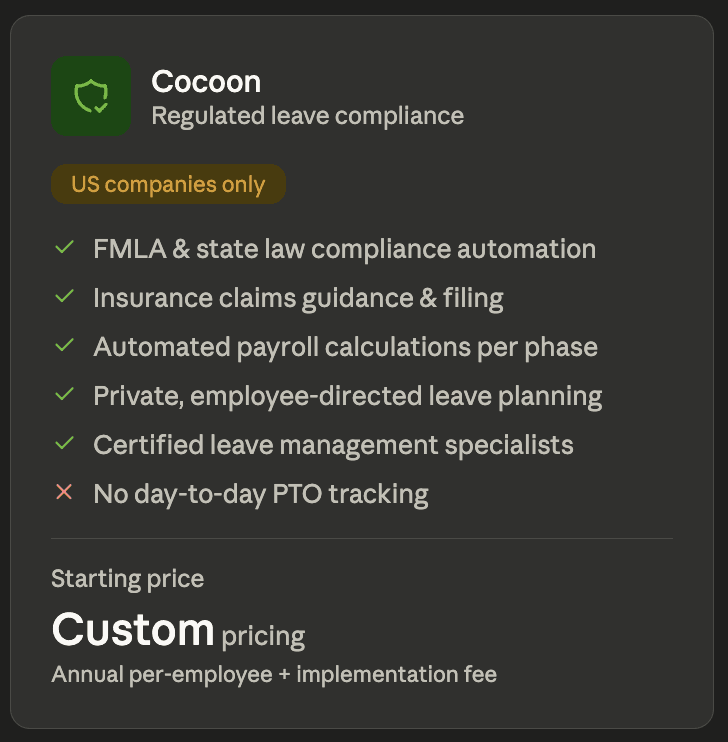
Cocoon is made for US-based companies—specifically for people ops, HR, and payroll teams dealing with the complexity of regulated leave. This includes parental leave, medical leave, caregiver leave, and FMLA compliance.
This is not a simple PTO tracker. Cocoon is designed for organizations where leave involves filing insurance claims, navigating state-by-state laws, and calculating pay across multiple sources. If your company has a dedicated people team and employees taking extended protected leave, Cocoon is built for that exact situation.
What Makes Vacation Tracker Strong
Vacation Tracker is focused on PTO and leave management, and that focus shows in the depth of what it can do. The platform has expanded well beyond basic leave tracking.
Burnout prevention: The new Recharge feature helps managers spot when employees have been working too much and might need time off. It's one of the few PTO tools that actually connects the dots between not taking enough time off and suggesting time off for people at risk.
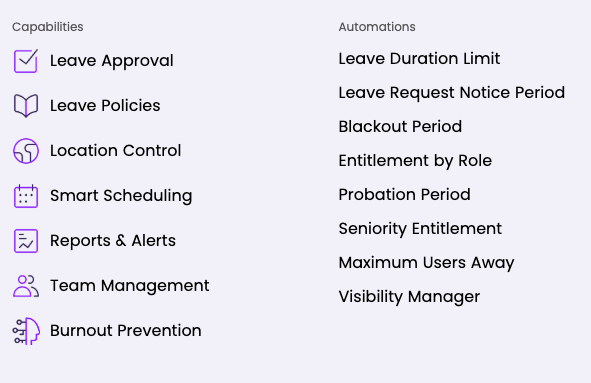
Multi-level approval workflows: If multiple people need to approve an employee's time off, the platform can do that. (A lot of leave tracking software can't.) You can also automate certain leave types or set substitute approvers if somebody's going to be out.
Built for global teams: Vacation Tracker supports nine languages and lets you configure unique leave rules, public holidays, work week or workday hours for each location. If you have teams across different countries or just different states, this level of location-based control is helpful.
Employee self-service: Employees can check their own leave balances, request history, and approval status without talking to HR. For smaller companies where you don't have a dedicated HR person, not having somebody come up to you multiple times per day asking about a leave request is extremely helpful.
What Makes Cocoon Strong
Users of Cocoon say it gives their employees a certain level of trust and ownership over their leave at a moment that really matters. Their marketing highlights that an employee can privately plan a compliant leave in under 10 minutes without involving HR until they're ready.
Automated compliance: Cocoon automatically cross-references FMLA and state laws against your company's policies to calculate employee eligibility and send required designation notices. This dramatically reduces legal risk for US companies.
Claims guidance: Cocoon automatically surfaces state and insurance benefits for each employee and walks them through filing step by step. This is something most leave tools simply never do.
Automated payroll calculations: Cocoon helps calculate leave pay across each phase—employer pay, state pay, and insurance—while giving admins full visibility. On average, customers recoup $12,515 per leave in benefits payments they would have otherwise missed.
Employee experience: The employee-facing dashboard shows pay trackers, upcoming payments, and return to work guidance. It's built to be private and self-directed, which employees consistently appreciate.
Where Vacation Tracker Falls Short
The biggest weakness: it's only built for PTO and leave management. There's no document storage or hiring workflow, and it won't do all the things a bigger HR platform would normally do. It does integrate with payroll tools, but if your team leave needs go deeper into legal compliance, you'll need a dedicated solution alongside it (for now).
Where Cocoon Falls Short
Cocoon's biggest limitation is its scope. It's specifically designed for complex US regulated leaves, not day-to-day PTO tracking. If your team needs to manage standard vacation days, sick time, or personal leave across an entire workforce, Cocoon is not the right tool for that.
It's also priced at the enterprise end of the market with no public pricing available or free trial. And since it's US only, if you have a global team, you'll need another platform to help out as well.
How Pricing Compares
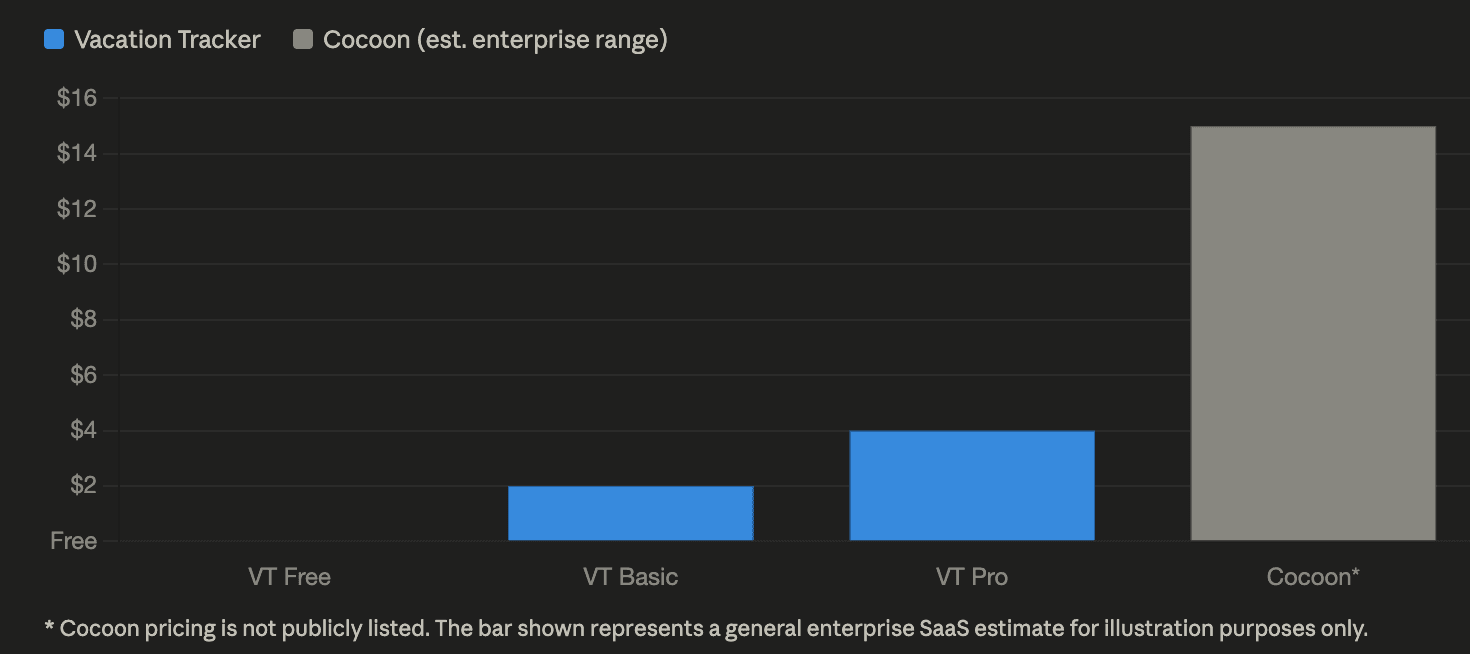
Vacation Tracker starts at $2 per user per month and can scale to $4 per user per month, depending on the complexity of the leave you're trying to manage. There's also a free plan you can use forever if you only need basic leave management, plus a 7-day free trial for any paid plan.
Cocoon doesn't have publicly listed pricing. It uses an annual per-employee fee plus a one-time implementation fee. If you want an estimate for your company, you'll need to go through a sales process.
Setup Process Differences
Vacation Tracker's implementation is simple—you can be set up in under a day. The bulk of the setup is importing your users and setting up your rules.
Cocoon requires a formal implementation process configuring compliance rules, payroll integrations, and policy structures that just take more time. (It makes sense for the complexity of what they're doing.)
Feature Comparison
This is where they diverge. Vacation Tracker covers everything in the PTO world: unlimited custom leave types, multi-level approvals, burnout prevention, and data and reporting.
Cocoon is focused on regulated leave compliance. The features there are FMLA eligibility, claims filing, payroll calculations, designation notices, and employee pay tracking across states and insurance sources. The platforms are solving different issues.
Integrations and Apps
Vacation Tracker connects natively to Slack, Microsoft Teams, Google Workspace, ADP, and Zapier. It also has iOS and Android apps.
Cocoon can integrate into other HRIS platforms but has no native collaboration tool. Employees access it through an online dashboard. It's web-only (no mobile apps).
Support and Security
Cocoon has a certified leave management specialist that works with customers—meaningful for companies navigating regulated leave. Vacation Tracker offers live chat, email support, and guided onboarding if you choose to use it.
For security, Vacation Tracker is SOC 2 Type 2 certified and GDPR compliant. Cocoon uses data encryption to keep information safe.
The Final Verdict
There's no best tool because everybody's situation is different. If your company needs flexible, easy-to-manage PTO software, Vacation Tracker is a great option. If your company is US-based, has a dedicated people ops team, and regularly deals with parental leave, FMLA, or medical leave, Cocoon is exactly built for that situation.
Since they're targeting two different problems, you might actually have both issues. It might be worth testing both to see if they work for your company—Vacation Tracker for day-to-day PTO and a tool like Cocoon for more complicated regulated leave in the US.

Nicholas Lydon
Nick is the Content Marketing Manager at Vacation Tracker, where he turns leave management, HR headaches, and the occasional oddly specific PTO question into content people can watch. He spends most of his time creating videos, articles, campaigns, and creative experiments that make HR a little less boring.


Pricing & Free Trial
Starts at $2 per user/month (Core) up to $4 per user/month (Complete). Includes a 14-day free trial and setup call.
Cocoon does not publish pricing. It uses an annual per-employee fee plus a one-time implementation fee, requiring a sales process for an estimate. No free trial is available.
Primary Use Case
Vacation Tracker is a focused PTO and leave management tool built for teams of all sizes, including distributed and global teams needing flexible policy customization.
Cocoon is a US-only platform built specifically for complex regulated leave—parental leave, medical leave, caregiver leave, and FMLA compliance.
Day-to-Day PTO Tracking
- Unlimited custom leave types
- Multi-level approval workflows
- Employee self-service for balances and request history
Cocoon is not designed for day-to-day PTO tracking. It focuses exclusively on complex regulated leave and is not the right tool for managing standard vacation or sick time.
Regulated Leave & FMLA Compliance
Vacation Tracker handles PTO and leave management but currently does not provide automated FMLA compliance, designation notices, or regulated leave eligibility calculations.
- Automatically cross-references FMLA and state laws against company policies
- Calculates employee eligibility
- Sends required designation notices automatically
Global & Multi-Location Support
- Supports nine languages
- Configurable leave rules, public holidays, and work hours per location
- Works across different countries and states
Cocoon is US-only. Teams with global employees will need a separate platform to manage leave outside the United States.
Native Collaboration Tool Integrations
- Native integrations with Slack, Microsoft Teams, and Google Workspace
- Employees can request time off without leaving their existing tools
- Also connects with ADP and Zapier
Cocoon has no native integration with collaboration tools like Slack or Microsoft Teams. Employees access it through an online web dashboard only.
Mobile Apps
Vacation Tracker offers both iOS and Android mobile apps.
Cocoon is web-only with no mobile apps available.
Setup & Implementation Speed
Vacation Tracker can be fully set up in under a day. The main steps are importing users and configuring leave rules.
Cocoon requires a formal implementation process to configure compliance rules, payroll integrations, and policy structures, which takes significantly more time.