Last updated on October 8, 2026
Vacation Tracker vs Google Sheets: When a Spreadsheet Stops Working for PTO Tracking
I'm comparing Vacation Tracker and Google Sheets for managing employee leave. This comparison is a bit different because Google Sheets isn't actually a PTO tool (it's just a spreadsheet), but it's still one of the most common ways small teams track time off.
The real question is: when does a spreadsheet work well enough, and when does it start creating more problems than it solves?
Watch the full breakdown here:
Who Vacation Tracker is Built For
Vacation Tracker works for any size team, but it really shines for teams where the HR person is busy and tired of people constantly asking about leave balances. You know the drill: "How much time do I have left?" "Can I take this day off?" "What's my balance?"
We purpose-built this to work in Slack, Microsoft Teams, Google Workspace, or our mobile app. This means it lives where your team already works, so nobody has to change their workflow or learn a new platform.
Who Google Sheets is Built For
Google Sheets is built for anybody who wants a spreadsheet. It's a general-purpose tool. There are plenty of people who've made custom PTO spreadsheets they sell, and there are tutorials online showing you how to build your own.
For small teams, tracking PTO with a Google sheet makes sense. It's free, it's familiar, and it doesn't require buying a whole new product. But as your team grows and policies get more complicated, it becomes a real headache.
Vacation Tracker's Biggest Strengths
Vacation Tracker is focused on PTO and nothing else. It's not a general HR platform trying to do everything. We're not adding time tracking or other HR functions. We built this specifically to handle leave management and integrate with payroll software like ADP through our open API.
The setup process can be fully self-service (there's a free version), but if you want extra help with onboarding, we have a dedicated team that'll help you for free.
Another big positive: there's a full list of PTO policies built in. Every special case your company could have is already there. And if it isn't, you can create it with a custom leave policy or request it. We're constantly making updates and adding new features. This means Vacation Tracker adapts to your policies, not the other way around.
Why Google Sheets is Still Useful
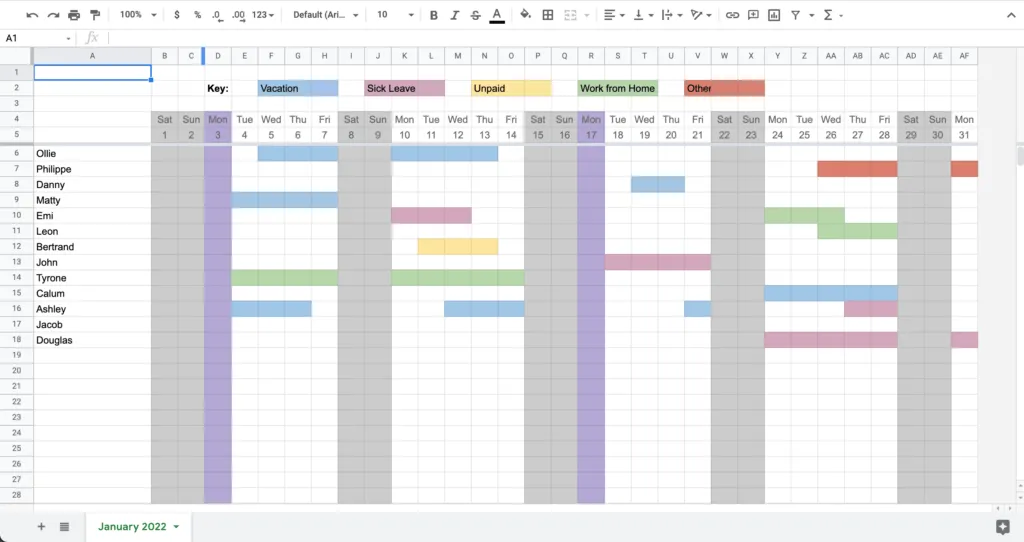
Google Sheets has real advantages. It's zero cost and there are no pricing tiers. For a bootstrapped founder or small business, it makes sense to do it yourself.
There's also universal familiarity. Almost everyone knows how to create a spreadsheet. If you don't, there are tutorials online. You're probably already using spreadsheets for other functions, so it's natural to think PTO tracking can happen the same way.
The Hidden Complexity of PTO Tracking
What they don't tell you is that there's constant upkeep on the back end. There are a million policies you could have for vacation tracking: accruals, seniority-based entitlements, probation periods, blackout periods, maximum users away at once.
It all becomes very confusing very quickly. That's why Vacation Tracker becomes a better option for most teams once they grow past the basics.
Direct Pricing Comparison
Google Sheets is free (except for the time you put into it). Vacation Tracker has a free version, but if you want to unlock more capabilities, you'll need a paid plan at either $2 per user per month or $4 per user per month.
That said, Google Sheets does have a price. It's just not visible. Somebody has to build it. Somebody has to maintain it. And there's a constant flow of people coming in asking about leave, balances, and approvals. Vacation Tracker has a free trial where you can test the paid programs before you commit.
The length of time to implement a Google sheet is basically how fast you are at building it. Vacation Tracker is usually up in less than a day depending on your team size. All you have to do is invite your users and set up your policies.
Where Vacation Tracker's Features Stand Out
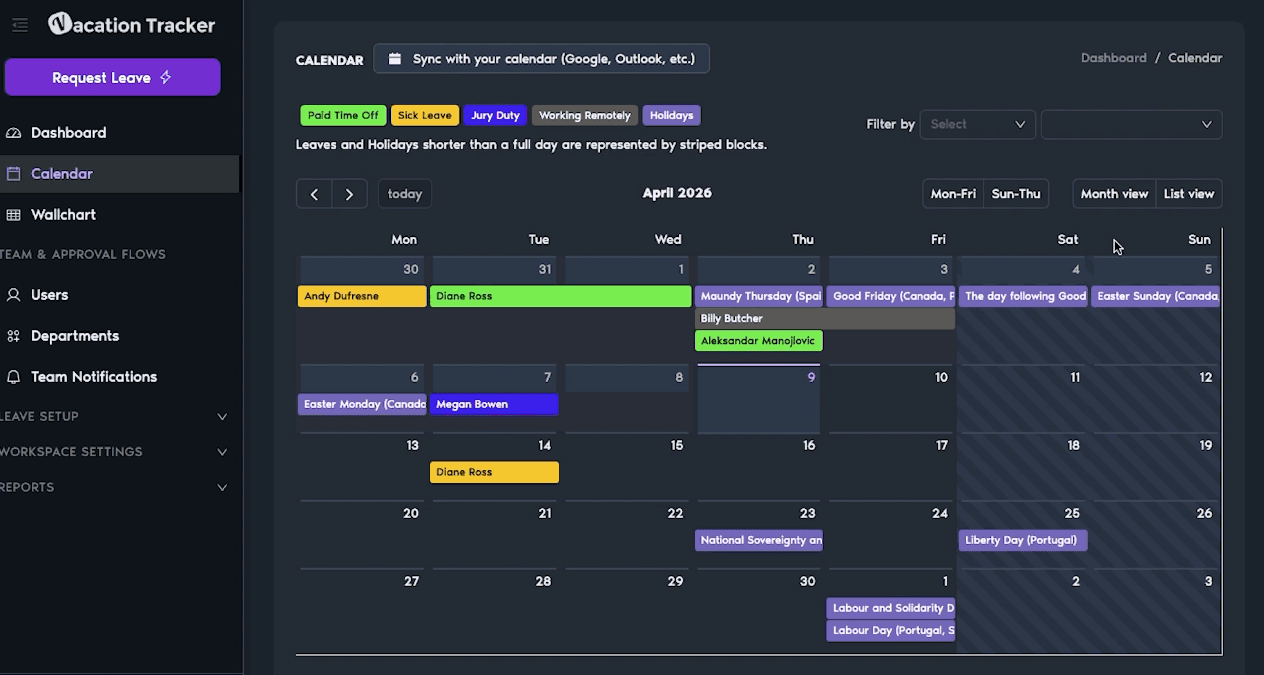
This is where the gap is widest. Google Sheets has no approval workflow, no automated approvals, no balance tracking or notifications, and no policy enforcement. Vacation Tracker automates all of that.
Automated Policy Enforcement Explained
Whether it's probation periods, blackout periods, seniority-based entitlement rules, or maximum users away at once, it all has to be manually tracked in a spreadsheet. In Vacation Tracker, it's automatic.
For integrations, Vacation Tracker works in Microsoft Teams, Slack, Google Workspace, a mobile app, or just a regular internet browser. This means employees can request time off where they're already working, and it won't pull you out of your workflow.
It also integrates with ADP, Zapier, and has an open API, so you can integrate it with basically anything. Google Sheets doesn't really do this. It can integrate with Google products somewhat, but you're not getting the full-scale integration you get with Vacation Tracker.
It's tough to get help via Google support, but with Vacation Tracker, we have live chat, email, and a general onboarding call if you want help setting up.
Security: Vacation Tracker is SOC 2 Type 2 certified and GDPR compliant. Google Sheets security depends on how your organization manages file sharing and permissions.
When Teams Outgrow Spreadsheets
There's no one-size-fits-all approach to tracking leave. If your team is under 10 people, has one location, and not a lot of complexity in your leave policies, Google Sheets can work perfectly fine.
But once you start growing (multiple locations, more users, or you just get overwhelmed by people asking you every day about their balances), it becomes a headache.
Why Vacation Tracker Exists
That's what Vacation Tracker is purpose-built for. It's simple to set up, and most teams are live in under a day. Because it lives inside Slack, Google Workspace, or Microsoft Teams, your team doesn't have to get distracted or change anything about how they work.
Why It's Worth Testing Both Options
Both options have free entry points. If you're reading this, you're probably already used to a Google sheet. So there's no reason not to test out Vacation Tracker just to see how it compares.

Nicholas Lydon
Nick is the Content Marketing Manager at Vacation Tracker, where he turns leave management, HR headaches, and the occasional oddly specific PTO question into content people can watch. He spends most of his time creating videos, articles, campaigns, and creative experiments that make HR a little less boring.

Starting Price
Starts at $2/user/month and scales up to $4/user/month for advanced features. Includes a 7-day free trial.
Free
Free plan or free trial
Vacation Tracker's free plan supports unlimited users with features included.
Google sheets is free for all users
Time to implement
< 1 day
Depends on your spreadsheet creation ability
Advanced Leave Policies
- TOIL (Time Off in Lieu)
- Seniority-based leave
- Probation periods
- Blackout dates
- Accrual caps and department-level rules
Not present
Platform Integrations
- Slack, Microsoft Teams, Google Workspace
- ADP and Zapier
- Open API available
- Mobile app
Basic integrations with google products and platform
OpenAPI available
Yes
Yes, Google Sheets has a comprehensive RESTful API that allows you to programmatically read, write, and manage spreadsheet data.
Customer support
- Email support
- Live chat
- Guided onboarding process available on request
Yes, but only for paying Google Workspace users
Security & Compliance
SOC 2 Type 2 certified and GDPR compliant.
Depends on company and spreadsheet permission settings