Last updated on October 8, 2026
Vacation Tracker vs. Leave Dates: Which Leave Management Tool Fits Your Team?
I've spent time comparing Vacation Tracker and Leave Dates to help you figure out which leave tracking tool actually makes sense for your team. Here's what I found.
Watch this full comparison above to see both platforms in action.
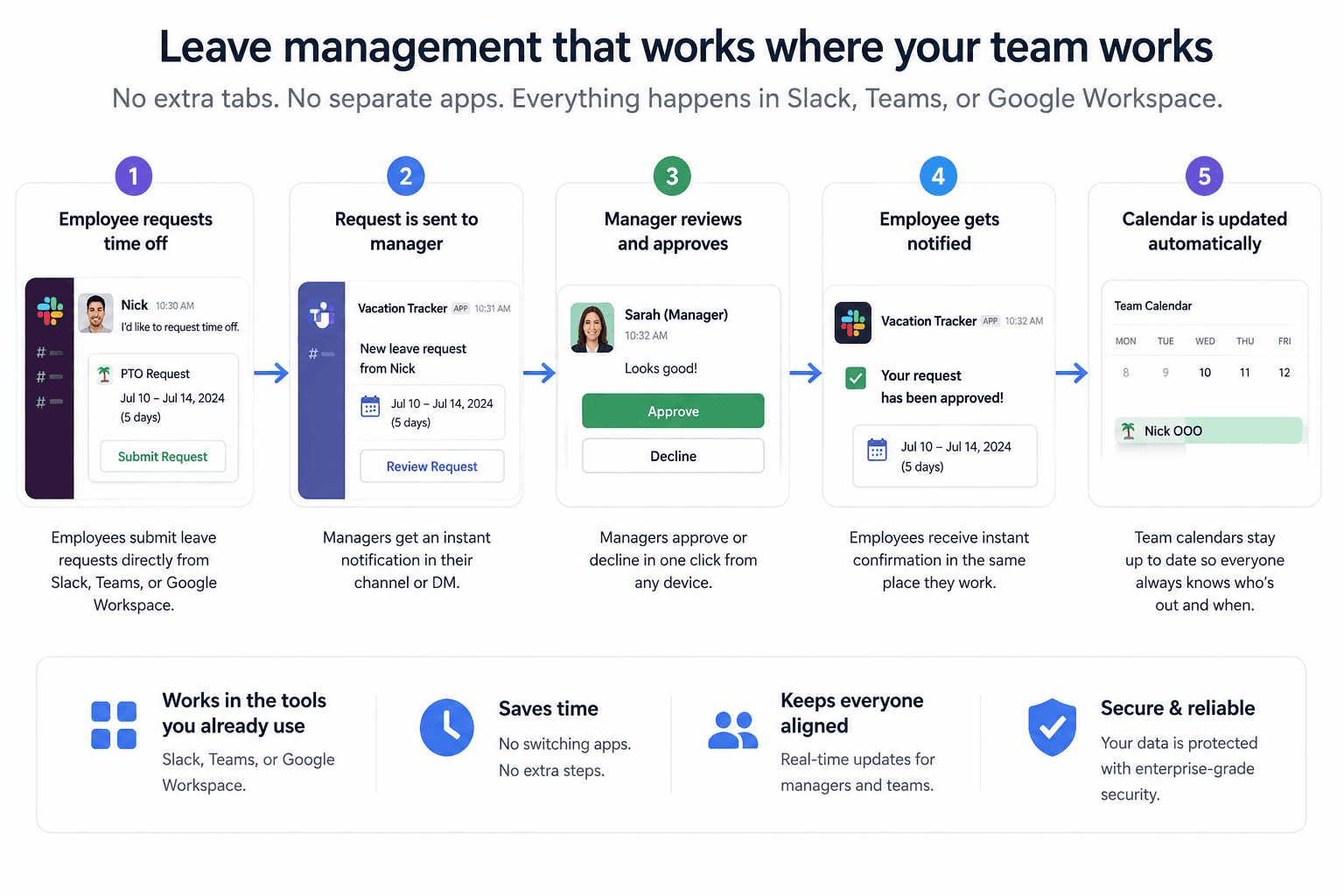
Vacation Tracker is built for teams that live inside Slack, Teams, or Google Workspace
I'll be upfront—I work for Vacation Tracker, so take that for what it's worth. But here are the facts: Vacation Tracker fits any size team that wants leave management baked into the platforms they already use every day.
The tool can integrate directly into Slack, Microsoft Teams, and Google Workspace. Your team doesn't have to open another tab or download another app just to request time off. Everything happens where they already work, in our mobile app, or on the web!
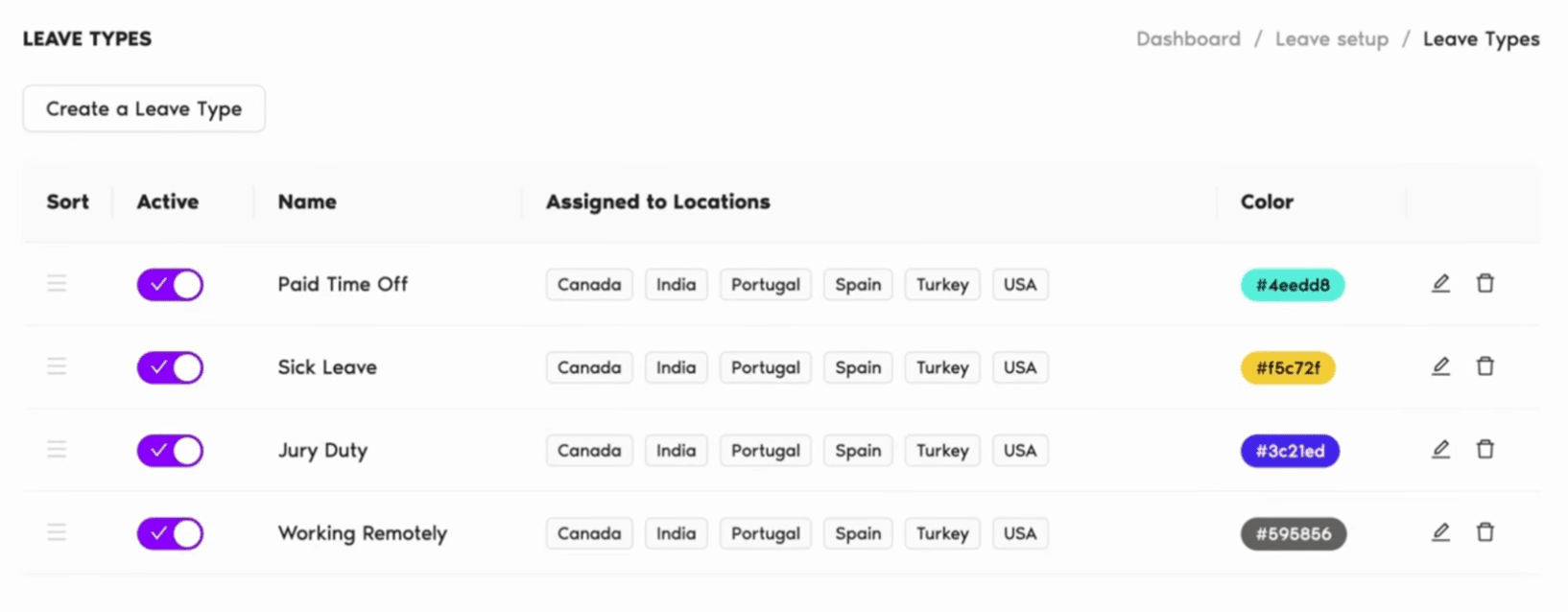
It also handles complex policy setups. If you've got different leave rules across departments, locations, or seniority levels, Vacation Tracker can manage that. Think accruals, probation periods, blackout dates, and seniority-based entitlements.
Leave Dates targets small to mid-size UK and EU teams who want simplicity
Leave Dates is a web-first tool with a mobile app. There's nothing to install and no integrations to configure. If your team operates mostly out of email or a browser, this might be your fit.
It's especially popular in the UK, where annual leave tracking and statutory holidays matter. The platform handles UK statutory holidays automatically, which saves time for teams in that region.
The interface is clean. Employees request time off by clicking and dragging over a calendar. Managers get notified instantly and can approve from any device.
Vacation Tracker's strengths: integrations and policy flexibility
Both tools prioritize simplicity over trying to be a full HR platform. But Vacation Tracker goes deeper on customization.
You can set up accruals, seniority-based leave entitlements, probation periods, and blackout dates. This makes it a good option for companies that have outgrown basic leave trackers.
The integrations are the real differentiator. Vacation Tracker connects natively to Slack, Microsoft Teams, and Google Workspace. It also syncs with payroll software like ADP and connects via Zapier. Plus, there's a mobile app for iOS and Android.
Leave Dates' strengths: price and ease of use
Leave Dates starts at just over $1 per user per month. That's one of the lowest prices on the market for leave tracking software.
The interface is genuinely clean. The drag-and-drop calendar makes requesting time off feel natural. Managers can approve requests from their phone, tablet, or desktop.
It also offers a 30-day free trial with no credit card required, which gives you plenty of time to test it out.
Vacation Tracker's weaknesses: cost and scope

If you need more than Vacation Tracker's free version, paid plans start at $2 per user per month and go up to $4 per user per month. That's more expensive than Leave Dates.
Vacation Tracker also isn't a full HR platform. If you're looking for a tool that handles recruiting, onboarding, or performance reviews alongside leave management, this won't cut it.
Leave Dates' weaknesses: no integrations and limited customization
Leave Dates doesn't integrate with Slack, Microsoft Teams, or Google Workspace. If your team works in those platforms, they'll have to log into Leave Dates separately on the web or mobile app. That adds friction.
The policy customization is also more basic. You can set up custom leave types, approval workflows, and carryover, but it's less configurable for complex organizational structures. If you've got multiple locations or departments with different rules, you might hit some limits.
Pricing: Leave Dates is cheaper, Vacation Tracker offers a free plan
Leave Dates starts at just over $1 per user per month. Vacation Tracker has a free plan, but paid plans range from $2 to $4 per user per month.
Both offer free trials. Vacation Tracker's is 7 days. Leave Dates gives you 30 days.
Integrations: Vacation Tracker wins by a mile
Vacation Tracker integrates natively with Slack, Microsoft Teams, and Google Workspace. It also connects to payroll software like ADP and works with Zapier.
Leave Dates doesn't offer any of those integrations. It does connect via calendar link to Google Calendar and Outlook, but that's it.
Policy customization: Vacation Tracker handles complexity better
Vacation Tracker supports advanced rules like accruals, seniority-based entitlements, probation periods, and blackout dates.
Leave Dates covers the essentials—custom leave types, approval workflows, and carryover—but it's less flexible for complex setups.
Setup time and mobile: both are fast and mobile-friendly
Both platforms can be set up in under an hour for small teams. Vacation Tracker lets you bulk upload employees, so you don't have to type them in manually.
Both offer iOS and Android apps with similar mobile experiences.
Support: both offer email and chat, plus helpful resources
Both platforms provide email and chat support. Vacation Tracker offers guided onboarding if you want it. Leave Dates has a solid help center with support documentation.
Security: Vacation Tracker is SOC 2 certified, Leave Dates hosts data in the EU
Vacation Tracker is SOC 2 Type 2 certified and GDPR compliant. Leave Dates is also GDPR compliant and hosts all data in the EU, which matters for UK and European teams.
Who should choose Vacation Tracker?
If your team already works in Slack, Microsoft Teams, or Google Workspace, Vacation Tracker makes sense. It's also the better fit if you need complex leave policies or expect to scale up.
Who should choose Leave Dates?
If you're a small to mid-size team in the UK or EU and you want an affordable, no-fuss tool that doesn't require integrations, Leave Dates is worth testing.
Both offer free trials, so you can try them out without risking anything but your time.

Nicholas Lydon

Nick is the Content Marketing Manager at Vacation Tracker, where he turns leave management, HR headaches, and the occasional oddly specific PTO question into content people can watch. He spends most of his time creating videos, articles, campaigns, and creative experiments that make HR a little less boring.


Pricing
Starts at $2 per user/month (Core) up to $4 per user/month (Complete). Includes a 14-day free trial and setup call.
Starts at just over $1 per user/month, one of the lowest prices available for leave tracking software.
Free Plan
Vacation Tracker no longer offers a free plan. A 14-day free trial and free setup call are available.
Leave Dates does not offer a free plan, but provides a 30-day free trial with no credit card required.
Platform Integrations
- Integrates natively with Slack, Microsoft Teams, and Google Workspace
- Also connects to payroll software like ADP and supports Zapier
No native integrations with Slack, Teams, or Google Workspace. Only supports calendar links to Google Calendar and Outlook.
Policy Customization
- Supports accruals, seniority-based entitlements, probation periods, and blackout dates
- Suitable for multi-location or multi-department organizations with different rules
- Covers essentials: custom leave types, approval workflows, and carryover
- Less flexible for complex organizational structures
Free Trial Length
Offers a 7-day free trial.
Offers a generous 30-day free trial with no credit card required.
Mobile App
Provides iOS and Android mobile apps for employees and managers.
Also offers iOS and Android apps with a similar mobile experience.
Security & Compliance
- SOC 2 Type 2 certified
- GDPR compliant
- GDPR compliant
- Hosts all data in the EU, which is beneficial for UK and European teams
UK Statutory Holiday Handling
No specific mention of automatic UK statutory holiday handling.
Automatically handles UK statutory holidays, saving time for teams based in the UK or EU.