Last updated on May 12, 2026
Vacation Tracker vs. Absentify: Which PTO Tool Actually Fits Your Team
I'm breaking down how Vacation Tracker and Absentify stack up against each other. Full disclosure: I work at Vacation Tracker, so take that for what it's worth. But I'll be straight with you about where each tool excels and where it falls short.
Watch the full comparison below to see both platforms in action.
Who Vacation Tracker Is Built For
Vacation Tracker works for teams of any size, but it really shines for remote companies or organizations with complicated leave structures. If you have different leave types based on location, seniority rules, or multiple departments with their own policies, this is where the platform does its best work.
The core idea is simple: your team shouldn't need another login. Vacation Tracker lives inside Slack, Microsoft Teams, or Google Workspace. Employees request time off in the same place they're already working, and managers approve it there too.
Who Absentify Is Built For
If your company runs on Microsoft 365, Absentify is designed specifically for you. It plugs directly into Outlook without requiring separate software or additional logins.
They claim over 30,000 companies use their platform, and while it works for small teams and large enterprises alike, the real advantage shows up when you're already deep in the Microsoft ecosystem. The tool can pull existing data from Microsoft, which speeds up the setup process considerably.
Where Vacation Tracker Excels
Both platforms keep things simple by focusing only on PTO tracking instead of trying to become bloated HR platforms. But Vacation Tracker has some specific strengths worth noting.
The setup process is 100% self-service, though support is available if you want help (and you can schedule an onboarding call if needed). What really sets it apart is the range of PTO policies it supports. Over the years, we've built in support for basically every leave policy variation you can think of: blackout dates, accrual caps, probation rules, seniority-based entitlement. If your company has a weird edge case, there's a good chance we've already solved for it.
The integration piece matters too. Since Vacation Tracker works in Slack, Teams, and Google Workspace, your employees can request time off without switching contexts. They're already in these tools all day anyway.
Where Absentify Excels
Users consistently praise Absentify for how fast the setup moves. Their marketing leans into this heavily, and it makes sense: if you're already on Microsoft, your information is sitting there ready to use. Once you connect Absentify, it pulls that data and gets you running quickly.
The automatic out-of-office messaging is a standout feature. Once employees set their leave, Absentify automatically configures their out-of-office reply. This is the kind of automation most tools skip, and it saves people from forgetting to set it manually.
Their free plan deserves mention too. Absentify offers a genuine free tier with substantial features and unlimited users. You can test it thoroughly before deciding whether to upgrade for additional capabilities.
Where Vacation Tracker Falls Short
Vacation Tracker is built exclusively for PTO tracking. That's it. You can integrate it with payroll systems, but it won't store employee documents, manage hiring pipelines, or handle day-to-day HR tasks. If you need a comprehensive HR platform, this isn't it.
Where Absentify Falls Short
Absentify's biggest weakness is the flip side of its strength. It's built primarily for Microsoft, and you won't be able to use other platforms to request or approve leave. If your team needs flexibility for Google Workspace or just wants an email workflow, this becomes a problem.
They do have a Google Calendar integration and other notification options, but the core functionality lives in Microsoft. Also, like Vacation Tracker, Absentify focuses on absence management. You won't find performance reviews, hiring tools, or document storage here either.
Pricing Comparison: What You'll Actually Pay
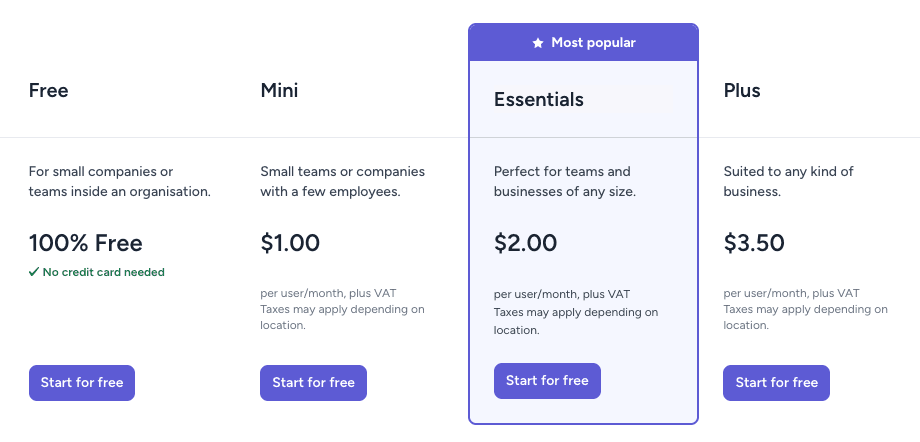
Vacation Tracker starts at $2 per user monthly and scales to $4 per user monthly for the complete plan with every feature. Absentify's paid plans start at $1 per user monthly for their mini version and go up to $3.50 per user monthly for advanced features.
Absentify offers a permanent free plan. Vacation Tracker provides a 14-day free trial of its complete plan, so you can test the full feature set before committing.
Setup Time: How Fast Can You Get Running
Both platforms get you up and running in less than a day. Absentify has a slight edge here if you're already using Microsoft, since it can leverage your existing user data. Either way, you're looking at a quick implementation.
Features: What Both Tools Handle Well
PTO and leave management gets complex fast. Both tools handle approval workflows, location-specific rules, and various leave types effectively. They've both built systems that adapt to different organizational needs.
Integrations: Where Each Tool Connects
Absentify probably takes the lead on total integrations. But Vacation Tracker works seamlessly in Slack, Microsoft Teams, and Google Workspace. It also integrates with ADP and Zapier for payroll purposes or custom connections.
Absentify goes deep on Microsoft and connects to other tools like Slack or Google Calendar for notifications. They offer various payroll integrations and project management tool connections as well.
Support: When You Need Help
Both offer live chat and email support. Absentify provides 24/7 support including weekends, which helps if your team spans multiple time zones.
Security: How Both Platforms Protect Your Data
Vacation Tracker is SOC 2 Type 2 certified and GDPR compliant. Absentify is ISO 27001 certified, GDPR compliant, and Microsoft 365 app certified. Both platforms meet serious security standards.
The Actual Verdict: Which Tool Fits Your Situation
There's no objectively best tool here. It depends on your company's specific setup.
If your company works in Google, Slack, Microsoft, or mixes different tools, Vacation Tracker probably makes more sense. It's platform agnostic, flexible, and handles every PTO edge case you're likely to encounter.
If your company is all-in on Microsoft 365, Absentify is likely the better choice. That native integration alone saves considerable time.
Absentify has a free plan, and Vacation Tracker offers a 14-day trial of its complete plan. There's no real reason not to test both if you're unsure which fits better.
Good luck and please let us know if you have any questions!

Nicholas Lydon

Nick is the Content Marketing Manager at Vacation Tracker, where he turns leave management, HR headaches, and the occasional oddly specific PTO question into content people can watch. He spends most of his time creating videos, articles, campaigns, and creative experiments that make HR a little less boring.


Starting Price
$2/user/month
$1/user/month
Free plan or free trial
14-day free trial
Free plan available
Time to implement
< 1 day
< 1 day
Key features
- Time Off Management
- Leave Automation
- Real-time Calendar Syncing
- Customization
- Notifications
- Reporting & Analytics
- Multi-location & Policy Support
- Absence Management
- Automatic Out-of-Office Replies
- Microsoft Entra ID User Sync
- Substitute/Backup Assignment
- AI Assistant & MCP Server (Plus plan)
- Power BI Connector (Plus plan)
Integrations
- Slack
- Microsoft Teams
- Google Workspace
- ADP
- Zapier
- Microsoft 365
- Microsoft Teams
- Microsoft Power Automate and BI
- timeghost
Apps available
Web, iOS and Android
Web
OpenAPI available
Yes
Yes
Customer support
Live chat, email and guided onboarding
Live chat and email support 24/7
Security
SOC 2 Type II certified and GDPR compliant
ISO 27001 certified, GDPR compliant, and Microsoft 365 app certified.
Ideal for
Small to mid-sized distributed teams wanting simple, automated PTO tracking without the complexity of a full HR system
Companies of any size that run on Microsoft 365 (Teams, Outlook, Entra ID) and want a focused, lightweight absence management tool