Last updated on May 4, 2026
Vacation Tracker vs. Timetastic: Which Leave Management Tool Fits Your Team?
I'm comparing Vacation Tracker and Timetastic because these two platforms keep coming up in conversations about leave management. They're both solid tools, but they're built for different types of teams. I'll walk you through who each one works best for, what they do well, where they fall short, and how their features stack up side by side.
Watch the full video breakdown here:
Who Vacation Tracker Is Built For
Vacation Tracker works for any team size, but it really shines with small to midsize remote teams or companies with multiple departments that need different leave rules. Maybe your sales team has different PTO policies than your engineering team. Or your London office follows UK regulations while your New York office follows US rules. Vacation Tracker can handle that.
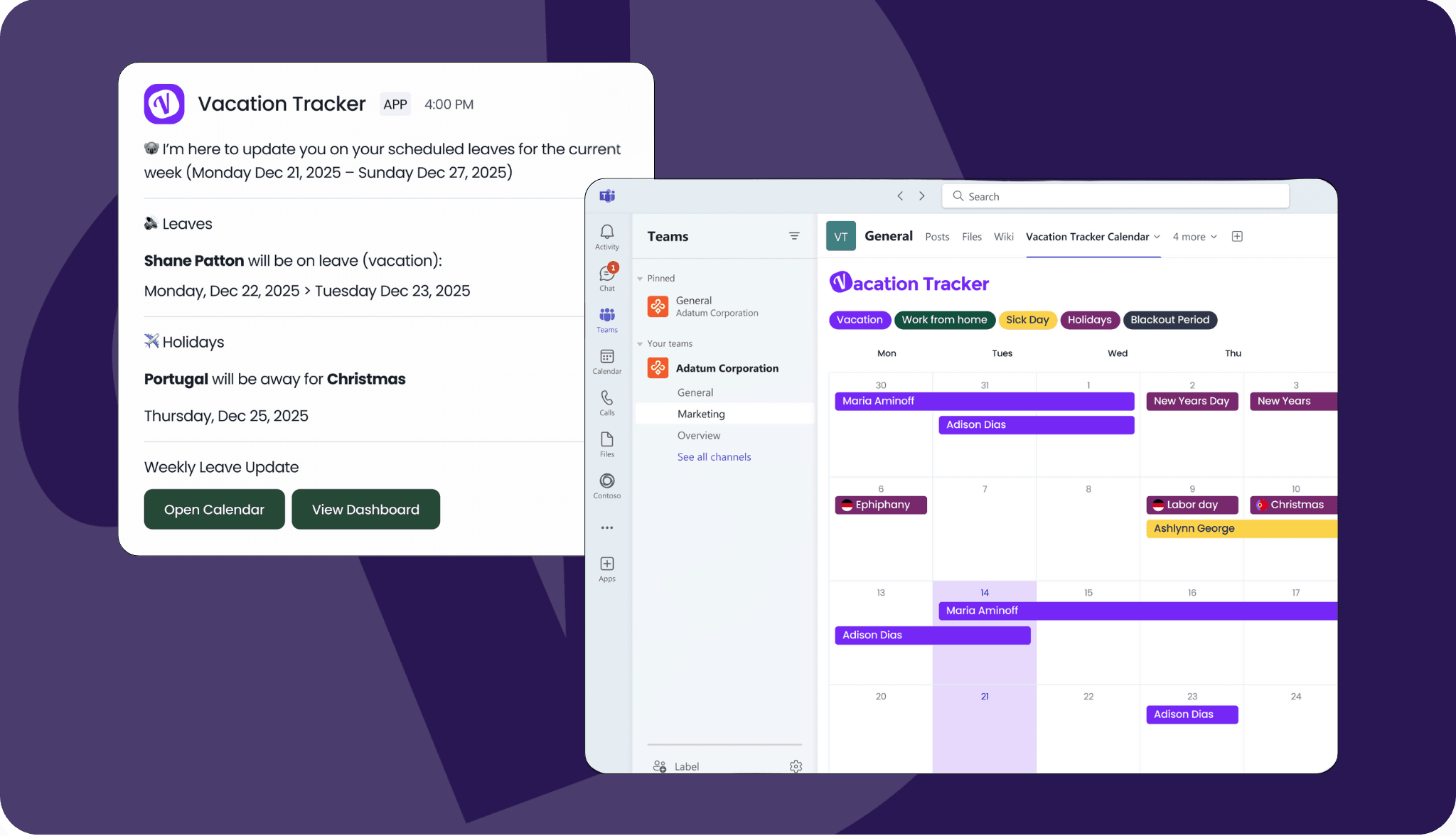
The platform is built specifically for teams working in Slack, Microsoft Teams, Google Workspace, or email. If your team already lives in one of those tools, you can request and approve leave without opening another app or remembering another login. Check out an example of a weekly update you can get in Slack to the right!
Who Timetastic Is Built For
Timetastic targets small to midsize teams (mostly UK and European companies) that want a dead simple way to replace spreadsheets and paper holiday forms. It's perfect for single-location teams or lightly distributed teams where everyone basically follows the same rules.
If you're a team of 10 to 150 people and you just want a clean, visual way to see who's off and when, Timetastic is designed for exactly that use case.
What Both Platforms Do Really Well
Here's something most leave management tools completely miss: both Vacation Tracker and Timetastic can flag when team members haven't taken time off in a while. This helps managers protect employee energy by proactively encouraging rest. It's a small but thoughtful feature that both platforms handle well.
Vacation Tracker's Main Strengths
Simple setup with optional guided onboarding. The platform is built to be self-service, but if you want help, you can hop on a call and we'll set up the entire system for you.
Every PTO policy you can think of. Vacation Tracker has built-in support for blackout dates, probation periods, accrual caps, seniority-based entitlements, and more. Whatever special case your company has when it comes to time off, you can configure it without workarounds.
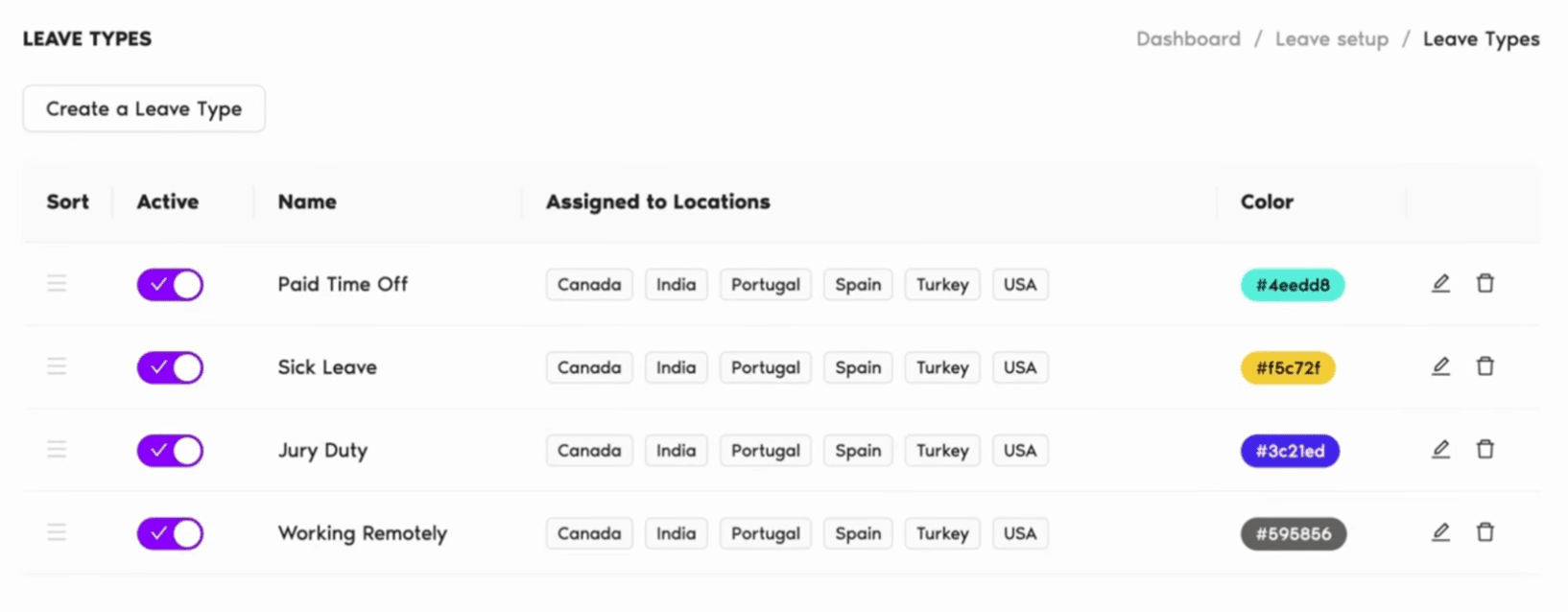
Works where you already work. You can request time off directly in Slack, Microsoft Teams, Google Workspace, or the mobile app. Managers get notifications in those same tools when requests come in. You're not adding another tool to your stack (well, technically you are, but it doesn't feel like it).
Vacation Tracker also integrates with payroll software like ADP, and it has an open API if you need custom connections.
Timetastic's Main Strengths
Users consistently say Timetastic is one of the simplest tools they've ever used. It has a 4.7 out of 5 rating on Capterra, with ease of use being the top thing people mention. Their marketing even leans into this, calling themselves the 'super simple staff leave planner.'
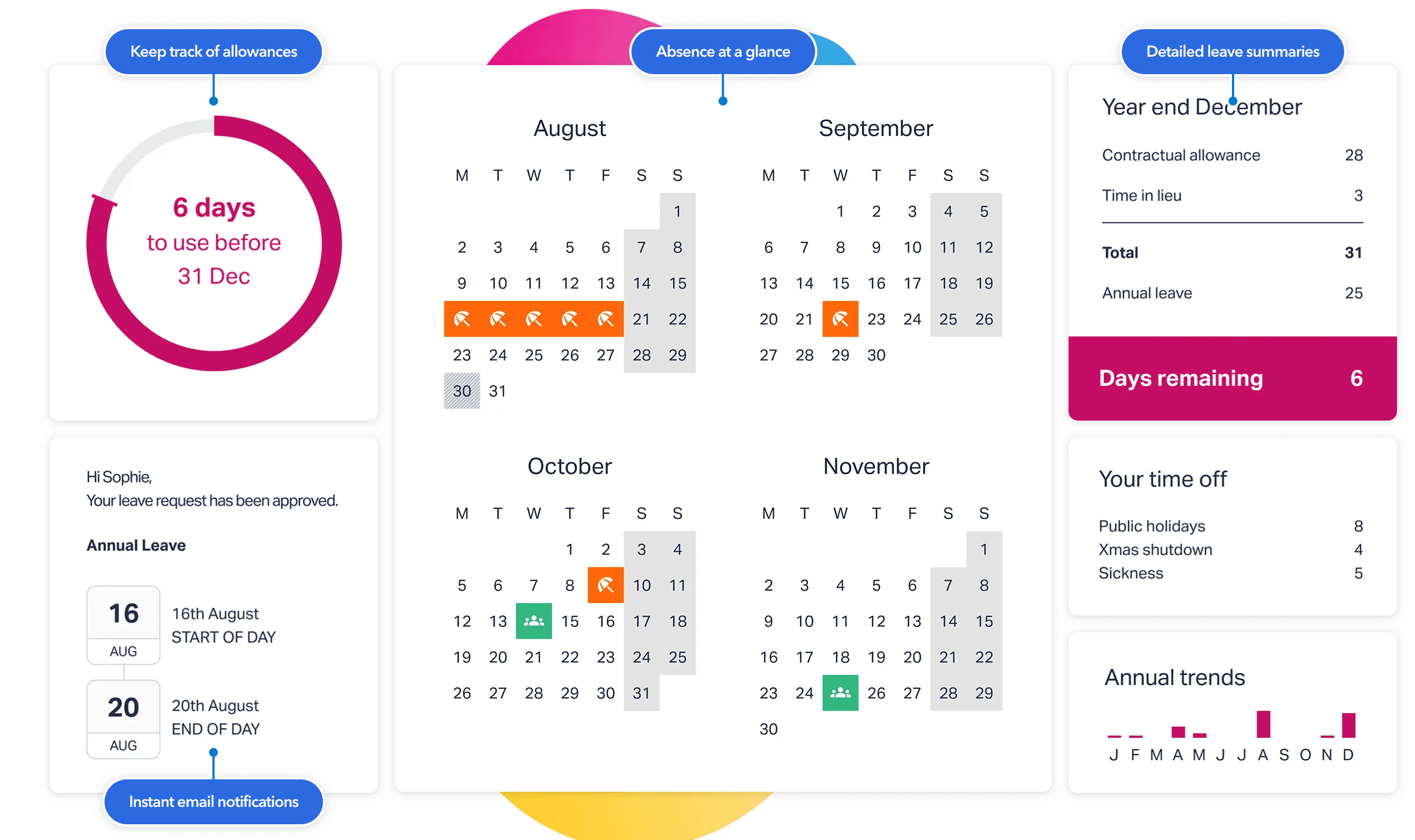
Beautiful visual wall chart. Timetastic has a color-coded calendar view that shows who's out and when at a glance. Managers love it because you can spot overlapping absences and coverage gaps without digging into reports. It's like a digital version of an office wall planner, but better.
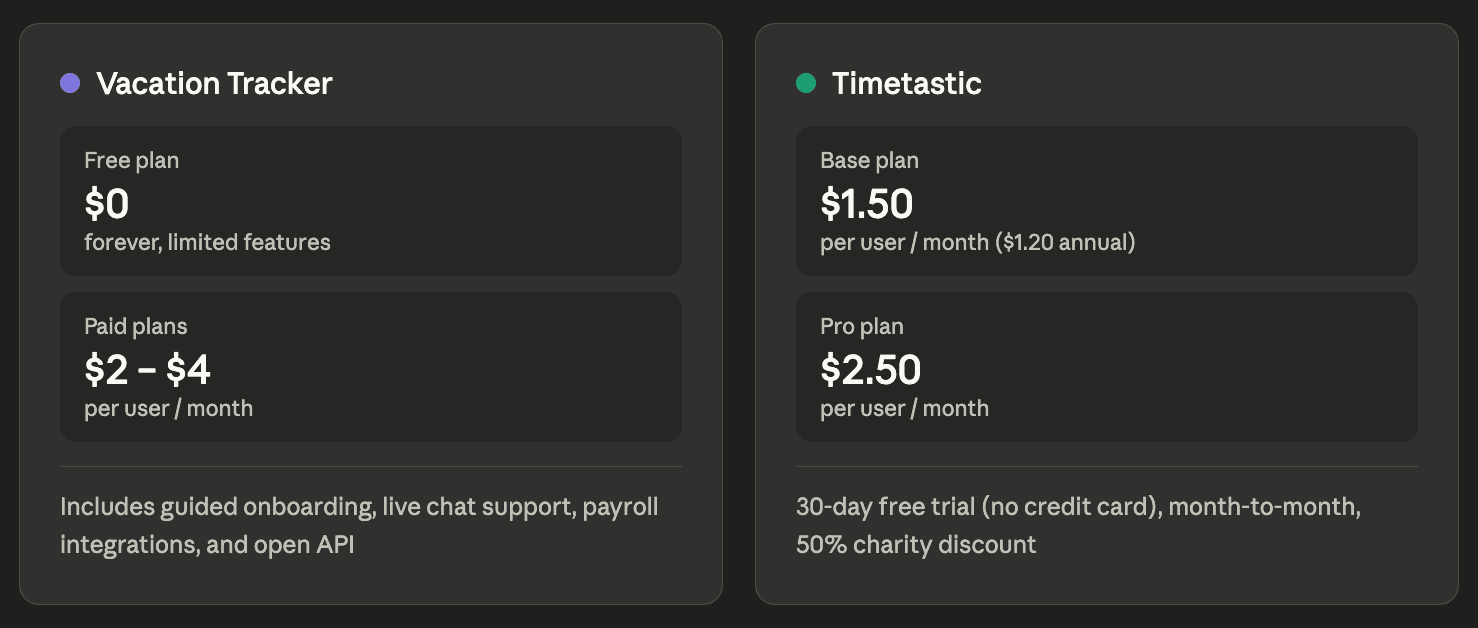
Incredibly affordable pricing. They don't have a free plan, but their base plan starts at $1.50 per user per month (or $1.20 if you pay annually). Their pro plan only costs $2.50 per user per month. They also offer a 50% discount for charities, which is a nice touch.
Generous free trial. You get 30 days to test Timetastic without entering a credit card. There's no minimum contract because everything is month-to-month. That low barrier makes it easy to just try it out.
Where Vacation Tracker Falls Short
Vacation Tracker is really only built for PTO and leave tracking. There are no other HR functions built into the platform (though it can integrate with payroll software).
Where Timetastic Falls Short
The biggest limitation is that Timetastic is built very simplistically. You can only assign one approver per department. That means no multi-level approval workflows and no ability to set up different approval chains for different departments.
For a small flat team, this makes sense. But if you have any management layers, this could be a problem.
Timetastic also lacks depth in location-based policies. If you have offices in different countries with different accrual rules, you'll likely need to manage those with workarounds.
Feature Comparison: Vacation Tracker vs. Timetastic
Pricing: Vacation Tracker offers a 14-day free trial, and paid plans range from $2 to $4 per user per month. Timetastic doesn't have a free plan, but pricing ranges from $1.50 to $2.50 per user per month.
Implementation time: Both platforms can be set up in under a day.
Key features: Vacation Tracker takes the lead here because it has more depth in PTO policy configuration.
Access: Both are accessible on the web and have mobile apps for iOS and Android. Both also have open APIs.
Customer support: Both offer email support. Vacation Tracker also has live chat and offers guided onboarding calls during setup.
Security and compliance: Both platforms are GDPR compliant. Vacation Tracker is also SOC 2 Type 2 certified.
Which One Should You Choose?
There's no objectively best tool here (sorry). Just the tool that fits your team better.
If your priority is simplicity and cost, and your team is in one location with straightforward leave policies, Timetastic is hard to beat. It's clean, affordable, and does exactly what it says.
If you need more flexibility, multiple locations, complex approval workflows, deeper Slack or Teams integrations, or more depth to your policy rules, Vacation Tracker is probably the stronger choice.
If you're still deciding, test both. Both have free trials, Vacation Tracker has a free version you can use forever, and both can be set up in under a day. You're not wasting much time by trying them out, and that alone will give you a clear answer about what works best for your team.
Learn more about Vacation Tracker or check the description for an updated comparison table (coming soon).

Nicholas Lydon
Nick is the Content Marketing Manager at Vacation Tracker, where he turns leave management, HR headaches, and the occasional oddly specific PTO question into content people can watch. He spends most of his time creating videos, articles, campaigns, and creative experiments that make HR a little less boring.


Starting Price
Starts at $2/user/month and scales up to $4/user/month for advanced features. Includes a 14-day free trial.
Paid plans range from $1.50 to $2.50 per user per month, with a 50% discount for charities.
Free plan or free trial
Vacation Tracker offers a 14-day free trial with all core features included.
Timetastic has no free plan, but does support a 30 day free trial with no credit card requied.
Time to implement
< 1 day
< 1 day
Advanced Leave Policies
- Supports blackout dates, probation periods, accrual caps, and seniority-based entitlements
- Can apply different rules per department or office location
- Handles multi-country compliance (e.g., UK and US rules simultaneously)
- TOIL (Time Off in Lieu)
Timetastic is built for simplicity and lacks some depth in location-based or complex policy configuration. Teams with multiple countries or layered rules may need workarounds.
Platform Integrations
- Slack, Microsoft Teams, Google Workspace
- ADP and Zapier
- Open API available
- Mobile app
- Mobile app
- Open API available
OpenAPI available
Yes
Yes.
Customer support
- Email support
- Live chat
- Guided onboarding process available on request
- Email support
- Help desk guides
Burnout / Unused Leave Alerts
Vacation Tracker can flag employees who haven't taken time off recently, helping managers proactively encourage rest.
Timetastic also flags team members who haven't taken time off in a while, supporting manager visibility into employee wellbeing.
Security & Compliance
- GDPR compliant
- SOC 2 Type 2 certified
- GDPR compliant
- No SOC 2 Type 2 certification mentioned