
Last updated on August 5, 2026
How Can I Change My Subscription? (Core/Complete and Annual/Monthly)
Your team grows, your needs change, and switching between Core and Complete — or between monthly and annual billing — should be a single click. Here's how to swap plans inside Vacation Tracker, plus what actually happens to billing in each scenario.
Pricing at a Glance
Pricing is per user, with a minimum each month (or each year on the annual plan). Annual billing saves about 10% compared to paying month-to-month.
Core
Complete
How to Change Your Subscription
- Sign in at app.vacationtracker.io as an Administrator.
- In the left-hand menu, expand Workspace Settings.
- Click Billing.
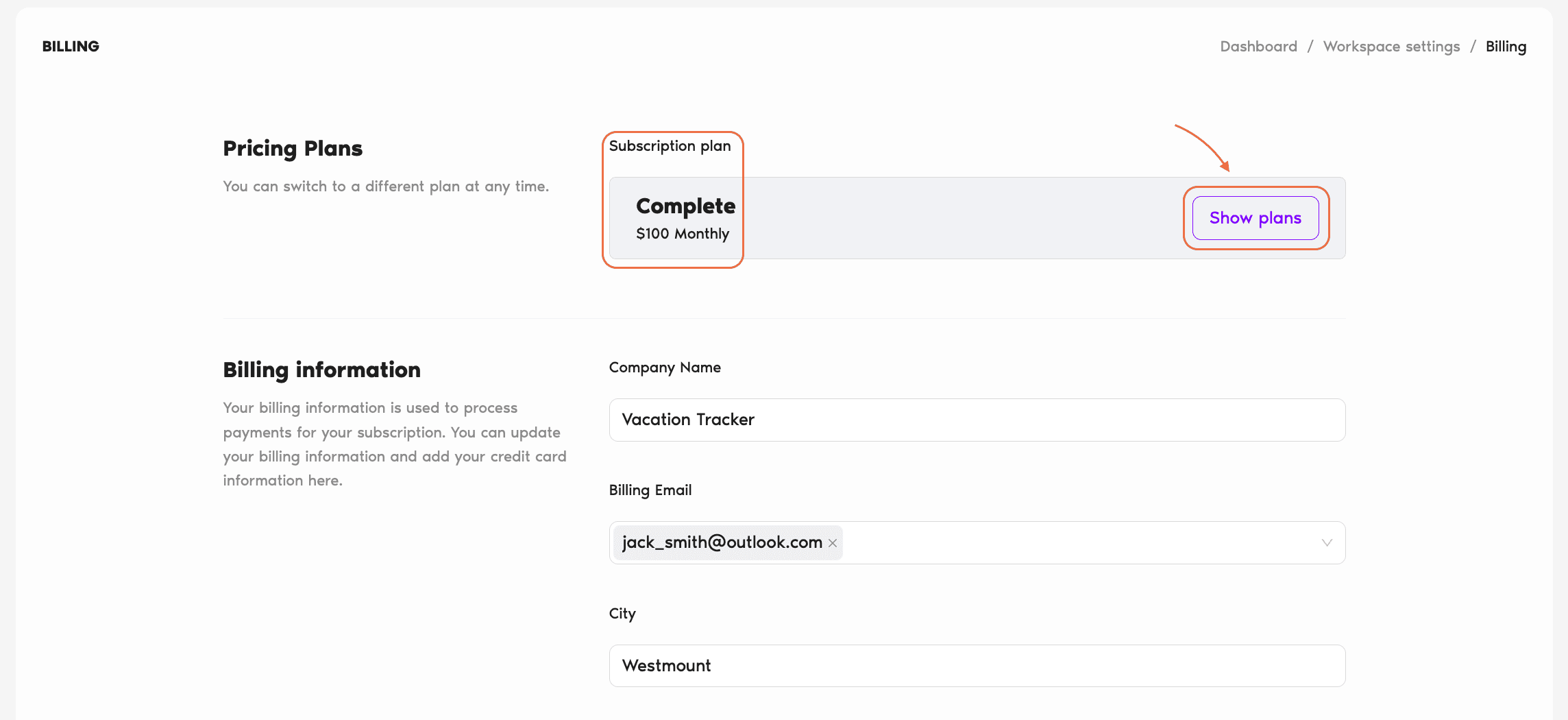
- In the Pricing Plans section at the top, your current plan is shown. Click Show plans to open the plan-switch view.
- Use the Monthly/Annual toggle to see pricing for each billing cycle. Pick the plan and cycle you want.
- Click Switch Plan to confirm and activate the new subscription.
What Happens When You Switch
The behavior depends on whether you're upgrading or downgrading, and whether you're moving between billing cycles. Here's every scenario:
Core/Complete Monthly → Same plan, Annual Immediate
The annual plan activates right away. Whatever was left unused on your current month's invoice gets credited against the new annual price.
Core Monthly → Complete Annual Immediate
The Complete annual plan activates right away. Same prorated handling: the remaining balance on your current monthly invoice reduces the annual charge.
Complete Monthly → Core Monthly At end of cycle
The downgrade to Core monthly activates at the end of your current billing cycle (the system shows you the exact date). Until then, you keep using all the Complete features.
Complete Monthly → Core Annual At end of cycle
The Core annual plan activates once your current monthly cycle ends. You keep your Complete features for the remainder of the month.
Core/Complete Annual → Same plan, Monthly At end of cycle
You keep your annual plan benefits until the current annual cycle ends. After that, the monthly billing kicks in at the corresponding plan.
Complete Annual → Core Monthly At end of cycle
Core monthly activates after your current annual cycle ends. You keep Complete features for the rest of the annual period.
Core Annual → Complete Monthly Contact Support
This particular combination isn't self-serve — reach out to the Support team and they'll handle the switch for you.
Common Questions
No. There's no minimum term and no cancellation fee — you can cancel your subscription at any time.
Yes. Annual plans use user tiers, so your per-user rate is based on the range your team falls into rather than your exact headcount. The pricing page lets you enter your team size to see the specific rate for your tier.
Core covers everyday leave management — up to 3 locations, 10 departments, unlimited leave policies and holidays, standard reporting, and email/chat support. Complete layers on unlimited locations and departments, all 7 automations (like Blackout Period, Seniority Entitlement, Probation Period), advanced leave policies (accruals, hourly tracking, TOIL), multi-level approvals, scheduled reports, shared calendars, and priority support. See the full breakdown on the pricing page.
 Book a Call