
Last updated on January 20, 2026
Can I Change the Calendar Starting Day?
Yes — there's a one-click toggle on the Calendar page that flips the week between starting on Monday and starting on Sunday. The control is right at the top of the calendar, doesn't need an Admin to change it, and applies just to your own view.
How to Switch the Start Day
- Sign in at app.vacationtracker.io.
- In the left-hand menu, click Calendar.
- Make sure you're on Month view (the toggle at the top-right of the page — it sits next to List view). The start-day toggle only appears in Month view.
- To the left of the Month view / List view buttons, you'll see two buttons labeled Mon-Fri and Sun-Thu. Click whichever one you want.
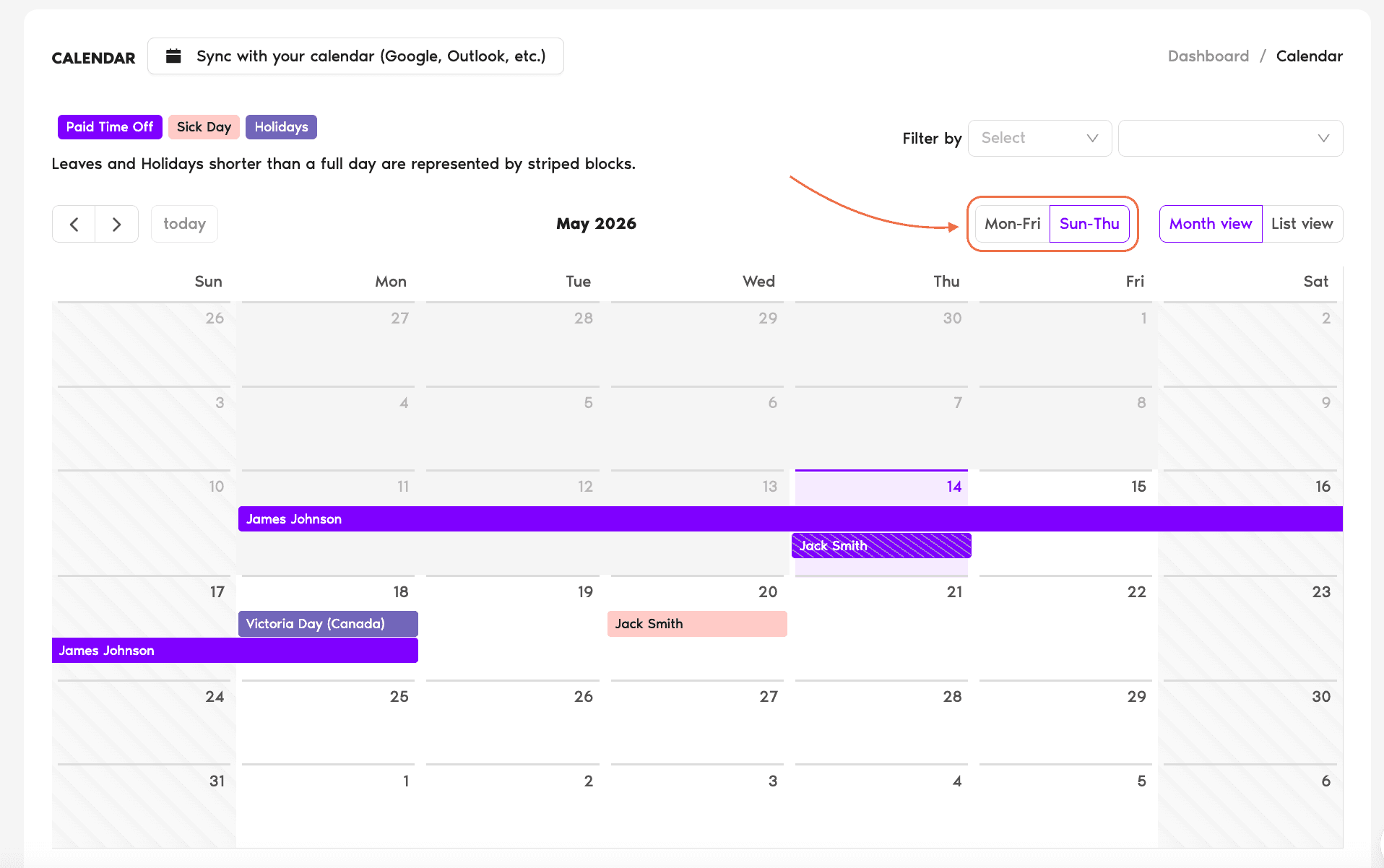
The change is instant — no Save button. The grid re-orders so the leftmost column is the start day, and the weekends are visually struck through (the days that aren't part of the selected working week).
What Each Option Does
Mon-Fri (Monday start)
The standard Western working-week orientation. Calendar runs Mon → Tue → Wed → Thu → Fri → Sat → Sun. Saturday and Sunday render as weekends (visually distinguished as non-working days).
Sun-Thu (Sunday start)
The Sunday-first orientation used in much of the Middle East and parts of South Asia. Calendar runs Sun → Mon → Tue → Wed → Thu → Fri → Sat. Friday and Saturday render as weekends instead.
Common Questions
Most likely you're on List view rather than Month view. Switch to Month view using the toggle on the top-right of the Calendar page, and the Mon-Fri / Sun-Thu buttons will appear immediately to its left.
No. This is a display-only toggle for your in-app calendar view. The working days that count against a User's leave balance come from the Location's work-week configuration (set by an Admin in Leave Setup → Locations). If a User in a Sun-Thu Location takes Friday off, that day won't count as leave because Friday isn't a working day for that Location — regardless of how their personal calendar view is oriented.
Yes — Vacation Tracker remembers the orientation you picked for your own account, so you don't need to re-flip it every time you open the calendar. It's a per-User preference: changing yours doesn't affect anyone else's view.
 Book a Call