
Last updated on October 10, 2025
Can My Users Earn Their Accrued Amount at the Beginning of the Accrual Period?
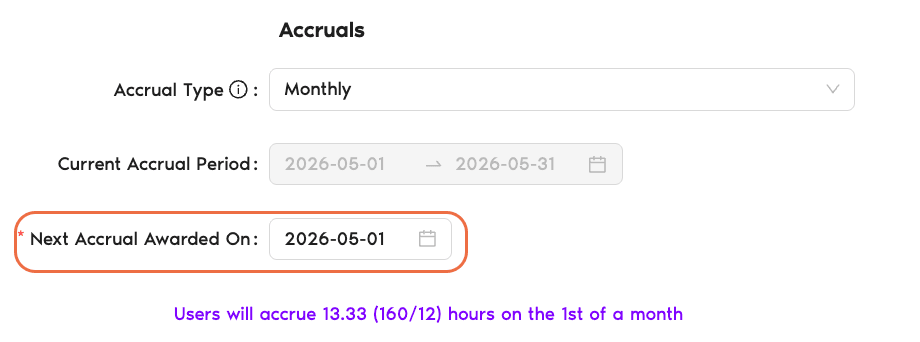
Yes. The trick isn't a separate toggle — it's the date you pick for Next Accrual Awarded On. Set it to the first day of the current accrual period and employees earn their share before working the period, rather than after.
Three Common Timing Choices
Take a Monthly accrual with the current period running April 1 → April 30. Here's how Next Accrual Awarded On changes the behavior:
April 30 — End of the current period
Days are awarded on the last day of the month the employee just worked. Classic "earn as you go" — the full chunk lands once the period finishes.
May 1 — Start of the next period (default)
Days are awarded on the first day of the following period. Behaviorally similar to End of current period but technically dated one day later. This is what the system picks by default when you first set an accrual.
April 1 — Start of the current period ← earn ahead of time
Days are awarded at the very beginning of the period, before the employee has "earned" them through time worked. This is the configuration described in this article — front-loading the period's accrued amount.
How to Set It Up
The mechanism lives inside the Accruals section of each leave policy. Accruals must be enabled first (Accrual Type ≠ None) — see How Do I Set Up and Configure Accruals if you haven't set them up yet.
- Sign in at app.vacationtracker.io.
- In the left-hand menu, expand Leave Setup and click Locations.
- On the Location you want to configure, click Edit Leave Policies.
- Find the leave policy you want to update and click the edit (pencil) icon on its row.
- Scroll to the Accruals section. Make sure Accrual Type is set to Monthly, Semimonthly, Biweekly, or Weekly — the timing fields only appear once a type is picked.
- Note the dates shown in Current Accrual Period — this is a read-only range (e.g., April 1 → April 30).
- Click into Next Accrual Awarded On and pick the first day of the current period (in the example above, April 1). This is the "earn ahead" setup.
- Click Update at the bottom of the page to save.
Common Questions
Vacation Tracker tracks the days as accrued once the award date passes, regardless of how much of the period the person actually worked. Settlement of any "unearned" time off after an employee departs is a policy decision you'd make outside the app.
No — Next Accrual Awarded On is per leave policy, which means per Leave Type per Location. You can front-load Vacation while keeping Sick Day on end-of-period awarding. Each policy's timing is independent.
Different problems. Earning at the beginning of the period changes when the days actually land in someone's accrued balance. Allow Requesting Accrual-based Leave In Advance lets people submit requests for leave that uses days they haven't yet accrued, based on future projected accrual. You can use either, both, or neither. See Can Users Request Their Accrued Leave in Advance? for the sibling feature.
 Book a Call