
Last updated on August 4, 2026
How Do I Set Up and Configure Accruals?
By default, employees get their full Yearly Leave Quota at the start of the year. Accruals change that. Instead of granting everything upfront, the quota is distributed in smaller portions on a regular schedule (monthly, semimonthly, biweekly, or weekly) so employees earn leave as they work.
How to Enable Accruals
- Sign in at app.vacationtracker.io.
- In the left-hand menu, expand Leave Setup and click Locations.
- Click Edit Leave Policies on the Location you want to configure.
- Click the edit icon next to the leave policy you want to update.
- Scroll down to the Accruals section.
- Open the Accrual Type drop-down and choose your schedule.
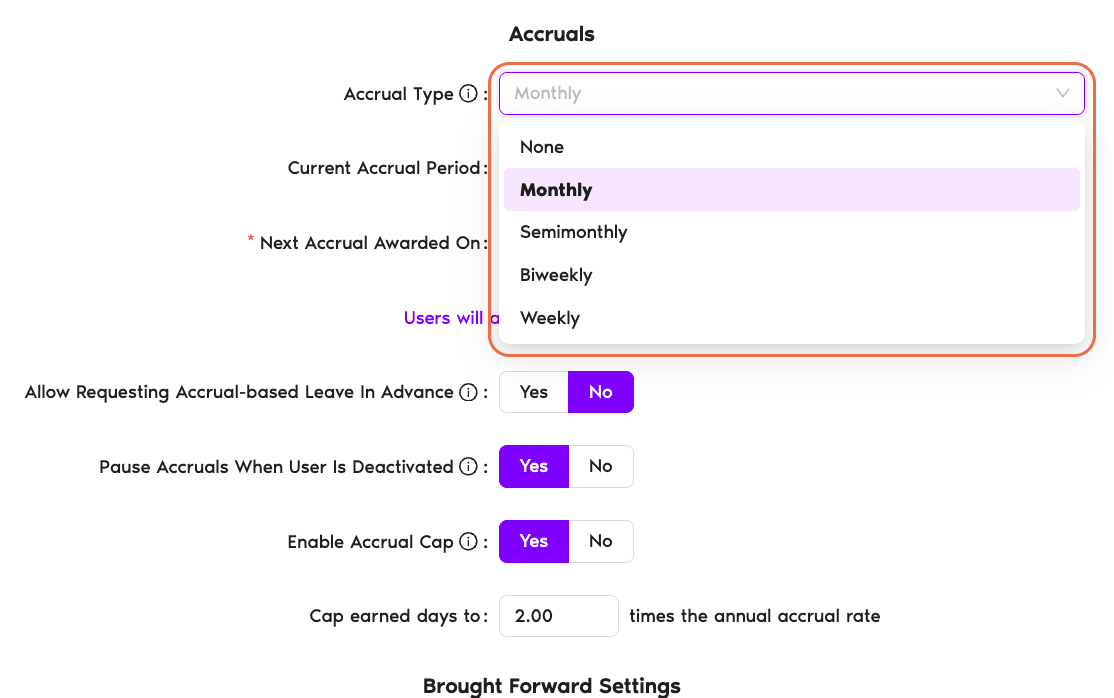
Accrual Type Options
Choose the schedule that matches how your company distributes leave. Click any option below for details.
The full Yearly Leave Quota is available from the start of the year (or the employee's start date). No gradual earning, so employees can use their entire balance right away.
Leave accrues once per month. The yearly quota is divided by 12, and that amount is added to the User's balance once per month. The exact accrual date depends on whether your policy is set to award the accrual at the beginning or the end of each accrual period (configured separately on the policy).
Leave accrues twice per month (24 times per year). The yearly quota is divided by 24, and that amount is added on each of the two accrual dates each month. The two accrual dates are configurable by the Admin on the leave policy. Common choices are the 1st and 15th, but you can pick any two days that match your payroll cycle.
Note: semimonthly is twice per month, not every two weeks. That's biweekly (described below), which lands 26 times per year, so the per-accrual amount is slightly smaller for the same annual quota.
Leave accrues once every two weeks (each accrual period is 14 days), which works out to 26 accrual events per year. The yearly quota is divided by 26, and that amount is added on the same weekday every second week. Vacation Tracker sets that recurring day from your accrual period and shows it right below the schedule. For example, "Users will accrue 0.58 (15/26) days every second Monday."
Because a year holds 26 biweekly periods but only 24 semimonthly ones, the amount earned per accrual is a little smaller than semimonthly for the same annual quota. Biweekly is the right fit if your company runs a two-week (every-other-week) payroll cycle.
Additional Accrual Settings
Once you've selected an accrual type (anything other than None), a few more options appear below the schedule. Click any option below for details.
A read-only field that shows the date range of the accrual period currently in progress. Vacation Tracker calculates it automatically from the accrual type you picked, so there's nothing to set here.
The date the next accrual will be added to each User's balance. Vacation Tracker fills this in based on your schedule, and you can adjust it if you need the first accrual to land on a specific day. Just below it, the app shows the exact amount that will accrue, for example "Users will accrue 1.25 (15/12) days on the 1st of a month."
Lets employees request leave based on the days they are projected to accrue, not only the balance they have already earned. If someone knows they will have accrued enough days by the time the leave takes place, they can submit the request now even though the balance isn't available yet. Set to No (the default), employees can only request days they have already accrued.
Temporarily suspends accruals for any User who is deactivated. When that User is reactivated, their accruals automatically resume, so their balance stays accurate for the time they were actually active. This is set to Yes by default.
Sets a ceiling on how much leave an employee can build up through accruals. The cap is defined as a multiple of the annual accrual rate rather than an exact number of days, and it's turned Off by default. For the full setup steps, see How Do I Set Up an Accrual Cap?
 Book a Call