
Last updated on February 13, 2026
How Do I Pro-Rate Quotas for New Users?
Admins — looking to pro-rate the quotas for employees who start mid-year? You can enable this option automatically on the Users page when importing them, instead of having to set custom quotas afterwards.
When new employees start in the middle of the year, it's likely that they will not be entitled to the quotas assigned for the entire year. Use the proration option during import to handle this automatically.
Steps
- Log in to your online dashboard at app.vacationtracker.io/signin.
- Select the Users tab on the left-hand side of the page.
- Click the Add Users button.
- Type in the name(s) of the user(s) you'd like to import.
- Click the Configure Settings for selected Users button.
- A new page will appear with additional settings. You will see an option to prorate the quotas for the selected users. Click Yes. This will automatically calculate the number of days/hours that the user is entitled to as of the current date.
- Edit the leave types that you want the system to prorate the leaves to.
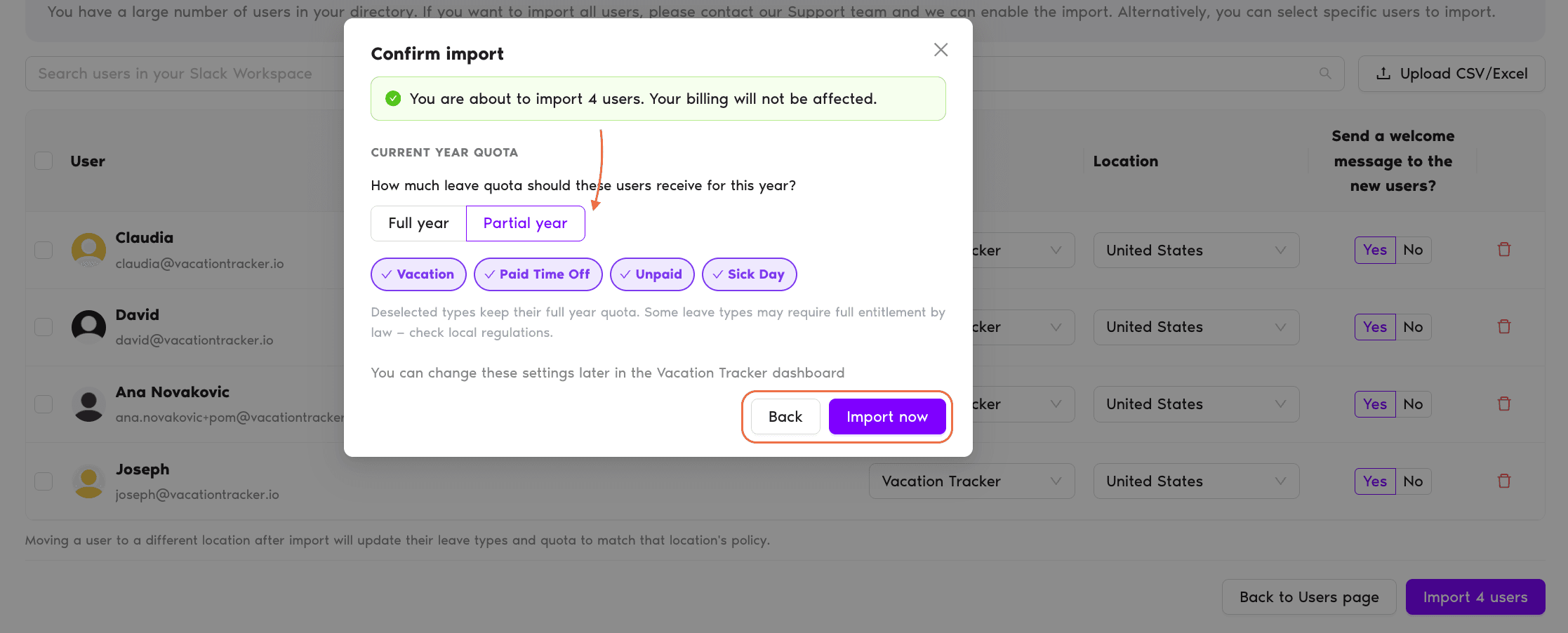
- Click the Import Users button. A pop-up window will appear with the summary of the users you will import, as well as the leave types that will pro-rate.
- Confirm the import — and you're all set!
Where to see the result
The leave quotas will be visible on the user's profile page once the import completes.Adding new users
For more information on adding new users, see How Do I Add (Import) Users? Book a Call