
Last updated on February 13, 2026
How Do I Request TOIL (Time Off in Lieu) / Comp Time?
Worked overtime and want it converted into time off later? That's TOIL. As long as your Admin has it enabled on the relevant Leave Policy, you can submit your own TOIL request from the dashboard, Slack, or Microsoft Teams — pick whichever channel matches your integration.
Three Ways to Submit
Dashboard
- Sign in at app.vacationtracker.io.
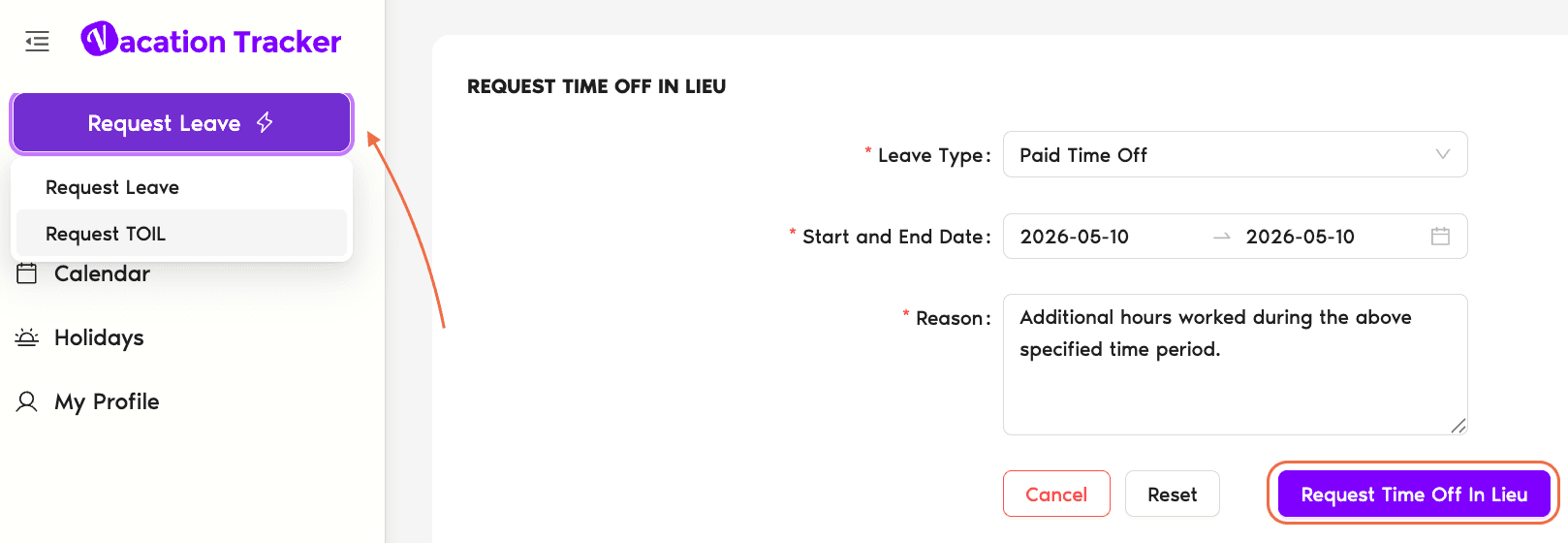
- Click Request Leave in the top-left, then switch to the Request TOIL tab.
- Pick the Leave Type from the dropdown — only Leave Types with TOIL enabled on your Location appear here.
- Enter Start Date and End Date — the dates you actually worked the overtime.
- For half-day or hourly TOIL, pick Hourly TOIL; a date + start time + end time picker appears so you can enter exactly what you worked.
- Edit the Reason if you want — Vacation Tracker prefills it.
- Click Request Time Off in Lieu. You'll get a confirmation that the request has been submitted.
Slack
- In any Slack channel or DM, type
/Vacationand press Enter. - When Vacation Tracker responds, pick the third option: Request TOIL.
- Pick the Leave Type.
- Mark the Start Date and End Date (the dates you worked overtime).
- For half-day or hourly TOIL, choose the PTO (Half Day) leave type variant; the form switches to date + start time + end time inputs.
- Edit the Reason if you want.
- Click Send Request.
Microsoft Teams
- Open the Vacation Tracker chat: in MS Teams' left sidebar click Chat, find the Vacation Tracker conversation. (Or search "Vacation Tracker" in the top search bar and pick the app from the Chat tab.)
- Type Request TOIL in the chatbot input and send.
- From the dropdown that appears, pick the Leave Type, then click Next.
- Mark the Start Date and End Date (the overtime dates).
- For half-day or hourly TOIL, choose the PTO (Hourly) variant; the form switches to date + time entry.
- Edit the Reason if you want.
- Click Submit.
What Happens After Submission
Common Questions
Two possibilities: (1) the Leave Policy on your Location doesn't have TOIL enabled at all, or (2) it's enabled but the Who Can Request Time Off In Lieu setting is restricted to "Only Admins and Approvers" — so regular Users can't self-submit. Ask your Admin to either enable TOIL on the relevant Leave Type or change the requestor permission. See Configure TOIL.
Requesting TOIL is how you earn the credit — you tell Vacation Tracker about overtime you've worked. Using TOIL is filing a regular leave request that draws against the TOIL balance you've built up. Both go through the standard approval flow if the Leave Policy requires it.
TOIL is added in one shot when the request is approved (or instantly, if approval isn't required). It doesn't accrue gradually like regular leave does; the hours or days you submitted land in your balance the moment the credit is granted.
 Book a Call