
Last updated on May 27, 2025
Can I Turn Off Leave Reminders?
Short answer: no. Vacation Tracker's reminders for unanswered leave requests are part of the core approval flow and can't be disabled. The longer answer: you can snooze them on a per-request, per-Approver basis from the reminder message itself, which stops the rest of the reminder cycle for that one request.
Why Reminders Aren't Switchable
Approval reminders are baked into how Vacation Tracker keeps requests moving. Without them, requests would silently sit in inboxes until they expired, leaving Users in the dark about whether their leave is approved. So reminders are automated, mandatory, and run on a fixed cadence: a 1st reminder the next business day, a 2nd after 3 business days, a 3rd after 5 business days, and then automatic expiration on day 7. The full timing is in What is the schedule / flow of leave reminders?
The trade-off is intentional. Disabling reminders globally would create a much worse problem: leave requests stuck in an Approver's queue with no nudges, eventually expiring and forcing the User to re-submit. The snooze option below is the escape hatch when a particular reminder is genuinely unwelcome.
Snoozing a Reminder Instead
When a reminder lands in Slack, Microsoft Teams, or email, the message includes a Snooze action alongside Approve and Deny. Tapping Snooze stops Vacation Tracker from sending any further reminders for that specific request to that specific Approver.
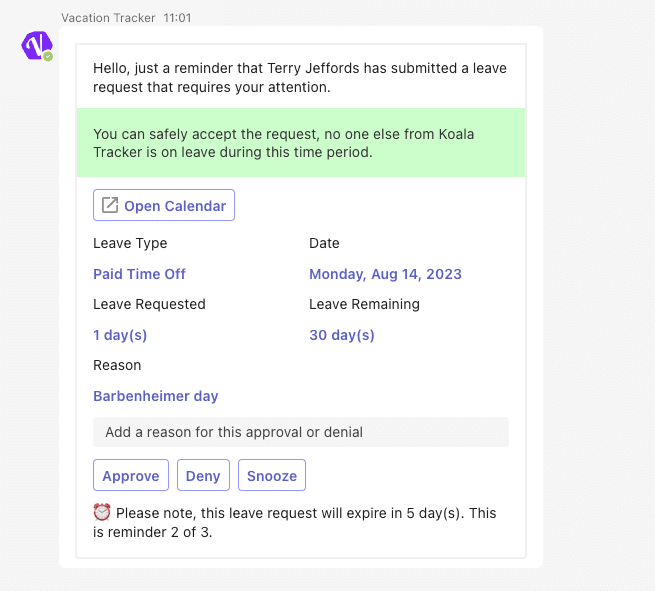
What snooze does and doesn't do:
Common Questions
No. There's no workspace-wide toggle for approval reminders, and there's no per-Department or per-Leave-Type toggle either. They run automatically for every leave request that requires approval. This is true on both the Core and Complete plans.
The reminder messages stop, but the request stays pending in your dashboard. Open Dashboard → Pending Requests in Vacation Tracker any time to see what's still awaiting your decision. The request will also auto-expire on day 7 if no one acts, so a forgotten snooze isn't catastrophic — the User will get an "expired" notification and can re-submit.
Yes. Snooze is scoped to one specific leave. If the same User submits another request — or if anyone else in your Department does — that's a new reminder cycle that you'll receive normally. The first reminder for it will land within 24 hours of submission, on the standard cadence.
 Book a Call