
Last updated on January 20, 2026
Can I Update User Information from my Directory Into Vacation Tracker?
Yes — Admins can pull the latest names and profile images from your team's Slack, Microsoft Teams, or Google Workspace directory into Vacation Tracker on demand. The action lives at the bottom of the Users page as a single Sync Existing Users button. One click, one confirmation, and Vacation Tracker re-reads the directory.
What Vacation Tracker Pulls — and What It Doesn't
That's intentional: Vacation Tracker is built as a leave-tracking tool, not a directory of record. The integration is read-only, scoped to the minimum that's needed to keep names and avatars current.
How to Run the Sync
- Sign in at app.vacationtracker.io with an Admin account.
- In the left-hand menu, click Users.
- Scroll to the bottom of the Users table. Next to the Previous / Next pagination buttons, on the right-hand side, you'll see Sync Existing Users.
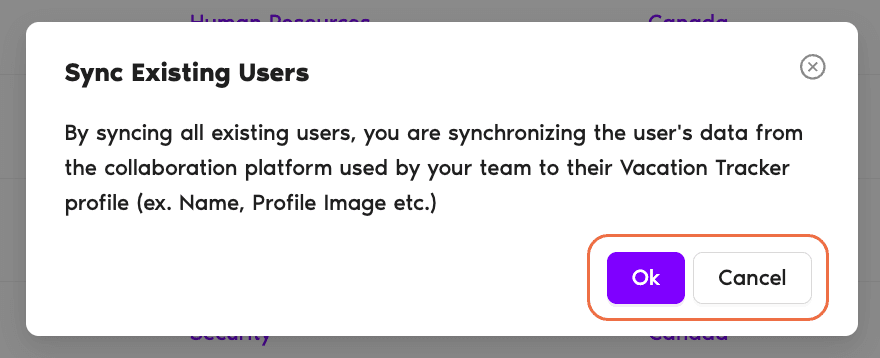
- Click Sync Existing Users. A small confirmation modal opens with the privacy summary quoted above and two buttons: Ok and Cancel.
- Click Ok to start. Vacation Tracker re-reads your directory and updates the relevant Users.

The sync runs as a single batch — it doesn't re-scan continuously. If a User changes their name later, you'll need to run the sync again (or rely on automatic User Import if you have it on; see How Do I Enable/Disable the Automatic User Import?).
When the Sync Won't Work
Two situations to be aware of:
Common Questions
No. Sync Existing Users is an Admin-only action. It only appears on the Users page, which itself is only accessible to Admins. If you don't see the button, you likely don't have the Admin Role — see How Do I Set an Administrator? for how to get it.
That's a separate flow. Sync Existing Users only updates Users who already exist in Vacation Tracker. To bring in newly added directory members, use Add Users at the top of the Users page — see How Do I Add (Import) Users?. Or if you have Automatic User Import turned on, new joiners are pulled in for you on a schedule.
No. Department assignments, Location assignments, leave history, leave balances, custom labels, role (Admin/User), and Approver assignments all live entirely in Vacation Tracker — they're not pulled from the directory. The sync only refreshes Name and Profile Image. Everything else you've configured in Vacation Tracker stays exactly as it was.
 Book a Call