
Last updated on October 10, 2025
How Can I Apply the Brought Forward Policy to the Previous Year?
Forgot to turn on Brought Forward at year-end? Changed your mind about the rollover policy? Vacation Tracker lets you apply the setting retroactively so last year's unused days can still be carried into this year — no manual adjustments per user.
How to Apply Brought Forward to the Previous Year
The setting lives on each leave policy — per Location, per Leave Type. If you need to apply it across multiple Locations or multiple leave types, you'll edit each policy one at a time.
- Sign in at app.vacationtracker.io.
- In the left-hand menu, expand Leave Setup and click Locations.
- On the Location you want to configure, click Edit Leave Policies.
- Find the leave policy you want to update and click the edit (pencil) icon on its row.
- Scroll to the Brought Forward Settings section and set Brought Forward to either Limited or All (the retroactive field doesn't appear while the dropdown is on Disabled).
- A new required field appears: When Would You Like To Apply These Changes? Pick the option that matches what you want.
- Click Update at the bottom of the page to save.
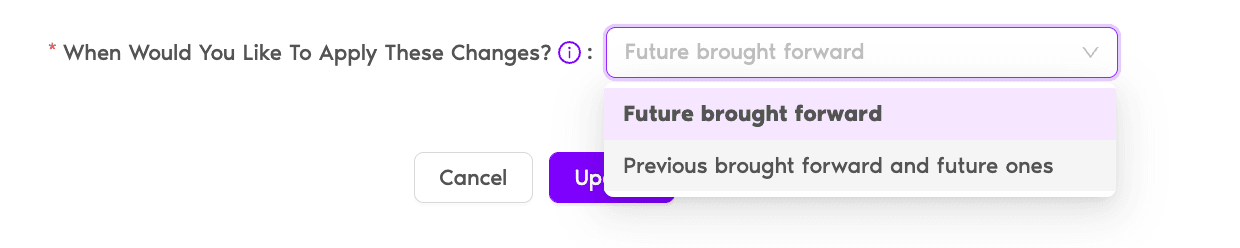
The Two Options
Future brought forward (default)
Only affects the upcoming year-end rollover and every year after. Last year's closed balance is left untouched. Pick this when you're setting up Brought Forward going forward — e.g., deciding mid-year that next January you want unused days to roll over.
Previous brought forward and future ones
Retroactively applies the rule to the most recent closed year and every future year. Each user's unused days from last year are added as Brought Forward to their current-year balance. Pick this when you forgot to configure rollover at year-end and want to make employees whole.
Common Questions
Two usual reasons: your Brought Forward dropdown is still on Disabled (switch it to Limited or All and the field will appear), or the Location's leave year reset is based on User Employment Date. The retroactive option is only available when a Location resets on an Accounting Year, because that's the only setup where "previous year" has a consistent meaning for everyone.
No — the setting sits on a single leave policy (one Leave Type at one Location). To apply retroactive Brought Forward to multiple leave types or multiple Locations, edit each policy individually.
No. The system only reaches back to the most recent completed leave year. If you need to bring forward days from further back, reach out to Support — it's not self-serve.
 Book a Call