
Last updated on August 15, 2025
How to Enable the Negative Brought Forward?
Some employees finish the year with a negative balance — they took more leave than they'd earned. Enable Negative Brought Forward decides whether that deficit carries into the new year (reducing the fresh quota) or gets wiped clean at the reset.
How to Enable It
The setting lives on each leave policy — per Location, per Leave Type. You can carry over negative balances on Vacation while resetting them on Sick Day, for example. The toggles are independent.
- Sign in at app.vacationtracker.io.
- In the left-hand menu, expand Leave Setup and click Locations.
- On the Location you want to configure, click Edit Leave Policies.
- Find the leave policy you want to update and click the edit (pencil) icon on its row.
- In the top section, toggle Allow Negative Balance to on. Without this, users can't go negative to begin with, so there's no negative balance to carry forward.
- Scroll to Brought Forward Settings and set Brought Forward to Limited or All — if it's Disabled, there's no rollover to apply. See How Do I Set a Brought Forward (Rollover) Policy? if you need the setup.
- Toggle Enable Negative Brought Forward to Yes.
- Click Update at the bottom of the page to save.
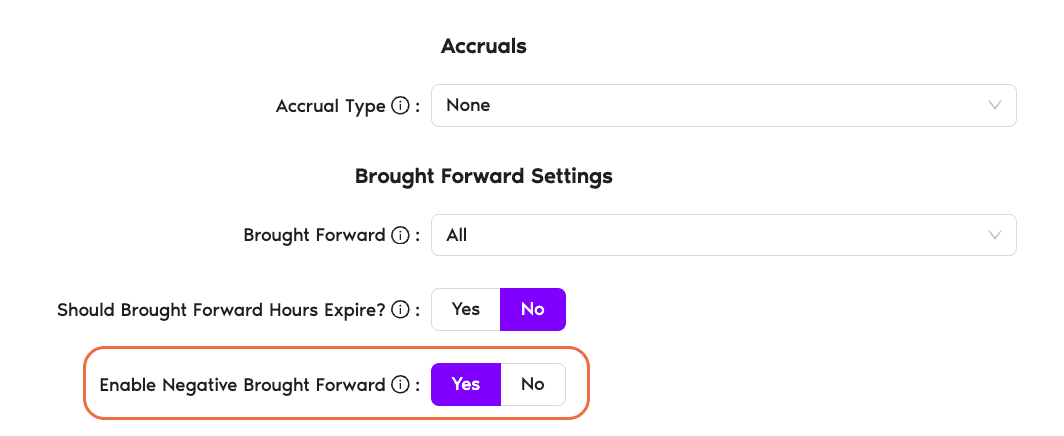
What Happens When the Year Resets
Enable Negative Brought Forward = Yes
The negative balance transfers into the new period. An employee who ended last year at −3 days starts the new year with their fresh quota reduced by 3. Example: 15-day Vacation quota minus 3 deficit = 12 days to work with on January 1.
Enable Negative Brought Forward = No (default)
The negative balance is wiped at reset. The employee starts the new year with the full fresh quota, regardless of where last year closed out.
Common Questions
Check the Brought Forward dropdown above it. If it's on Disabled, the Negative Brought Forward toggle is hidden — there's no rollover happening. Switch Brought Forward to Limited or All, and the toggle will appear.
Allow Negative Balance controls whether a user can go below zero during the current year — it opens the gate for taking more than the quota. Enable Negative Brought Forward controls what happens at year-end if they're still negative — carry the deficit into the new year, or wipe it. You typically only turn on Negative Brought Forward if Allow Negative Balance is also on.
No — it's per leave policy (one Leave Type at one Location). You can carry over negative Vacation balances and wipe negative Sick Day balances, for example. Each policy's toggle is independent.
 Book a Call