
Last updated on February 18, 2026
How Can I Update my Dashboard to English/French?
Would your users like to view their online dashboard in French? Vacation Tracker lets users choose their preferred dashboard language at any time. English and French are both supported (along with several other languages — see below).
How to Switch Language
- Log in to your online dashboard at app.vacationtracker.io/signin.
- On the bottom-left corner of the dashboard, click on your profile (your name / avatar).
- Click on the Language option in the dropdown menu and select your preferred option from the list.
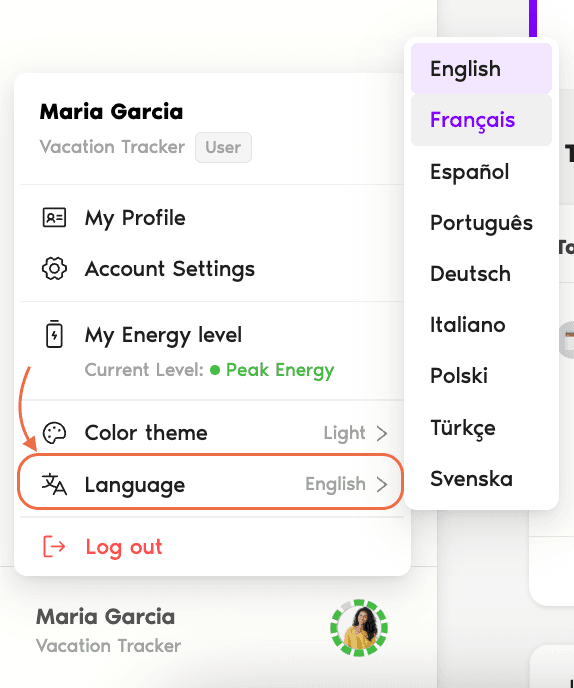
Your online dashboard will now display in your preferred language.
Available Languages
The dashboard supports the following languages (displayed in their native form in the dropdown):
English
Français
Español
Português
Deutsch
Italiano
Polski
Türkçe
Svenska
Other display preferences
To change other view preferences (time format, dark/light mode), see How Do I Choose My View Preferences? Book a Call