
Last updated on January 27, 2026
How Do I Set Half-Day Intervals?
Not every absence needs to be a full day. Half-day intervals let employees book a morning or afternoon off instead of burning a whole day of leave — useful for appointments, errands, or when someone just needs a shorter break.
How to Enable Half-Day Intervals
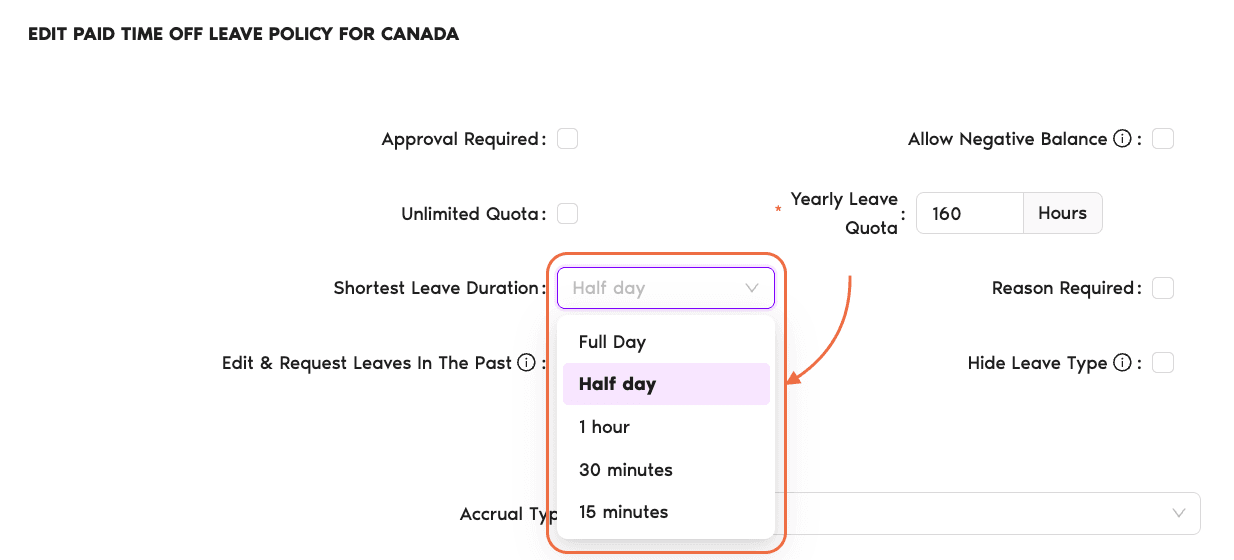
Half-day intervals are controlled by the Shortest Leave Duration setting on a leave policy. You set it per Location and per Leave Type, so you can turn half-days on for Vacation but keep Sick Day as full-day-only if you want.
- Sign in at app.vacationtracker.io.
- In the left-hand menu, expand Leave Setup and click Locations.
- Click Edit Leave Policies on the Location you want to configure.
- Click the edit icon next to the leave policy you want to update (for example, Vacation or Personal Day).
- Find the Shortest Leave Duration drop-down.
- Select Half day.
- Click Update to save your changes.
Employees assigned to that Location and Leave Type will now see a Half day option when they submit a request for that leave type.
Shortest Leave Duration Options
The Shortest Leave Duration drop-down has five values, grouped into three levels of granularity. Click any option below for details.
Every leave request takes a minimum of one full working day out of the balance. This is the default for new policies and works well for companies that only track whole days.
Users can request either a full day or a half day. When they pick Half day on a request, they choose the start hour for the half-day (for example 8, 9, 10, 11, or 12) — it's not locked to a fixed AM or PM block. 0.5 days is deducted from their balance instead of a full day.
On the Complete plan, the drop-down also includes 1 hour, 30 minutes, and 15 minutes. Employees pick the time block they'll be away, and leave is deducted in hourly fractions of a day.
Want Even Shorter Intervals?
Hourly Intervals Complete
If half-days aren't flexible enough — say, an employee only needs 90 minutes for an appointment — Hourly Intervals on the Complete plan let them request leave in 1 hour, 30 minute, or 15 minute blocks. Same screen, same setting, just a more granular choice.
Set up Hourly Intervals Book a Call