
Last updated on June 3, 2025
Slack Error: "Apologies, but you are not authorized to install Vacation Tracker"
If you see this exact error during Slack signup or login, the cause sits in your Slack workspace — not in Vacation Tracker. The Workspace Owner has restricted which apps can be installed, and Vacation Tracker hasn't been pre-approved yet.
The Error
It appears in the Slack OAuth window after you click Sign in with Slack at app.vacationtracker.io/signin.
Why It Happens
Your Slack Workspace Owner has restricted app installation to a pre-approved list, and Vacation Tracker isn't on that list yet. This is a Slack workspace setting — Vacation Tracker can't bypass it from our side; the fix happens inside Slack's admin console.
The Fix (for the Slack Workspace Owner)
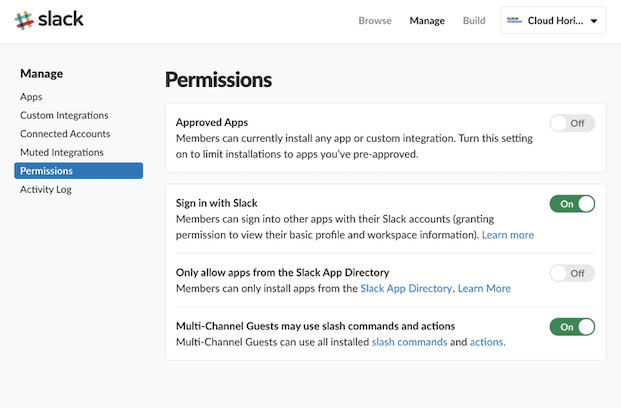
- Go to slack.com/apps/manage/permissions as the Workspace Owner.
- Find the Approved Apps setting (or "App Approval").
- Approve Vacation Tracker for the workspace.
- Once approved, return to app.vacationtracker.io/signin and click Sign in with Slack again.
Reference: Slack's Own Documentation
Slack has a guide covering app management for workspaces — useful if you want the full picture or your settings page looks different from a teammate's:
slack.com — Manage apps for your workspace
 Book a Call